2019-05-26 16:30:19 +00:00
# ⇆🎉 copyparty
2020-01-19 16:20:49 +01:00
* http file sharing hub (py2/py3) [(on PyPI) ](https://pypi.org/project/copyparty/ )
2019-05-26 16:30:19 +00:00
* MIT-Licensed, 2019-05-26, ed @ irc.rizon.net
2019-06-25 23:21:15 +00:00
2019-05-26 20:21:54 +00:00
## summary
turn your phone or raspi into a portable file server with resumable uploads/downloads using IE6 or any other browser
2021-02-03 22:32:01 +01:00
* server runs on anything with `py2.7` or `py3.3+`
2021-05-16 07:51:39 +02:00
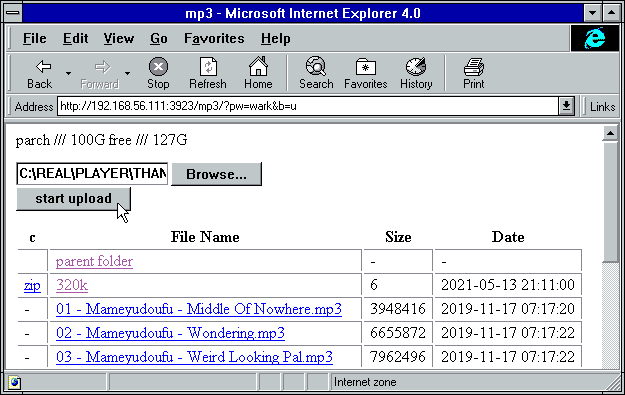
* browse/upload with IE4 / netscape4.0 on win3.11 (heh)
2021-05-18 04:10:37 +02:00
* *resumable* uploads need `firefox 34+` / `chrome 41+` / `safari 7+` for full speed
2019-05-26 20:24:48 +00:00
* code standard: `black`
2019-05-26 20:21:54 +00:00
2021-05-26 00:47:43 +02:00
📷 **screenshots: ** [browser ](#the-browser ) // [upload ](#uploading ) // [thumbnails ](#thumbnails ) // [md-viewer ](#markdown-viewer ) // [search ](#searching ) // [fsearch ](#file-search ) // [zip-DL ](#zip-downloads ) // [ie4 ](#browser-support )
2021-04-25 04:34:06 +02:00
2019-06-25 23:21:15 +00:00
2021-03-21 09:41:05 +01:00
## readme toc
* top
* [quickstart ](#quickstart )
* [notes ](#notes )
* [status ](#status )
* [bugs ](#bugs )
2021-05-16 09:05:40 +02:00
* [general bugs ](#general-bugs )
2021-04-25 03:00:47 +02:00
* [not my bugs ](#not-my-bugs )
* [the browser ](#the-browser )
* [tabs ](#tabs )
* [hotkeys ](#hotkeys )
* [tree-mode ](#tree-mode )
2021-05-26 00:47:43 +02:00
* [thumbnails ](#thumbnails )
2021-03-27 03:34:03 +01:00
* [zip downloads ](#zip-downloads )
2021-04-25 03:00:47 +02:00
* [uploading ](#uploading )
2021-04-25 21:42:45 +02:00
* [file-search ](#file-search )
2021-04-25 04:34:06 +02:00
* [markdown viewer ](#markdown-viewer )
2021-04-25 03:00:47 +02:00
* [other tricks ](#other-tricks )
2021-03-21 09:41:05 +01:00
* [searching ](#searching )
* [search configuration ](#search-configuration )
2021-06-10 20:43:19 +02:00
* [database location ](#database-location )
2021-03-21 09:41:05 +01:00
* [metadata from audio files ](#metadata-from-audio-files )
* [file parser plugins ](#file-parser-plugins )
2021-03-21 20:38:29 +01:00
* [complete examples ](#complete-examples )
2021-04-02 02:55:41 +02:00
* [browser support ](#browser-support )
2021-03-21 09:41:05 +01:00
* [client examples ](#client-examples )
2021-04-25 03:00:47 +02:00
* [up2k ](#up2k )
2021-03-21 09:41:05 +01:00
* [dependencies ](#dependencies )
2021-05-26 00:47:43 +02:00
* [optional dependencies ](#optional-dependencies )
* [install recommended deps ](#install-recommended-deps )
2021-03-21 09:41:05 +01:00
* [optional gpl stuff ](#optional-gpl-stuff )
* [sfx ](#sfx )
* [sfx repack ](#sfx-repack )
* [install on android ](#install-on-android )
2021-06-19 16:20:35 +02:00
* [building ](#building )
* [dev env setup ](#dev-env-setup )
* [just the sfx ](#just-the-sfx )
* [complete release ](#complete-release )
2021-03-21 09:41:05 +01:00
* [todo ](#todo )
2021-01-02 22:57:48 +01:00
## quickstart
download [copyparty-sfx.py ](https://github.com/9001/copyparty/releases/latest/download/copyparty-sfx.py ) and you're all set!
2021-05-16 08:52:22 +02:00
running the sfx without arguments (for example doubleclicking it on Windows) will give everyone full access to the current folder; see `-h` for help if you want accounts and volumes etc
2021-01-02 22:57:48 +01:00
2021-06-16 18:29:29 +02:00
some recommended options:
* `-e2dsa` enables general file indexing, see [search configuration ](#search-configuration )
* `-e2ts` enables audio metadata indexing (needs either FFprobe or mutagen), see [optional dependencies ](#optional-dependencies )
* `-v /mnt/music:/music:r:afoo -a foo:bar` shares `/mnt/music` as `/music` , `r` eadable by anyone, with user `foo` as `a` dmin (read/write), password `bar`
* replace `:r:afoo` with `:rfoo` to only make the folder readable by `foo` and nobody else
* in addition to `r` ead and `a` dmin, `w` rite makes a folder write-only, so cannot list/access files in it
2021-06-16 18:37:23 +02:00
* `--ls '**,*,ln,p,r'` to crash on startup if any of the volumes contain a symlink which point outside the volume, as that could give users unintended access
2021-06-16 18:29:29 +02:00
2021-01-02 22:57:48 +01:00
you may also want these, especially on servers:
* [contrib/systemd/copyparty.service ](contrib/systemd/copyparty.service ) to run copyparty as a systemd service
2021-05-16 08:52:22 +02:00
* [contrib/nginx/copyparty.conf ](contrib/nginx/copyparty.conf ) to reverse-proxy behind nginx (for better https)
2021-01-02 22:57:48 +01:00
2019-07-05 19:01:04 +00:00
## notes
2021-06-07 02:10:54 +02:00
general:
* paper-printing is affected by dark/light-mode! use lightmode for color, darkmode for grayscale
* because no browsers currently implement the media-query to do this properly orz
browser-specific:
2019-07-05 19:01:04 +00:00
* iPhone/iPad: use Firefox to download files
2021-04-25 22:44:50 +02:00
* Android-Chrome: increase "parallel uploads" for higher speed (android bug)
* Android-Firefox: takes a while to select files (their fix for ☝️)
2021-04-26 04:02:22 +02:00
* Desktop-Firefox: ~~may use gigabytes of RAM if your files are massive~~ * seems to be OK now *
2021-06-07 02:10:54 +02:00
* Desktop-Firefox: may stop you from deleting folders you've uploaded until you visit `about:memory` and click `Minimize memory usage`
2019-07-05 19:01:04 +00:00
2019-05-26 16:30:19 +00:00
## status
2021-05-27 01:42:22 +02:00
summary: all planned features work! now please enjoy the bloatening
2021-02-21 00:26:29 +00:00
* backend stuff
* ☑ sanic multipart parser
* ☑ load balancer (multiprocessing)
* ☑ volumes (mountpoints)
* ☑ accounts
* upload
* ☑ basic: plain multipart, ie6 support
* ☑ up2k: js, resumable, multithreaded
2021-02-21 00:29:10 +00:00
* ☑ stash: simple PUT filedropper
* ☑ symlink/discard existing files (content-matching)
2021-02-21 00:26:29 +00:00
* download
* ☑ single files in browser
2021-03-27 02:08:07 +01:00
* ☑ folders as zip / tar files
2021-02-21 00:26:29 +00:00
* ☑ FUSE client (read-only)
* browser
2021-02-21 00:29:10 +00:00
* ☑ tree-view
2021-06-16 18:29:29 +02:00
* ☑ audio player
2021-05-25 19:46:35 +02:00
* ☑ thumbnails
* ☑ images using Pillow
* ☑ videos using FFmpeg
* ☑ cache eviction (max-age; maybe max-size eventually)
2021-06-12 20:25:08 +02:00
* ☑ image gallery
2021-05-16 08:52:22 +02:00
* ☑ SPA (browse while uploading)
* if you use the file-tree on the left only, not folders in the file list
2021-02-21 00:29:10 +00:00
* server indexing
* ☑ locate files by contents
* ☑ search by name/path/date/size
2021-03-02 00:31:08 +01:00
* ☑ search by ID3-tags etc.
2021-02-21 00:26:29 +00:00
* markdown
* ☑ viewer
* ☑ editor (sure why not)
2019-05-26 16:30:19 +00:00
2019-06-07 08:54:41 +00:00
2021-02-22 01:25:13 +01:00
# bugs
2021-03-06 00:30:05 +01:00
* Windows: python 3.7 and older cannot read tags with ffprobe, so use mutagen or upgrade
* Windows: python 2.7 cannot index non-ascii filenames with `-e2d`
2021-03-27 03:07:44 +01:00
* Windows: python 2.7 cannot handle filenames with mojibake
2021-06-11 03:05:42 +02:00
* MacOS: `--th-ff-jpg` may fix thumbnails using macports-FFmpeg
2021-05-16 08:52:22 +02:00
## general bugs
* all volumes must exist / be available on startup; up2k (mtp especially) gets funky otherwise
* cannot mount something at `/d1/d2/d3` unless `d2` exists inside `d1`
2021-03-06 00:30:05 +01:00
* probably more, pls let me know
2021-02-22 01:25:13 +01:00
2021-04-21 21:42:37 +02:00
## not my bugs
* Windows: msys2-python 3.8.6 occasionally throws "RuntimeError: release unlocked lock" when leaving a scoped mutex in up2k
* this is an msys2 bug, the regular windows edition of python is fine
2021-02-22 01:25:13 +01:00
2021-04-25 03:00:47 +02:00
# the browser
2021-04-25 04:34:06 +02:00
2021-04-25 03:00:47 +02:00
## tabs
2021-04-25 21:42:45 +02:00
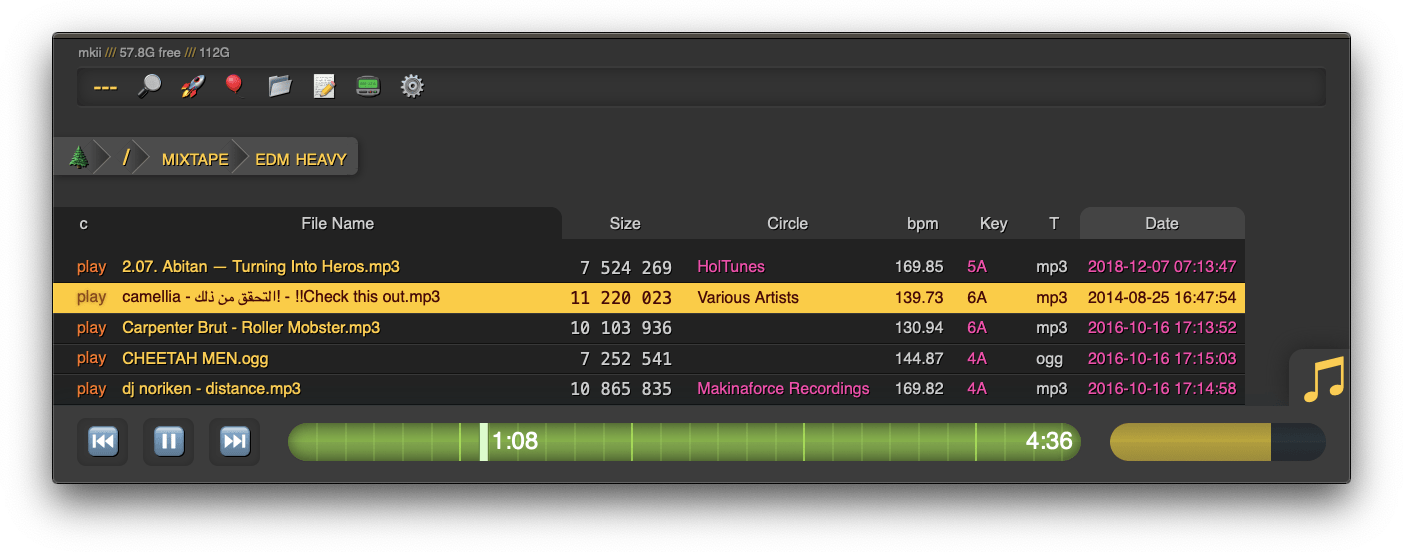
* `[🔎]` search by size, date, path/name, mp3-tags ... see [searching ](#searching )
2021-04-25 03:04:24 +02:00
* `[🚀]` and `[🎈]` are the uploaders, see [uploading ](#uploading )
* `[📂]` mkdir, create directories
* `[📝]` new-md, create a new markdown document
* `[📟]` send-msg, either to server-log or into textfiles if `--urlform save`
* `[⚙️]` client configuration options
2021-04-25 03:00:47 +02:00
## hotkeys
2021-03-21 09:41:05 +01:00
the browser has the following hotkeys
* `I/K` prev/next folder
* `P` parent folder
2021-05-26 00:47:43 +02:00
* `G` toggle list / grid view
* `T` toggle thumbnails / icons
2021-05-12 21:20:59 +02:00
* when playing audio:
* `0..9` jump to 10%..90%
* `U/O` skip 10sec back/forward
* `J/L` prev/next song
2021-06-16 19:19:29 +02:00
* `M` play/pause (also starts playing the folder)
2021-05-26 00:47:43 +02:00
* in the grid view:
* `S` toggle multiselect
* `A/D` zoom
2021-03-21 09:41:05 +01:00
2021-04-25 03:00:47 +02:00
## tree-mode
by default there's a breadcrumbs path; you can replace this with a tree-browser sidebar thing by clicking the 🌲
2021-04-25 03:04:24 +02:00
click `[-]` and `[+]` to adjust the size, and the `[a]` toggles if the tree should widen dynamically as you go deeper or stay fixed-size
2021-04-19 16:41:06 +02:00
2021-03-21 09:41:05 +01:00
2021-05-26 00:47:43 +02:00
## thumbnails
2021-05-29 15:03:32 +02:00
2021-05-26 00:47:43 +02:00
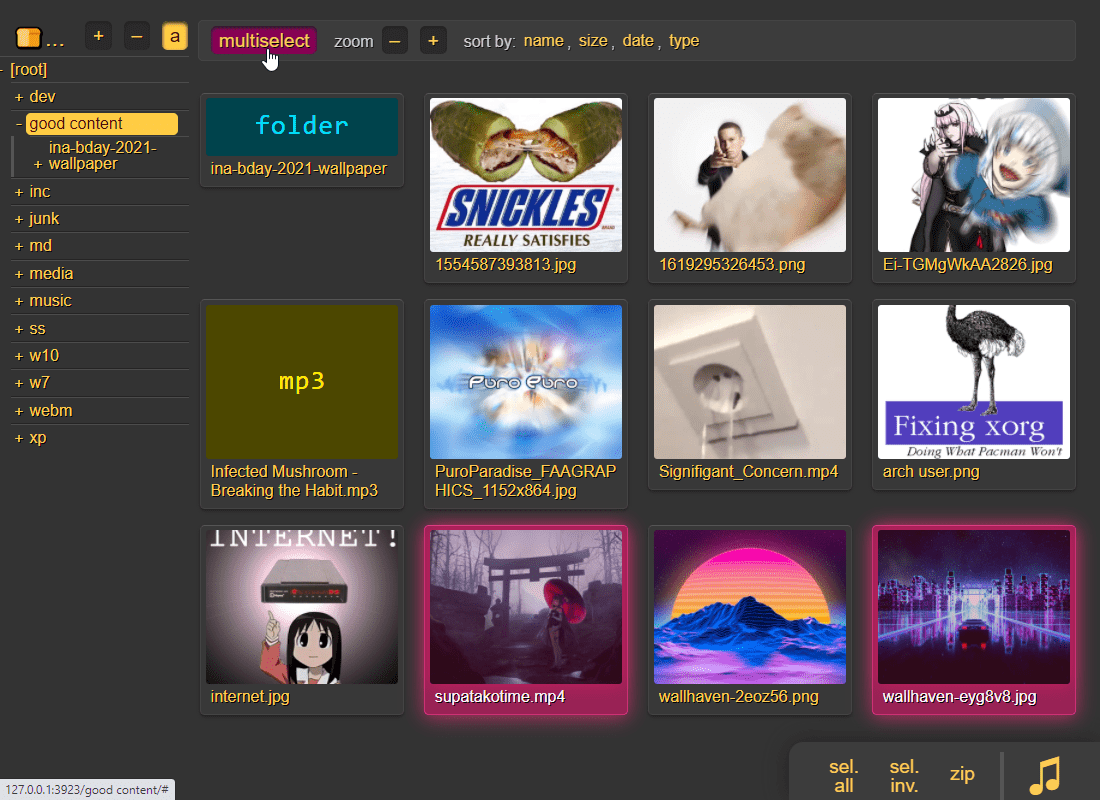
it does static images with Pillow and uses FFmpeg for video files, so you may want to `--no-thumb` or maybe just `--no-vthumb` depending on how destructive your users are
2021-06-12 03:06:56 +02:00
images named `folder.jpg` and `folder.png` become the thumbnail of the folder they're in
2021-05-26 00:47:43 +02:00
2021-03-27 03:34:03 +01:00
## zip downloads
2021-03-27 03:35:57 +01:00
the `zip` link next to folders can produce various types of zip/tar files using these alternatives in the browser settings tab:
2021-03-27 03:34:03 +01:00
| name | url-suffix | description |
|--|--|--|
| `tar` | `?tar` | plain gnutar, works great with `curl \| tar -xv` |
| `zip` | `?zip=utf8` | works everywhere, glitchy filenames on win7 and older |
| `zip_dos` | `?zip` | traditional cp437 (no unicode) to fix glitchy filenames |
| `zip_crc` | `?zip=crc` | cp437 with crc32 computed early for truly ancient software |
* hidden files (dotfiles) are excluded unless `-ed`
* the up2k.db is always excluded
* `zip_crc` will take longer to download since the server has to read each file twice
* please let me know if you find a program old enough to actually need this
2021-04-25 04:34:06 +02:00
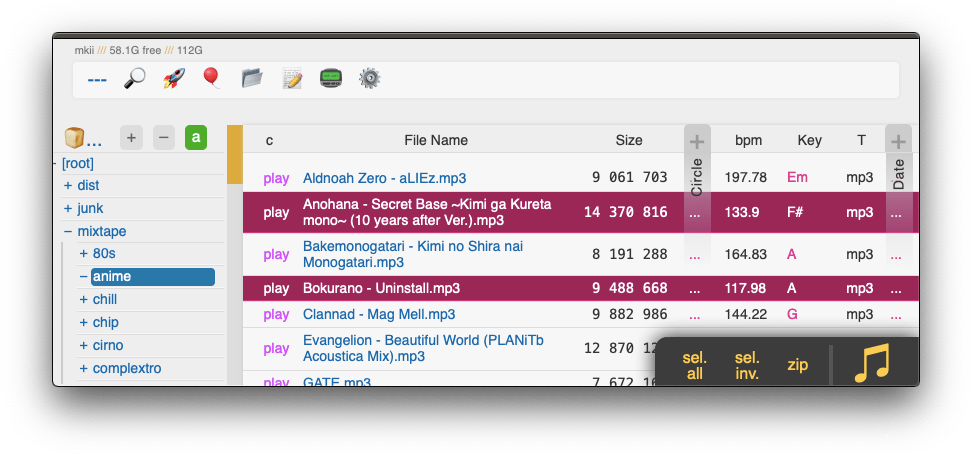
you can also zip a selection of files or folders by clicking them in the browser, that brings up a selection editor and zip button in the bottom right
2021-04-25 22:44:50 +02:00
2021-03-27 03:34:03 +01:00
2021-04-25 03:00:47 +02:00
## uploading
two upload methods are available in the html client:
2021-05-16 08:52:22 +02:00
* `🎈 bup` , the basic uploader, supports almost every browser since netscape 4.0
* `🚀 up2k` , the fancy one
2021-04-25 03:00:47 +02:00
up2k has several advantages:
* you can drop folders into the browser (files are added recursively)
* files are processed in chunks, and each chunk is checksummed
* uploads resume if they are interrupted (for example by a reboot)
* server detects any corruption; the client reuploads affected chunks
* the client doesn't upload anything that already exists on the server
* the last-modified timestamp of the file is preserved
see [up2k ](#up2k ) for details on how it works
2021-04-25 04:34:06 +02:00
2021-04-25 03:00:47 +02:00
2021-05-14 20:07:48 +02:00
**protip:** you can avoid scaring away users with [docs/minimal-up2k.html ](docs/minimal-up2k.html ) which makes it look [much simpler ](https://user-images.githubusercontent.com/241032/118311195-dd6ca380-b4ef-11eb-86f3-75a3ff2e1332.png )
2021-05-14 16:38:07 +02:00
2021-04-25 03:00:47 +02:00
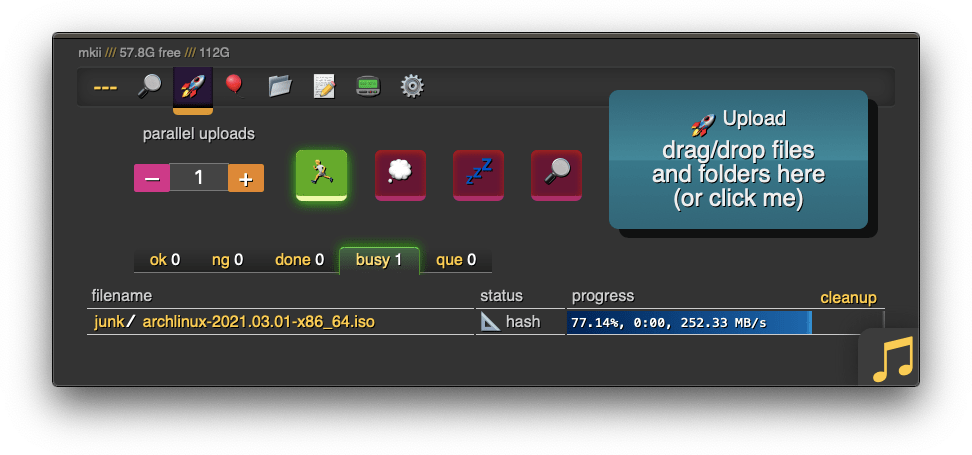
the up2k UI is the epitome of polished inutitive experiences:
* "parallel uploads" specifies how many chunks to upload at the same time
2021-04-25 03:04:24 +02:00
* `[🏃]` analysis of other files should continue while one is uploading
* `[💭]` ask for confirmation before files are added to the list
* `[💤]` sync uploading between other copyparty tabs so only one is active
* `[🔎]` switch between upload and file-search mode
2021-04-25 03:00:47 +02:00
and then theres the tabs below it,
2021-04-25 03:04:24 +02:00
* `[ok]` is uploads which completed successfully
* `[ng]` is the uploads which failed / got rejected (already exists, ...)
* `[done]` shows a combined list of `[ok]` and `[ng]` , chronological order
* `[busy]` files which are currently hashing, pending-upload, or uploading
2021-05-02 09:16:14 +02:00
* plus up to 3 entries each from `[done]` and `[que]` for context
2021-04-25 03:04:24 +02:00
* `[que]` is all the files that are still queued
2021-04-25 21:42:45 +02:00
### file-search
2021-04-25 22:44:50 +02:00
2021-05-16 09:05:40 +02:00
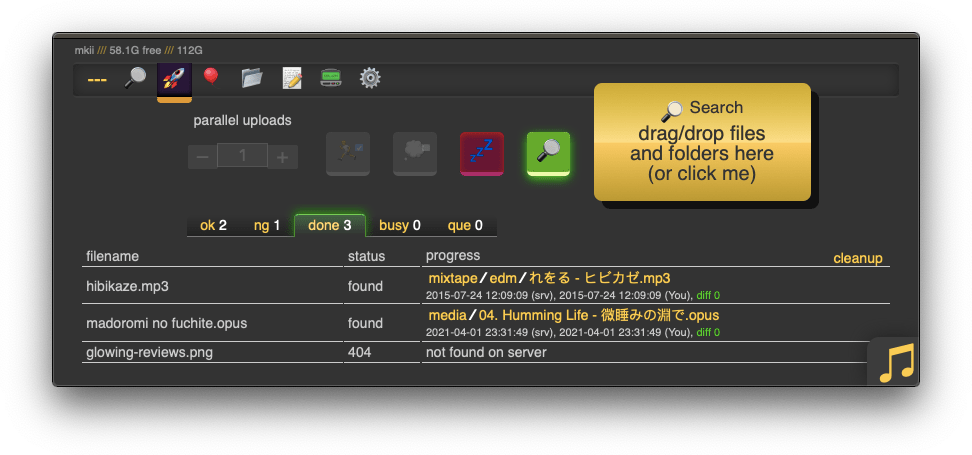
in the `[🚀 up2k]` tab, after toggling the `[🔎]` switch green, any files/folders you drop onto the dropzone will be hashed on the client-side. Each hash is sent to the server which checks if that file exists somewhere already
2021-04-25 21:42:45 +02:00
files go into `[ok]` if they exist (and you get a link to where it is), otherwise they land in `[ng]`
2021-05-16 09:05:40 +02:00
* the main reason filesearch is combined with the uploader is cause the code was too spaghetti to separate it out somewhere else, this is no longer the case but now i've warmed up to the idea too much
2021-04-25 03:00:47 +02:00
2021-04-27 09:24:50 +02:00
adding the same file multiple times is blocked, so if you first search for a file and then decide to upload it, you have to click the `[cleanup]` button to discard `[done]` files
2021-04-25 03:00:47 +02:00
2021-05-16 09:05:40 +02:00
note that since up2k has to read the file twice, `[🎈 bup]` can be up to 2x faster in extreme cases (if your internet connection is faster than the read-speed of your HDD)
2021-04-25 04:34:06 +02:00
2021-04-27 09:26:14 +02:00
up2k has saved a few uploads from becoming corrupted in-transfer already; caught an android phone on wifi redhanded in wireshark with a bitflip, however bup with https would * probably * have noticed as well thanks to tls also functioning as an integrity check
2021-04-25 04:34:06 +02:00
## markdown viewer
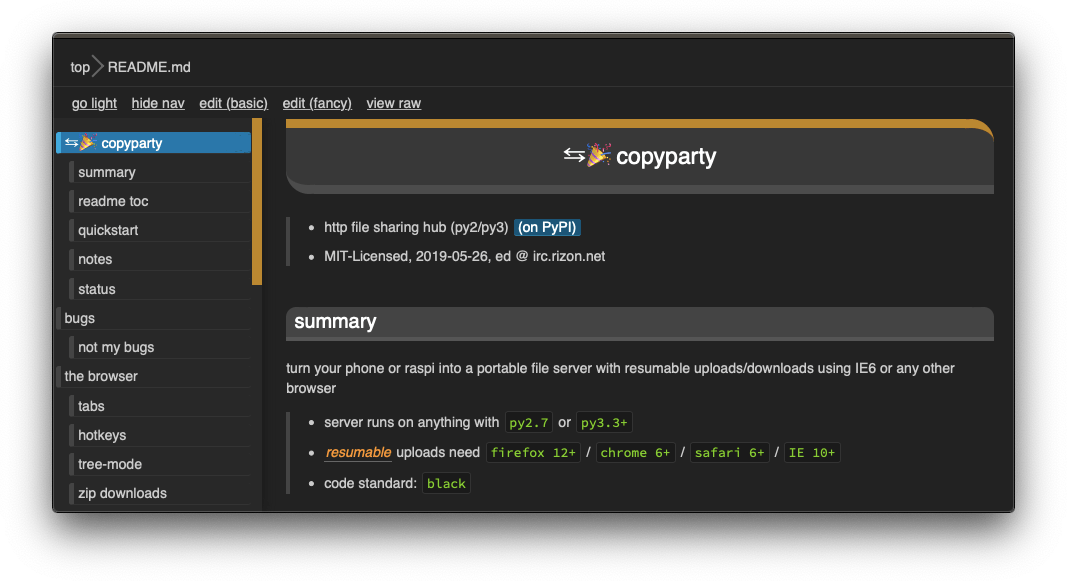
* the document preview has a max-width which is the same as an A4 paper when printed
2021-04-25 03:00:47 +02:00
## other tricks
* you can link a particular timestamp in an audio file by adding it to the URL, such as `&20` / `&20s` / `&1m20` / `&t=1:20` after the `.../#af-c8960dab`
2021-02-22 02:33:30 +01:00
# searching
2021-04-25 04:34:06 +02:00
2021-02-22 03:33:24 +01:00
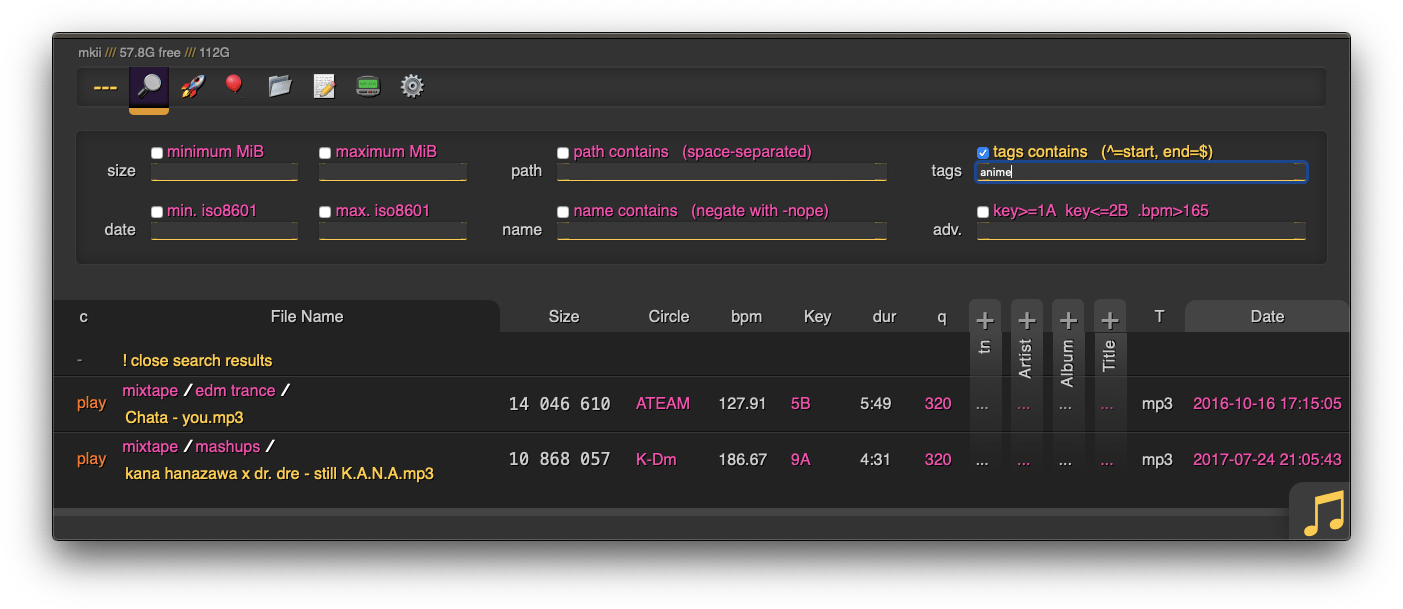
when started with `-e2dsa` copyparty will scan/index all your files. This avoids duplicates on upload, and also makes the volumes searchable through the web-ui:
* make search queries by `size` /`date` /`directory-path` /`filename` , or...
2021-04-25 21:42:45 +02:00
* drag/drop a local file to see if the same contents exist somewhere on the server, see [file-search ](#file-search )
2021-02-22 02:33:30 +01:00
2021-02-22 03:33:24 +01:00
path/name queries are space-separated, AND'ed together, and words are negated with a `-` prefix, so for example:
* path: `shibayan -bossa` finds all files where one of the folders contain `shibayan` but filters out any results where `bossa` exists somewhere in the path
* name: `demetori styx` gives you [good stuff ](https://www.youtube.com/watch?v=zGh0g14ZJ8I&list=PL3A147BD151EE5218&index=9 )
2021-02-22 02:33:30 +01:00
2021-03-02 01:02:13 +01:00
add `-e2ts` to also scan/index tags from music files:
2021-03-01 02:50:10 +01:00
## search configuration
searching relies on two databases, the up2k filetree (`-e2d` ) and the metadata tags (`-e2t` ). Configuration can be done through arguments, volume flags, or a mix of both.
through arguments:
* `-e2d` enables file indexing on upload
* `-e2ds` scans writable folders on startup
* `-e2dsa` scans all mounted volumes (including readonly ones)
* `-e2t` enables metadata indexing on upload
* `-e2ts` scans for tags in all files that don't have tags yet
* `-e2tsr` deletes all existing tags, so a full reindex
2021-03-01 03:15:41 +01:00
the same arguments can be set as volume flags, in addition to `d2d` and `d2t` for disabling:
2021-03-19 00:08:31 +01:00
* `-v ~/music::r:ce2dsa:ce2tsr` does a full reindex of everything on startup
* `-v ~/music::r:cd2d` disables **all ** indexing, even if any `-e2*` are on
* `-v ~/music::r:cd2t` disables all `-e2t*` (tags), does not affect `-e2d*`
2021-03-01 02:50:10 +01:00
2021-06-10 18:08:30 +02:00
note:
2021-06-16 18:29:29 +02:00
* `e2tsr` is probably always overkill, since `e2ds` /`e2dsa` would pick up any file modifications and `e2ts` would then reindex those
2021-06-10 18:08:30 +02:00
* the rescan button in the admin panel has no effect unless the volume has `-e2ds` or higher
2021-03-01 02:50:10 +01:00
2021-06-12 01:55:45 +02:00
you can choose to only index filename/path/size/last-modified (and not the hash of the file contents) by setting `--no-hash` or the volume-flag `cdhash` , this has the following consequences:
2021-06-10 18:08:30 +02:00
* initial indexing is way faster, especially when the volume is on a networked disk
* makes it impossible to [file-search ](#file-search )
* if someone uploads the same file contents, the upload will not be detected as a dupe, so it will not get symlinked or rejected
if you set `--no-hash` , you can enable hashing for specific volumes using flag `cehash`
2021-05-29 23:35:07 +02:00
2021-03-19 00:08:31 +01:00
2021-06-10 01:27:04 +02:00
## database location
copyparty creates a subfolder named `.hist` inside each volume where it stores the database, thumbnails, and some other stuff
this can instead be kept in a single place using the `--hist` argument, or the `hist=` volume flag, or a mix of both:
* `--hist ~/.cache/copyparty -v ~/music::r:chist=-` sets `~/.cache/copyparty` as the default place to put volume info, but `~/music` gets the regular `.hist` subfolder (`-` restores default behavior)
2021-06-10 18:08:30 +02:00
note:
2021-06-10 01:27:04 +02:00
* markdown edits are always stored in a local `.hist` subdirectory
2021-06-10 18:08:30 +02:00
* on windows the volflag path is cyglike, so `/c/temp` means `C:\temp` but use regular paths for `--hist`
2021-06-12 01:55:45 +02:00
* you can use cygpaths for volumes too, `-v C:\Users::r` and `-v /c/users::r` both work
2021-06-10 01:27:04 +02:00
2021-03-19 00:08:31 +01:00
## metadata from audio files
2021-03-01 02:50:10 +01:00
`-mte` decides which tags to index and display in the browser (and also the display order), this can be changed per-volume:
2021-03-19 00:08:31 +01:00
* `-v ~/music::r:cmte=title,artist` indexes and displays * title * followed by * artist *
2021-03-01 02:50:10 +01:00
if you add/remove a tag from `mte` you will need to run with `-e2tsr` once to rebuild the database, otherwise only new files will be affected
`-mtm` can be used to add or redefine a metadata mapping, say you have media files with `foo` and `bar` tags and you want them to display as `qux` in the browser (preferring `foo` if both are present), then do `-mtm qux=foo,bar` and now you can `-mte artist,title,qux`
2021-03-19 00:08:31 +01:00
tags that start with a `.` such as `.bpm` and `.dur` (ation) indicate numeric value
2021-03-01 02:50:10 +01:00
see the beautiful mess of a dictionary in [mtag.py ](https://github.com/9001/copyparty/blob/master/copyparty/mtag.py ) for the default mappings (should cover mp3,opus,flac,m4a,wav,aif,)
`--no-mutagen` disables mutagen and uses ffprobe instead, which...
* is about 20x slower than mutagen
* catches a few tags that mutagen doesn't
2021-05-27 01:42:22 +02:00
* melodic key, video resolution, framerate, pixfmt
2021-03-01 02:50:10 +01:00
* avoids pulling any GPL code into copyparty
* more importantly runs ffprobe on incoming files which is bad if your ffmpeg has a cve
2021-02-22 02:33:30 +01:00
2021-03-19 00:08:31 +01:00
## file parser plugins
2021-03-19 21:22:56 +01:00
copyparty can invoke external programs to collect additional metadata for files using `mtp` (as argument or volume flag), there is a default timeout of 30sec
2021-03-19 00:08:31 +01:00
2021-03-19 21:22:56 +01:00
* `-mtp .bpm=~/bin/audio-bpm.py` will execute `~/bin/audio-bpm.py` with the audio file as argument 1 to provide the `.bpm` tag, if that does not exist in the audio metadata
* `-mtp key=f,t5,~/bin/audio-key.py` uses `~/bin/audio-key.py` to get the `key` tag, replacing any existing metadata tag (`f,` ), aborting if it takes longer than 5sec (`t5,` )
* `-v ~/music::r:cmtp=.bpm=~/bin/audio-bpm.py:cmtp=key=f,t5,~/bin/audio-key.py` both as a per-volume config wow this is getting ugly
2021-03-19 00:08:31 +01:00
2021-05-16 08:52:22 +02:00
*but wait, there's more!* `-mtp` can be used for non-audio files as well using the `a` flag: `ay` only do audio files, `an` only do non-audio files, or `ad` do all files (d as in dontcare)
2021-05-16 07:04:18 +02:00
* `-mtp ext=an,~/bin/file-ext.py` runs `~/bin/file-ext.py` to get the `ext` tag only if file is not audio (`an` )
2021-05-29 04:18:57 +02:00
* `-mtp arch,built,ver,orig=an,eexe,edll,~/bin/exe.py` runs `~/bin/exe.py` to get properties about windows-binaries only if file is not audio (`an` ) and file extension is exe or dll
2021-05-16 07:04:18 +02:00
2021-03-19 00:08:31 +01:00
2021-03-21 14:15:55 +01:00
## complete examples
2021-03-21 17:56:05 +01:00
* read-only music server with bpm and key scanning
`python copyparty-sfx.py -v /mnt/nas/music:/music:r -e2dsa -e2ts -mtp .bpm=f,audio-bpm.py -mtp key=f,audio-key.py`
2021-03-21 14:15:55 +01:00
2021-04-02 02:43:07 +02:00
# browser support
2021-05-14 00:00:15 +02:00
2021-04-25 22:44:50 +02:00
2021-04-03 02:58:50 +02:00
`ie` = internet-explorer, `ff` = firefox, `c` = chrome, `iOS` = iPhone/iPad, `Andr` = Android
| feature | ie6 | ie9 | ie10 | ie11 | ff 52 | c 49 | iOS | Andr |
| --------------- | --- | --- | ---- | ---- | ----- | ---- | --- | ---- |
| browse files | yep | yep | yep | yep | yep | yep | yep | yep |
| basic uploader | yep | yep | yep | yep | yep | yep | yep | yep |
| make directory | yep | yep | yep | yep | yep | yep | yep | yep |
| send message | yep | yep | yep | yep | yep | yep | yep | yep |
| set sort order | - | yep | yep | yep | yep | yep | yep | yep |
| zip selection | - | yep | yep | yep | yep | yep | yep | yep |
| directory tree | - | - | `*1` | yep | yep | yep | yep | yep |
| up2k | - | - | yep | yep | yep | yep | yep | yep |
| icons work | - | - | yep | yep | yep | yep | yep | yep |
| markdown editor | - | - | yep | yep | yep | yep | yep | yep |
| markdown viewer | - | - | yep | yep | yep | yep | yep | yep |
| play mp3/m4a | - | yep | yep | yep | yep | yep | yep | yep |
| play ogg/opus | - | - | - | - | yep | yep | `*2` | yep |
2021-04-02 02:43:07 +02:00
2021-04-03 08:26:42 +02:00
* internet explorer 6 to 8 behave the same
2021-04-02 02:43:07 +02:00
* firefox 52 and chrome 49 are the last winxp versions
* `*1` only public folders (login session is dropped) and no history / back-button
2021-04-03 02:52:19 +02:00
* `*2` using a wasm decoder which can sometimes get stuck and consumes a bit more power
2021-04-02 02:43:07 +02:00
2021-04-03 07:56:35 +02:00
quick summary of more eccentric web-browsers trying to view a directory index:
2021-05-16 08:52:22 +02:00
| browser | will it blend |
| ------- | ------------- |
2021-05-16 09:05:40 +02:00
| **safari ** (14.0.3/macos) | is chrome with janky wasm, so playing opus can deadlock the javascript engine |
| **safari ** (14.0.1/iOS) | same as macos, except it recovers from the deadlocks if you poke it a bit |
| **links ** (2.21/macports) | can browse, login, upload/mkdir/msg |
| **lynx ** (2.8.9/macports) | can browse, login, upload/mkdir/msg |
| **w3m ** (0.5.3/macports) | can browse, login, upload at 100kB/s, mkdir/msg |
| **netsurf ** (3.10/arch) | is basically ie6 with much better css (javascript has almost no effect) |
| **ie4 ** and **netscape ** 4.0 | can browse (text is yellow on white), upload with `?b=u` |
| **SerenityOS ** (22d13d8) | hits a page fault, works with `?b=u` , file input not-impl, url params are multiplying |
2021-05-16 08:52:22 +02:00
2021-04-02 02:43:07 +02:00
2020-08-08 00:47:54 +00:00
# client examples
* javascript: dump some state into a file (two separate examples)
2020-08-08 00:51:37 +00:00
* `await fetch('https://127.0.0.1:3923/', {method:"PUT", body: JSON.stringify(foo)});`
* `var xhr = new XMLHttpRequest(); xhr.open('POST', 'https://127.0.0.1:3923/msgs?raw'); xhr.send('foo');`
2020-08-08 00:47:54 +00:00
2021-02-25 22:26:03 +01:00
* curl/wget: upload some files (post=file, chunk=stdin)
* `post(){ curl -b cppwd=wark http://127.0.0.1:3923/ -F act=bput -F f=@"$1";}`
`post movie.mkv`
* `post(){ wget --header='Cookie: cppwd=wark' http://127.0.0.1:3923/?raw --post-file="$1" -O-;}`
`post movie.mkv`
* `chunk(){ curl -b cppwd=wark http://127.0.0.1:3923/ -T-;}`
`chunk <movie.mkv`
2020-10-25 08:05:11 +01:00
* FUSE: mount a copyparty server as a local filesystem
* cross-platform python client available in [./bin/ ](bin/ )
* [rclone ](https://rclone.org/ ) as client can give ~5x performance, see [./docs/rclone.md ](docs/rclone.md )
2020-08-08 00:47:54 +00:00
2021-06-06 02:53:01 +02:00
* sharex (screenshot utility): see [./contrib/sharex.sxcu ](contrib/#sharexsxcu )
2021-02-25 22:26:03 +01:00
copyparty returns a truncated sha512sum of your PUT/POST as base64; you can generate the same checksum locally to verify uplaods:
2021-06-20 15:32:36 +02:00
b512(){ printf "$((sha512sum||shasum -a512)|sed -E 's/ .*//;s/(..)/\\x\1/g')"|base64|head -c44;}
2021-02-25 22:26:03 +01:00
b512 <movie.mkv
2020-08-08 00:47:54 +00:00
2021-04-25 03:00:47 +02:00
# up2k
2021-04-25 22:44:50 +02:00
quick outline of the up2k protocol, see [uploading ](#uploading ) for the web-client
2021-04-25 03:00:47 +02:00
* the up2k client splits a file into an "optimal" number of chunks
* 1 MiB each, unless that becomes more than 256 chunks
2021-05-16 08:52:22 +02:00
* tries 1.5M, 2M, 3, 4, 6, ... until <= 256 chunks or size >= 32M
2021-05-02 09:16:14 +02:00
* client posts the list of hashes, filename, size, last-modified
2021-04-25 03:00:47 +02:00
* server creates the `wark` , an identifier for this upload
* `sha512( salt + filesize + chunk_hashes )`
* and a sparse file is created for the chunks to drop into
* client uploads each chunk
* header entries for the chunk-hash and wark
* server writes chunks into place based on the hash
* client does another handshake with the hashlist; server replies with OK or a list of chunks to reupload
2019-06-10 15:47:08 +00:00
# dependencies
2019-06-07 08:54:41 +00:00
2021-03-02 01:02:13 +01:00
* `jinja2` (is built into the SFX)
2019-06-07 08:54:41 +00:00
2021-05-25 06:14:25 +02:00
## optional dependencies
enable music tags:
2021-03-02 01:02:13 +01:00
* either `mutagen` (fast, pure-python, skips a few tags, makes copyparty GPL? idk)
2021-03-02 00:31:08 +01:00
* or `FFprobe` (20x slower, more accurate, possibly dangerous depending on your distro and users)
2021-05-25 06:14:25 +02:00
enable image thumbnails:
2019-06-10 15:47:08 +00:00
* `Pillow` (requires py2.7 or py3.5+)
2021-05-25 06:14:25 +02:00
enable video thumbnails:
* `ffmpeg` and `ffprobe` somewhere in `$PATH`
enable reading HEIF pictures:
2021-05-25 03:37:01 +02:00
* `pyheif-pillow-opener` (requires Linux or a C compiler)
2021-05-28 05:01:12 +02:00
enable reading AVIF pictures:
* `pillow-avif-plugin`
2021-05-25 03:37:01 +02:00
2021-05-26 00:47:43 +02:00
## install recommended deps
2021-05-25 03:37:01 +02:00
```
python -m pip install --user -U jinja2 mutagen Pillow
```
2019-06-10 15:47:08 +00:00
2021-03-17 00:55:27 +01:00
## optional gpl stuff
2021-03-17 01:37:59 +01:00
some bundled tools have copyleft dependencies, see [./bin/#mtag ](bin/#mtag )
2021-03-17 00:55:27 +01:00
2021-05-02 09:16:14 +02:00
these are standalone programs and will never be imported / evaluated by copyparty
2021-03-17 00:55:27 +01:00
2020-05-06 00:39:21 +02:00
# sfx
2021-05-12 21:20:59 +02:00
currently there are two self-contained "binaries":
2021-05-16 08:52:22 +02:00
* [copyparty-sfx.py ](https://github.com/9001/copyparty/releases/latest/download/copyparty-sfx.py ) -- pure python, works everywhere, **recommended **
* [copyparty-sfx.sh ](https://github.com/9001/copyparty/releases/latest/download/copyparty-sfx.sh ) -- smaller, but only for linux and macos, kinda deprecated
2020-05-06 00:39:21 +02:00
2020-06-24 23:53:23 +00:00
launch either of them (**use sfx.py on systemd**) and it'll unpack and run copyparty, assuming you have python installed of course
2020-05-06 00:39:21 +02:00
pls note that `copyparty-sfx.sh` will fail if you rename `copyparty-sfx.py` to `copyparty.py` and keep it in the same folder because `sys.path` is funky
2020-06-24 23:53:23 +00:00
## sfx repack
2020-05-13 01:12:33 +02:00
if you don't need all the features you can repack the sfx and save a bunch of space; all you need is an sfx and a copy of this repo (nothing else to download or build, except for either msys2 or WSL if you're on windows)
* `724K` original size as of v0.4.0
* `256K` after `./scripts/make-sfx.sh re no-ogv`
* `164K` after `./scripts/make-sfx.sh re no-ogv no-cm`
2020-05-06 00:39:21 +02:00
2020-05-13 01:12:33 +02:00
the features you can opt to drop are
* `ogv` .js, the opus/vorbis decoder which is needed by apple devices to play foss audio files
* `cm` /easymde, the "fancy" markdown editor
2020-05-06 00:39:21 +02:00
2020-05-13 01:12:33 +02:00
for the `re` pack to work, first run one of the sfx'es once to unpack it
2020-05-06 00:39:21 +02:00
2020-11-19 01:23:24 +01:00
**note:** you can also just download and run [scripts/copyparty-repack.sh ](scripts/copyparty-repack.sh ) -- this will grab the latest copyparty release from github and do a `no-ogv no-cm` repack; works on linux/macos (and windows with msys2 or WSL)
2020-05-06 00:39:21 +02:00
2019-06-13 11:38:05 +00:00
# install on android
2019-06-10 15:47:08 +00:00
2019-06-13 11:38:05 +00:00
install [Termux ](https://termux.com/ ) (see [ocv.me/termux ](https://ocv.me/termux/ )) and then copy-paste this into Termux (long-tap) all at once:
2019-06-10 15:47:08 +00:00
```sh
2020-11-19 01:23:24 +01:00
apt update && apt -y full-upgrade && termux-setup-storage && apt -y install python && python -m ensurepip && python -m pip install -U copyparty
2019-06-13 11:43:05 +00:00
echo $?
2019-06-10 15:47:08 +00:00
```
2020-11-19 01:23:24 +01:00
after the initial setup, you can launch copyparty at any time by running `copyparty` anywhere in Termux
2019-06-10 15:47:08 +00:00
2021-06-19 16:20:35 +02:00
# building
## dev env setup
mostly optional; if you need a working env for vscode or similar
2019-06-25 23:21:15 +00:00
2019-06-10 15:47:08 +00:00
```sh
2020-04-14 22:42:43 +00:00
python3 -m venv .venv
. .venv/bin/activate
2021-06-19 16:20:35 +02:00
pip install jinja2 # mandatory
pip install mutagen # audio metadata
pip install Pillow pyheif-pillow-opener pillow-avif-plugin # thumbnails
2019-06-10 02:34:35 +00:00
pip install black bandit pylint flake8 # vscode tooling
```
2019-06-07 08:54:41 +00:00
2019-06-10 15:47:08 +00:00
2021-06-19 16:20:35 +02:00
## just the sfx
unless you need to modify something in the web-dependencies, it's faster to grab those from a previous release:
```sh
rm -rf copyparty/web/deps
curl -L https://github.com/9001/copyparty/releases/latest/download/copyparty-sfx.py >x.py
python3 x.py -h
rm x.py
mv /tmp/pe-copyparty/copyparty/web/deps/ copyparty/web/
```
then build the sfx using any of the following examples:
```sh
./scripts/make-sfx.sh # both python and sh editions
./scripts/make-sfx.sh no-sh gz # just python with gzip
```
## complete release
also builds the sfx so disregard the sfx section above
2019-06-25 23:21:15 +00:00
in the `scripts` folder:
* run `make -C deps-docker` to build all dependencies
2021-03-15 01:13:46 +01:00
* `git tag v1.2.3 && git push origin --tags`
2019-06-25 23:21:15 +00:00
* create github release with `make-tgz-release.sh`
* upload to pypi with `make-pypi-release.(sh|bat)`
2020-05-06 00:39:21 +02:00
* create sfx with `make-sfx.sh`
2019-06-25 23:21:15 +00:00
2019-06-29 20:19:32 +00:00
# todo
2019-06-10 15:47:08 +00:00
roughly sorted by priority
2021-04-03 04:13:51 +02:00
* readme.md as epilogue
2021-06-02 09:42:33 +02:00
* single sha512 across all up2k chunks? maybe
2020-12-14 09:19:43 +01:00
* reduce up2k roundtrips
* start from a chunk index and just go
* terminate client on bad data
2021-04-03 04:13:51 +02:00
discarded ideas
2021-06-02 09:42:33 +02:00
* separate sqlite table per tag
* performance fixed by skipping some indexes (`+mt.k` )
* audio fingerprinting
* only makes sense if there can be a wasm client and that doesn't exist yet (except for olaf which is agpl hence counts as not existing)
* `os.copy_file_range` for up2k cloning
* almost never hit this path anyways
2021-04-03 04:13:51 +02:00
* up2k partials ui
2021-06-02 09:42:33 +02:00
* feels like there isn't much point
2021-04-03 04:13:51 +02:00
* cache sha512 chunks on client
2021-06-02 09:42:33 +02:00
* too dangerous
2021-04-03 04:13:51 +02:00
* comment field
2021-06-02 09:42:33 +02:00
* nah
2021-04-03 04:13:51 +02:00
* look into android thumbnail cache file format
2021-06-02 09:42:33 +02:00
* absolutely not
