2023-03-12 16:10:07 +00:00
# 💾🎉 copyparty
2019-05-26 16:30:19 +00:00
2023-03-19 21:45:35 +00:00
turn almost any device into a file server with resumable uploads/downloads using [*any* ](#browser-support ) web browser
2019-05-26 16:30:19 +00:00
2023-03-19 21:45:35 +00:00
* server only needs Python (2 or 3), all dependencies optional
* 🔌 protocols: [http ](#the-browser ) // [ftp ](#ftp-server ) // [webdav ](#webdav-server ) // [smb/cifs ](#smb-server )
* 📱 [android app ](#android-app ) // [iPhone shortcuts ](#ios-shortcuts )
2019-06-25 23:21:15 +00:00
2023-03-19 21:45:35 +00:00
👉 * * [Get started ](#quickstart )!** or visit the * * [read-only demo server ](https://a.ocv.me/pub/demo/ )** 👀 running from a basement in finland
2022-06-20 01:31:29 +02:00
📷 **screenshots: ** [browser ](#the-browser ) // [upload ](#uploading ) // [unpost ](#unpost ) // [thumbnails ](#thumbnails ) // [search ](#searching ) // [fsearch ](#file-search ) // [zip-DL ](#zip-downloads ) // [md-viewer ](#markdown-viewer )
2021-04-25 04:34:06 +02:00
2019-06-25 23:21:15 +00:00
2021-03-21 09:41:05 +01:00
## readme toc
* top
2023-02-20 21:00:04 +00:00
* [quickstart ](#quickstart ) - just run * * [copyparty-sfx.py ](https://github.com/9001/copyparty/releases/latest/download/copyparty-sfx.py )** -- that's it! 🎉
2021-09-07 21:57:33 +02:00
* [on servers ](#on-servers ) - you may also want these, especially on servers
2022-10-24 18:48:12 +02:00
* [features ](#features )
2021-08-22 17:23:42 +02:00
* [testimonials ](#testimonials ) - small collection of user feedback
2021-09-12 23:25:34 +02:00
* [motivations ](#motivations ) - project goals / philosophy
2022-10-24 18:48:12 +02:00
* [notes ](#notes ) - general notes
2021-03-21 09:41:05 +01:00
* [bugs ](#bugs )
2021-05-16 09:05:40 +02:00
* [general bugs ](#general-bugs )
2021-04-25 03:00:47 +02:00
* [not my bugs ](#not-my-bugs )
2022-12-03 18:58:56 +00:00
* [breaking changes ](#breaking-changes ) - upgrade notes
2021-09-14 23:05:32 +02:00
* [FAQ ](#FAQ ) - "frequently" asked questions
2021-08-26 01:16:59 +02:00
* [accounts and volumes ](#accounts-and-volumes ) - per-folder, per-user permissions
2022-10-24 18:48:12 +02:00
* [shadowing ](#shadowing ) - hiding specific subfolders
2021-08-22 17:23:42 +02:00
* [the browser ](#the-browser ) - accessing a copyparty server using a web-browser
* [tabs ](#tabs ) - the main tabs in the ui
2021-09-04 21:21:18 +02:00
* [hotkeys ](#hotkeys ) - the browser has the following hotkeys
2021-08-22 17:23:42 +02:00
* [navpane ](#navpane ) - switching between breadcrumbs or navpane
2022-07-06 00:00:56 +02:00
* [thumbnails ](#thumbnails ) - press `g` or `田` to toggle grid-view instead of the file listing
2021-08-22 17:23:42 +02:00
* [zip downloads ](#zip-downloads ) - download folders (or file selections) as `zip` or `tar` files
2021-09-07 22:44:48 +02:00
* [uploading ](#uploading ) - drag files/folders into the web-browser to upload
* [file-search ](#file-search ) - dropping files into the browser also lets you see if they exist on the server
2021-08-22 17:23:42 +02:00
* [unpost ](#unpost ) - undo/delete accidental uploads
2022-09-19 23:49:07 +02:00
* [self-destruct ](#self-destruct ) - uploads can be given a lifetime
2021-08-22 17:23:42 +02:00
* [file manager ](#file-manager ) - cut/paste, rename, and delete files/folders (if you have permission)
2021-09-04 21:21:18 +02:00
* [batch rename ](#batch-rename ) - select some files and press `F2` to bring up the rename UI
2023-04-12 22:06:44 +00:00
* [media player ](#media-player ) - plays almost every audio format there is
* [audio equalizer ](#audio-equalizer ) - bass boosted
2023-04-29 09:44:46 +00:00
* [fix unreliable playback on android ](#fix-unreliable-playback-on-android ) - due to phone / app settings
2021-08-22 17:23:42 +02:00
* [markdown viewer ](#markdown-viewer ) - and there are * two * editors
2021-04-25 03:00:47 +02:00
* [other tricks ](#other-tricks )
2021-08-22 17:23:42 +02:00
* [searching ](#searching ) - search by size, date, path/name, mp3-tags, ...
2021-11-06 22:15:37 +01:00
* [server config ](#server-config ) - using arguments or config files, or a mix of both
2023-01-29 21:23:48 +00:00
* [zeroconf ](#zeroconf ) - announce enabled services on the LAN ([pic ](https://user-images.githubusercontent.com/241032/215344737-0eae8d98-9496-4256-9aa8-cd2f6971810d.png ))
2022-11-27 01:30:18 +00:00
* [mdns ](#mdns ) - LAN domain-name and feature announcer
* [ssdp ](#ssdp ) - windows-explorer announcer
2022-10-09 00:04:02 +02:00
* [qr-code ](#qr-code ) - print a qr-code [(screenshot) ](https://user-images.githubusercontent.com/241032/194728533-6f00849b-c6ac-43c6-9359-83e454d11e00.png ) for quick access
2022-10-18 19:36:52 +02:00
* [ftp server ](#ftp-server ) - an FTP server can be started using `--ftp 3921`
2022-10-23 23:37:32 +02:00
* [webdav server ](#webdav-server ) - with read-write support
2022-11-01 22:18:20 +00:00
* [connecting to webdav from windows ](#connecting-to-webdav-from-windows ) - using the GUI
2022-10-24 14:08:32 +02:00
* [smb server ](#smb-server ) - unsafe, slow, not recommended for wan
2022-08-03 22:20:28 +02:00
* [file indexing ](#file-indexing ) - enables dedup and music search ++
* [exclude-patterns ](#exclude-patterns ) - to save some time
* [filesystem guards ](#filesystem-guards ) - avoid traversing into other filesystems
* [periodic rescan ](#periodic-rescan ) - filesystem monitoring
* [upload rules ](#upload-rules ) - set upload rules using volflags
2021-08-22 17:23:42 +02:00
* [compress uploads ](#compress-uploads ) - files can be autocompressed on upload
2022-09-18 17:30:57 +02:00
* [other flags ](#other-flags )
2021-09-04 21:21:18 +02:00
* [database location ](#database-location ) - in-volume (`.hist/up2k.db` , default) or somewhere else
2021-08-22 17:23:42 +02:00
* [metadata from audio files ](#metadata-from-audio-files ) - set `-e2t` to index tags on upload
2022-10-08 14:25:13 +02:00
* [file parser plugins ](#file-parser-plugins ) - provide custom parsers to index additional tags
2023-01-27 23:55:57 +00:00
* [event hooks ](#event-hooks ) - trigger a program on uploads, renames etc ([examples ](./bin/hooks/ ))
* [upload events ](#upload-events ) - the older, more powerful approach ([examples ](./bin/mtag/ ))
2022-03-20 06:15:57 +01:00
* [hiding from google ](#hiding-from-google ) - tell search engines you dont wanna be indexed
2022-04-29 23:13:37 +02:00
* [themes ](#themes )
2021-03-21 20:38:29 +01:00
* [complete examples ](#complete-examples )
2022-12-11 21:01:38 +00:00
* [reverse-proxy ](#reverse-proxy ) - running copyparty next to other websites
2023-04-29 09:44:46 +00:00
* [packages ](#packages ) - the party might be closer than you think
* [arch package ](#arch-package ) - now [available on aur ](https://aur.archlinux.org/packages/copyparty ) maintained by [@icxes ](https://github.com/icxes )
2023-04-17 13:17:53 +02:00
* [nix package ](#nix-package ) - `nix profile install github:9001/copyparty`
* [nixos module ](#nixos-module )
2021-08-22 17:23:42 +02:00
* [browser support ](#browser-support ) - TLDR: yes
* [client examples ](#client-examples ) - interact with copyparty using non-browser clients
2023-03-20 21:54:08 +00:00
* [folder sync ](#folder-sync ) - sync folders to/from copyparty
2022-10-24 15:48:34 +02:00
* [mount as drive ](#mount-as-drive ) - a remote copyparty server as a local filesystem
2023-03-18 18:38:37 +00:00
* [android app ](#android-app ) - upload to copyparty with one tap
* [iOS shortcuts ](#iOS-shortcuts ) - there is no iPhone app, but
2021-09-04 21:40:22 +02:00
* [performance ](#performance ) - defaults are usually fine - expect `8 GiB/s` download, `1 GiB/s` upload
2021-10-31 06:24:11 +01:00
* [client-side ](#client-side ) - when uploading files
2021-09-06 08:36:18 +02:00
* [security ](#security ) - some notes on hardening
* [gotchas ](#gotchas ) - behavior that might be unexpected
2023-01-28 00:59:04 +00:00
* [cors ](#cors ) - cross-site request config
2023-03-19 21:45:35 +00:00
* [https ](#https ) - both HTTP and HTTPS are accepted
2021-09-25 18:03:19 +02:00
* [recovering from crashes ](#recovering-from-crashes )
* [client crashes ](#client-crashes )
* [frefox wsod ](#frefox-wsod ) - firefox 87 can crash during uploads
2023-04-19 21:46:33 +00:00
* [HTTP API ](#HTTP-API ) - see [devnotes ](./docs/devnotes.md#http-api )
2021-08-22 17:23:42 +02:00
* [dependencies ](#dependencies ) - mandatory deps
* [optional dependencies ](#optional-dependencies ) - install these to enable bonus features
2021-03-21 09:41:05 +01:00
* [optional gpl stuff ](#optional-gpl-stuff )
2022-02-13 20:44:03 +01:00
* [sfx ](#sfx ) - the self-contained "binary"
2023-02-26 19:22:54 +00:00
* [copyparty.exe ](#copypartyexe ) - download [copyparty.exe ](https://github.com/9001/copyparty/releases/latest/download/copyparty.exe ) (win8+) or [copyparty32.exe ](https://github.com/9001/copyparty/releases/latest/download/copyparty32.exe ) (win7+)
2021-03-21 09:41:05 +01:00
* [install on android ](#install-on-android )
2021-11-15 20:28:53 +01:00
* [reporting bugs ](#reporting-bugs ) - ideas for context to include in bug reports
2022-10-24 18:48:12 +02:00
* [devnotes ](#devnotes ) - for build instructions etc, see [./docs/devnotes.md ](./docs/devnotes.md )
2021-03-21 09:41:05 +01:00
2021-01-02 22:57:48 +01:00
## quickstart
2023-02-20 21:00:04 +00:00
just run * * [copyparty-sfx.py ](https://github.com/9001/copyparty/releases/latest/download/copyparty-sfx.py )** -- that's it! 🎉
2022-10-08 21:09:04 +02:00
2023-05-05 19:39:10 +00:00
* or install through pypi: `python3 -m pip install --user -U copyparty`
2023-02-04 17:35:20 +00:00
* or if you cannot install python, you can use [copyparty.exe ](#copypartyexe ) instead
2023-05-05 19:39:10 +00:00
* or install [on arch ](#arch-package ) ╱ on NixOS ](#nixos-module ) ╱ through nix ](#nix-package )
2023-03-16 21:06:18 +00:00
* or if you are on android, [install copyparty in termux ](#install-on-android )
2023-02-10 23:40:30 +00:00
* or if you prefer to [use docker ](./scripts/docker/ ) 🐋 you can do that too
2023-02-20 21:00:04 +00:00
* docker has all deps built-in, so skip this step:
2021-01-02 22:57:48 +01:00
2023-02-20 21:00:04 +00:00
enable thumbnails (images/audio/video), media indexing, and audio transcoding by installing some recommended deps:
2023-02-19 22:13:02 +00:00
* **Alpine:** `apk add py3-pillow ffmpeg`
* **Debian:** `apt install python3-pil ffmpeg`
* **Fedora:** `dnf install python3-pillow ffmpeg`
* **FreeBSD:** `pkg install py39-sqlite3 py39-pillow ffmpeg`
* **MacOS:** `port install py-Pillow ffmpeg`
* **MacOS** (alternative): `brew install pillow ffmpeg`
* **Windows:** `python -m pip install --user -U Pillow`
* install python and ffmpeg manually; do not use `winget` or `Microsoft Store` (it breaks $PATH)
2023-02-20 21:00:04 +00:00
* copyparty.exe comes with `Pillow` and only needs `ffmpeg`
* see [optional dependencies ](#optional-dependencies ) to enable even more features
2023-02-19 22:13:02 +00:00
2023-02-20 21:00:04 +00:00
running copyparty without arguments (for example doubleclicking it on Windows) will give everyone read/write access to the current folder; you may want [accounts and volumes ](#accounts-and-volumes )
2021-01-02 22:57:48 +01:00
2023-05-12 22:41:06 +00:00
or see [some usage examples ](#complete-examples ) for inspiration, or the [complete windows example ](./docs/examples/windows.md )
2023-04-12 22:06:44 +00:00
2021-06-16 18:29:29 +02:00
some recommended options:
2021-09-04 21:07:45 +02:00
* `-e2dsa` enables general [file indexing ](#file-indexing )
2023-02-20 21:00:04 +00:00
* `-e2ts` enables audio metadata indexing (needs either FFprobe or Mutagen)
2021-07-24 22:26:52 +02:00
* `-v /mnt/music:/music:r:rw,foo -a foo:bar` shares `/mnt/music` as `/music` , `r` eadable by anyone, and read-write for user `foo` , password `bar`
* replace `:r:rw,foo` with `:r,foo` to only make the folder readable by `foo` and nobody else
2023-02-20 21:00:04 +00:00
* see [accounts and volumes ](#accounts-and-volumes ) (or `--help-accounts` ) for the syntax and other permissions
2021-06-16 18:29:29 +02:00
2021-09-07 21:57:33 +02:00
### on servers
2021-01-02 22:57:48 +01:00
you may also want these, especially on servers:
2021-09-07 21:57:33 +02:00
2023-04-01 10:32:12 +00:00
* [contrib/systemd/copyparty.service ](contrib/systemd/copyparty.service ) to run copyparty as a systemd service (see guide inside)
2021-09-07 21:57:33 +02:00
* [contrib/systemd/prisonparty.service ](contrib/systemd/prisonparty.service ) to run it in a chroot (for extra security)
2023-02-19 22:13:02 +00:00
* [contrib/rc/copyparty ](contrib/rc/copyparty ) to run copyparty on FreeBSD
2022-12-11 21:01:38 +00:00
* [contrib/nginx/copyparty.conf ](contrib/nginx/copyparty.conf ) to [reverse-proxy ](#reverse-proxy ) behind nginx (for better https)
2023-04-04 18:32:31 +02:00
* [nixos module ](#nixos-module ) to run copyparty on NixOS hosts
2021-01-02 22:57:48 +01:00
2022-11-27 01:30:18 +00:00
and remember to open the ports you want; here's a complete example including every feature copyparty has to offer:
```
firewall-cmd --permanent --add-port={80,443,3921,3923,3945,3990}/tcp # --zone=libvirt
firewall-cmd --permanent --add-port=12000-12099/tcp --permanent # --zone=libvirt
firewall-cmd --permanent --add-port={1900,5353}/udp # --zone=libvirt
firewall-cmd --reload
```
(1900:ssdp, 3921:ftp, 3923:http/https, 3945:smb, 3990:ftps, 5353:mdns, 12000:passive-ftp)
2021-06-27 00:49:28 +02:00
2021-01-02 22:57:48 +01:00
2022-10-24 18:48:12 +02:00
## features
2021-05-27 01:42:22 +02:00
2021-02-21 00:26:29 +00:00
* backend stuff
2022-11-06 16:48:05 +00:00
* ☑ IPv6
2022-11-04 20:27:16 +00:00
* ☑ [multiprocessing ](#performance ) (actual multithreading)
2021-02-21 00:26:29 +00:00
* ☑ volumes (mountpoints)
2021-07-24 22:26:52 +02:00
* ☑ [accounts ](#accounts-and-volumes )
2022-10-23 23:08:00 +02:00
* ☑ [ftp server ](#ftp-server )
* ☑ [webdav server ](#webdav-server )
* ☑ [smb/cifs server ](#smb-server )
2022-10-09 00:04:02 +02:00
* ☑ [qr-code ](#qr-code ) for quick access
2022-11-27 01:30:18 +00:00
* ☑ [upnp / zeroconf / mdns / ssdp ](#zeroconf )
2023-03-14 22:24:43 +00:00
* ☑ [event hooks ](#event-hooks ) / script runner
* ☑ [reverse-proxy support ](https://github.com/9001/copyparty#reverse-proxy )
2021-02-21 00:26:29 +00:00
* upload
* ☑ basic: plain multipart, ie6 support
2021-08-06 01:48:34 +02:00
* ☑ [up2k ](#uploading ): js, resumable, multithreaded
2023-01-22 23:39:19 +00:00
* unaffected by cloudflare's max-upload-size (100 MiB)
2021-02-21 00:29:10 +00:00
* ☑ stash: simple PUT filedropper
2023-03-14 22:24:43 +00:00
* ☑ filename randomizer
* ☑ write-only folders
2021-08-17 00:23:12 +02:00
* ☑ [unpost ](#unpost ): undo/delete accidental uploads
2022-09-19 23:49:07 +02:00
* ☑ [self-destruct ](#self-destruct ) (specified server-side or client-side)
2023-03-23 23:37:45 +00:00
* ☑ symlink/discard duplicates (content-matching)
2021-02-21 00:26:29 +00:00
* download
* ☑ single files in browser
2021-08-06 01:48:34 +02:00
* ☑ [folders as zip / tar files ](#zip-downloads )
2022-11-26 19:53:41 +00:00
* ☑ [FUSE client ](https://github.com/9001/copyparty/tree/hovudstraum/bin#partyfusepy ) (read-only)
2021-02-21 00:26:29 +00:00
* browser
2021-09-04 21:07:45 +02:00
* ☑ [navpane ](#navpane ) (directory tree sidebar)
2021-08-06 01:48:34 +02:00
* ☑ file manager (cut/paste, delete, [batch-rename ](#batch-rename ))
2023-01-29 18:28:53 +00:00
* ☑ audio player (with [OS media controls ](https://user-images.githubusercontent.com/241032/215347492-b4250797-6c90-4e09-9a4c-721edf2fb15c.png ) and opus transcoding)
2021-08-05 21:53:51 +02:00
* ☑ image gallery with webm player
2021-11-15 20:28:53 +01:00
* ☑ textfile browser with syntax hilighting
2021-08-06 01:48:34 +02:00
* ☑ [thumbnails ](#thumbnails )
2022-04-11 10:38:57 +02:00
* ☑ ...of images using Pillow, pyvips, or FFmpeg
2021-07-16 02:44:06 +02:00
* ☑ ...of videos using FFmpeg
2021-11-15 20:28:53 +01:00
* ☑ ...of audio (spectrograms) using FFmpeg
2021-05-25 19:46:35 +02:00
* ☑ cache eviction (max-age; maybe max-size eventually)
2021-05-16 08:52:22 +02:00
* ☑ SPA (browse while uploading)
2021-02-21 00:29:10 +00:00
* server indexing
2021-08-06 01:48:34 +02:00
* ☑ [locate files by contents ](#file-search )
2021-02-21 00:29:10 +00:00
* ☑ search by name/path/date/size
2021-08-06 01:48:34 +02:00
* ☑ [search by ID3-tags etc. ](#searching )
2023-03-14 22:24:43 +00:00
* client support
2023-03-20 21:54:08 +00:00
* ☑ [folder sync ](#folder-sync )
2023-03-14 22:24:43 +00:00
* ☑ [curl-friendly ](https://user-images.githubusercontent.com/241032/215322619-ea5fd606-3654-40ad-94ee-2bc058647bb2.png )
2021-02-21 00:26:29 +00:00
* markdown
2021-08-06 01:48:34 +02:00
* ☑ [viewer ](#markdown-viewer )
2021-02-21 00:26:29 +00:00
* ☑ editor (sure why not)
2019-05-26 16:30:19 +00:00
2023-03-14 22:24:43 +00:00
PS: something missing? post any crazy ideas you've got as a [feature request ](https://github.com/9001/copyparty/issues/new?assignees=9001&labels=enhancement&template=feature_request.md ) or [discussion ](https://github.com/9001/copyparty/discussions/new?category=ideas ) 🤙
2019-06-07 08:54:41 +00:00
2021-07-04 00:32:29 +02:00
## testimonials
small collection of user feedback
2023-02-04 14:00:16 +01:00
`good enough` , `surprisingly correct` , `certified good software` , `just works` , `why` , `wow this is better than nextcloud`
2021-07-04 00:32:29 +02:00
2021-09-12 23:25:34 +02:00
# motivations
project goals / philosophy
* inverse linux philosophy -- do all the things, and do an * okay * job
* quick drop-in service to get a lot of features in a pinch
2023-01-29 21:23:48 +00:00
* some of [the alternatives ](./docs/versus.md ) might be a better fit for you
2021-09-12 23:25:34 +02:00
* run anywhere, support everything
* as many web-browsers and python versions as possible
* every browser should at least be able to browse, download, upload files
* be a good emergency solution for transferring stuff between ancient boxes
* minimal dependencies
* but optional dependencies adding bonus-features are ok
* everything being plaintext makes it possible to proofread for malicious code
* no preparations / setup necessary, just run the sfx (which is also plaintext)
* adaptable, malleable, hackable
* no build steps; modify the js/python without needing node.js or anything like that
2022-10-24 18:48:12 +02:00
## notes
2021-09-12 23:25:34 +02:00
2022-10-24 18:48:12 +02:00
general notes:
* paper-printing is affected by dark/light-mode! use lightmode for color, darkmode for grayscale
* because no browsers currently implement the media-query to do this properly orz
2021-09-12 23:25:34 +02:00
2022-10-24 18:48:12 +02:00
browser-specific:
* iPhone/iPad: use Firefox to download files
* Android-Chrome: increase "parallel uploads" for higher speed (android bug)
* Android-Firefox: takes a while to select files (their fix for ☝️)
* Desktop-Firefox: ~~may use gigabytes of RAM if your files are massive~~ * seems to be OK now *
2022-12-14 23:12:51 +00:00
* Desktop-Firefox: [may stop you from unplugging USB flashdrives ](https://bugzilla.mozilla.org/show_bug.cgi?id=1792598 ) until you visit `about:memory` and click `Minimize memory usage`
2021-09-12 23:25:34 +02:00
2022-11-06 16:48:05 +00:00
server-os-specific:
* RHEL8 / Rocky8: you can run copyparty using `/usr/libexec/platform-python`
2023-03-09 22:11:39 +00:00
server notes:
* pypy is supported but regular cpython is faster if you enable the database
2021-09-12 23:25:34 +02:00
2021-02-22 01:25:13 +01:00
# bugs
2021-03-06 00:30:05 +01:00
* Windows: python 2.7 cannot index non-ascii filenames with `-e2d`
2021-03-27 03:07:44 +01:00
* Windows: python 2.7 cannot handle filenames with mojibake
2021-09-04 21:07:45 +02:00
* `--th-ff-jpg` may fix video thumbnails on some FFmpeg versions (macos, some linux)
2021-11-06 22:15:37 +01:00
* `--th-ff-swr` may fix audio thumbnails on some FFmpeg versions
2021-05-16 08:52:22 +02:00
## general bugs
2022-07-05 23:27:48 +02:00
* Windows: if the `up2k.db` (filesystem index) is on a samba-share or network disk, you'll get unpredictable behavior if the share is disconnected for a bit
2022-02-13 03:10:53 +01:00
* use `--hist` or the `hist` volflag (`-v [...]:c,hist=/tmp/foo` ) to place the db on a local disk instead
2021-05-16 08:52:22 +02:00
* all volumes must exist / be available on startup; up2k (mtp especially) gets funky otherwise
2021-03-06 00:30:05 +01:00
* probably more, pls let me know
2021-02-22 01:25:13 +01:00
2021-04-21 21:42:37 +02:00
## not my bugs
2022-04-29 23:13:37 +02:00
* [Chrome issue 1317069 ](https://bugs.chromium.org/p/chromium/issues/detail?id=1317069 ) -- if you try to upload a folder which contains symlinks by dragging it into the browser, the symlinked files will not get uploaded
2022-12-14 23:12:51 +00:00
* [Chrome issue 1352210 ](https://bugs.chromium.org/p/chromium/issues/detail?id=1352210 ) -- plaintext http may be faster at filehashing than https (but also extremely CPU-intensive)
2022-08-20 09:25:29 +02:00
2022-12-14 23:12:51 +00:00
* [Firefox issue 1790500 ](https://bugzilla.mozilla.org/show_bug.cgi?id=1790500 ) -- entire browser can crash after uploading ~4000 small files
2022-09-18 17:30:57 +02:00
2023-04-29 09:44:46 +00:00
* Android: music playback randomly stops due to [battery usage settings ](#fix-unreliable-playback-on-android )
2023-04-29 09:31:53 +00:00
2021-11-15 20:28:53 +01:00
* iPhones: the volume control doesn't work because [apple doesn't want it to ](https://developer.apple.com/library/archive/documentation/AudioVideo/Conceptual/Using_HTML5_Audio_Video/Device-SpecificConsiderations/Device-SpecificConsiderations.html#//apple_ref/doc/uid/TP40009523-CH5-SW11 )
2021-11-16 00:05:35 +01:00
* *future workaround:* enable the equalizer, make it all-zero, and set a negative boost to reduce the volume
2023-03-19 21:45:35 +00:00
* "future" because `AudioContext` can't maintain a stable playback speed in the current iOS version (15.7), maybe one day...
2021-11-15 20:28:53 +01:00
2021-06-20 18:53:58 +02:00
* Windows: folders cannot be accessed if the name ends with `.`
* python or windows bug
2021-07-16 02:44:06 +02:00
* Windows: msys2-python 3.8.6 occasionally throws `RuntimeError: release unlocked lock` when leaving a scoped mutex in up2k
2021-04-21 21:42:37 +02:00
* this is an msys2 bug, the regular windows edition of python is fine
2021-07-18 21:34:36 +02:00
* VirtualBox: sqlite throws `Disk I/O Error` when running in a VM and the up2k database is in a vboxsf
2021-08-06 00:50:29 +02:00
* use `--hist` or the `hist` volflag (`-v [...]:c,hist=/tmp/foo` ) to place the db inside the vm instead
2021-07-18 21:34:36 +02:00
2022-09-07 23:03:48 +02:00
* Ubuntu: dragging files from certain folders into firefox or chrome is impossible
* due to snap security policies -- see `snap connections firefox` for the allowlist, `removable-media` permits all of `/mnt` and `/media` apparently
2021-02-22 01:25:13 +01:00
2022-12-03 18:58:56 +00:00
# breaking changes
upgrade notes
2023-01-29 02:55:44 +00:00
* `1.6.0` (2023-01-29):
2023-01-28 01:02:50 +00:00
* http-api: delete/move is now `POST` instead of `GET`
* everything other than `GET` and `HEAD` must pass [cors validation ](#cors )
2022-12-03 18:58:56 +00:00
* `1.5.0` (2022-12-03): [new chunksize formula ](https://github.com/9001/copyparty/commit/54e1c8d261df ) for files larger than 128 GiB
2023-05-07 15:35:56 +00:00
* **users:** upgrade to the latest [cli uploader ](https://github.com/9001/copyparty/blob/hovudstraum/bin/u2c.py ) if you use that
2022-12-03 18:58:56 +00:00
* **devs:** update third-party up2k clients (if those even exist)
2021-09-14 23:05:32 +02:00
# FAQ
"frequently" asked questions
* is it possible to block read-access to folders unless you know the exact URL for a particular file inside?
2021-09-18 15:38:13 +02:00
* yes, using the [`g` permission ](#accounts-and-volumes ), see the examples there
2021-11-16 01:13:04 +01:00
* you can also do this with linux filesystem permissions; `chmod 111 music` will make it possible to access files and folders inside the `music` folder but not list the immediate contents -- also works with other software, not just copyparty
2021-09-14 23:05:32 +02:00
* can I make copyparty download a file to my server if I give it a URL?
2023-01-22 23:45:11 +00:00
* yes, using [hooks ](https://github.com/9001/copyparty/blob/hovudstraum/bin/hooks/wget.py )
2021-09-14 23:05:32 +02:00
2021-07-24 22:26:52 +02:00
# accounts and volumes
2021-11-12 22:30:23 +01:00
per-folder, per-user permissions - if your setup is getting complex, consider making a [config file ](./docs/example.conf ) instead of using arguments
* much easier to manage, and you can modify the config at runtime with `systemctl reload copyparty` or more conveniently using the `[reload cfg]` button in the control-panel (if logged in as admin)
2023-02-07 19:54:08 +00:00
* changes to the `[global]` config section requires a restart to take effect
2021-11-12 22:30:23 +01:00
2022-07-05 23:27:48 +02:00
a quick summary can be seen using `--help-accounts`
2021-11-12 22:30:23 +01:00
configuring accounts/volumes with arguments:
2021-07-24 22:26:52 +02:00
* `-a usr:pwd` adds account `usr` with password `pwd`
* `-v .::r` adds current-folder `.` as the webroot, `r` eadable by anyone
* the syntax is `-v src:dst:perm:perm:...` so local-path, url-path, and one or more permissions to set
2021-09-04 21:07:45 +02:00
* granting the same permissions to multiple accounts:
`-v .::r,usr1,usr2:rw,usr3,usr4` = usr1/2 read-only, 3/4 read-write
2021-07-24 22:26:52 +02:00
permissions:
* `r` (read): browse folder contents, download files, download as zip/tar
2021-09-04 21:07:45 +02:00
* `w` (write): upload files, move files * into * this folder
* `m` (move): move files/folders * from * this folder
2021-07-24 22:26:52 +02:00
* `d` (delete): delete files/folders
2021-09-15 01:01:20 +02:00
* `g` (get): only download files, cannot see folder contents or zip/tar
2022-10-08 16:34:04 +02:00
* `G` (upget): same as `g` except uploaders get to see their own filekeys (see `fk` in examples below)
2021-07-24 22:26:52 +02:00
2021-09-04 21:07:45 +02:00
examples:
2021-07-24 22:26:52 +02:00
* add accounts named u1, u2, u3 with passwords p1, p2, p3: `-a u1:p1 -a u2:p2 -a u3:p3`
* make folder `/srv` the root of the filesystem, read-only by anyone: `-v /srv::r`
* make folder `/mnt/music` available at `/music` , read-only for u1 and u2, read-write for u3: `-v /mnt/music:music:r,u1,u2:rw,u3`
* unauthorized users accessing the webroot can see that the `music` folder exists, but cannot open it
* make folder `/mnt/incoming` available at `/inc` , write-only for u1, read-move for u2: `-v /mnt/incoming:inc:w,u1:rm,u2`
* unauthorized users accessing the webroot can see that the `inc` folder exists, but cannot open it
* `u1` can open the `inc` folder, but cannot see the contents, only upload new files to it
* `u2` can browse it and move files * from * `/inc` into any folder where `u2` has write-access
2022-10-08 16:34:04 +02:00
* make folder `/mnt/ss` available at `/i` , read-write for u1, get-only for everyone else, and enable filekeys: `-v /mnt/ss:i:rw,u1:g:c,fk=4`
* `c,fk=4` sets the `fk` (filekey) volflag to 4, meaning each file gets a 4-character accesskey
* `u1` can upload files, browse the folder, and see the generated filekeys
* other users cannot browse the folder, but can access the files if they have the full file URL with the filekey
* replacing the `g` permission with `wg` would let anonymous users upload files, but not see the required filekey to access it
2022-10-08 14:18:52 +02:00
* replacing the `g` permission with `wG` would let anonymous users upload files, receiving a working direct link in return
2021-07-24 22:26:52 +02:00
2022-09-23 22:32:04 +02:00
anyone trying to bruteforce a password gets banned according to `--ban-pw` ; default is 24h ban for 9 failed attempts in 1 hour
2021-07-24 22:26:52 +02:00
2022-10-24 18:48:12 +02:00
## shadowing
hiding specific subfolders by mounting another volume on top of them
for example `-v /mnt::r -v /var/empty:web/certs:r` mounts the server folder `/mnt` as the webroot, but another volume is mounted at `/web/certs` -- so visitors can only see the contents of `/mnt` and `/mnt/web` (at URLs `/` and `/web` ), but not `/mnt/web/certs` because URL `/web/certs` is mapped to `/var/empty`
2021-04-25 03:00:47 +02:00
# the browser
2021-08-22 17:23:42 +02:00
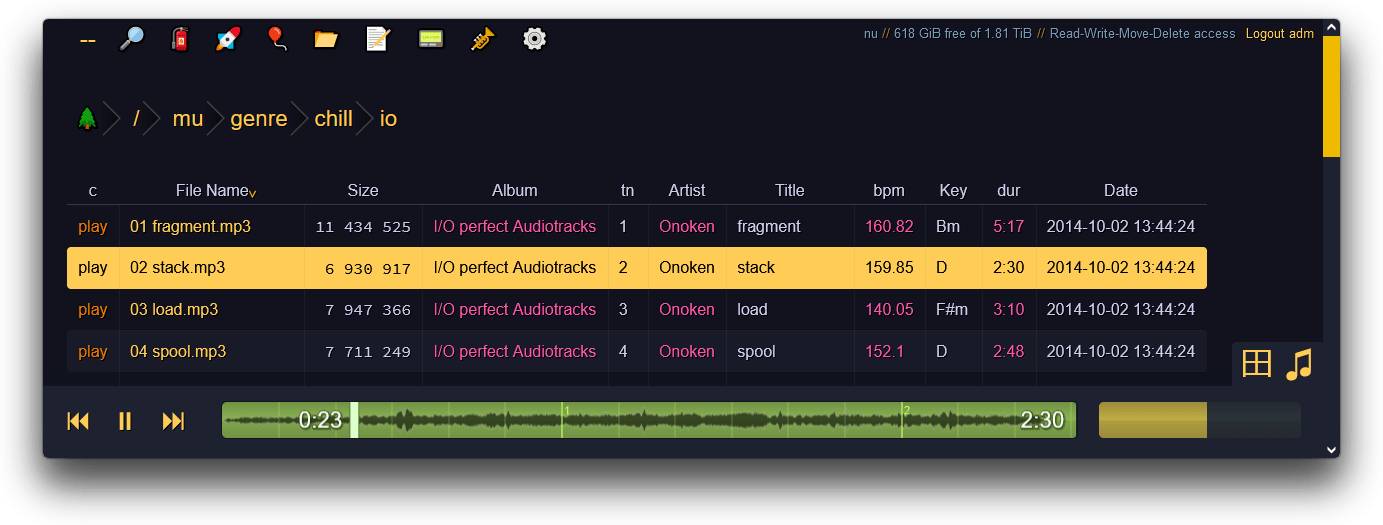
accessing a copyparty server using a web-browser
2022-09-23 22:32:04 +02:00
2021-04-25 04:34:06 +02:00
2021-04-25 03:00:47 +02:00
## tabs
2021-08-22 17:23:42 +02:00
the main tabs in the ui
2021-08-17 00:23:12 +02:00
* `[🔎]` [search ](#searching ) by size, date, path/name, mp3-tags ...
* `[🧯]` [unpost ](#unpost ): undo/delete accidental uploads
* `[🚀]` and `[🎈]` are the [uploaders ](#uploading )
2021-07-30 00:53:15 +02:00
* `[📂]` mkdir: create directories
* `[📝]` new-md: create a new markdown document
* `[📟]` send-msg: either to server-log or into textfiles if `--urlform save`
2021-07-16 02:44:06 +02:00
* `[🎺]` audio-player config options
* `[⚙️]` general client config options
2021-04-25 03:00:47 +02:00
## hotkeys
2021-03-21 09:41:05 +01:00
2021-09-04 21:21:18 +02:00
the browser has the following hotkeys (always qwerty)
2022-10-30 16:05:14 +00:00
* `?` show hotkeys help
2021-09-04 21:07:45 +02:00
* `B` toggle breadcrumbs / [navpane ](#navpane )
2021-03-21 09:41:05 +01:00
* `I/K` prev/next folder
2021-07-16 02:44:06 +02:00
* `M` parent folder (or unexpand current)
2021-11-06 22:15:37 +01:00
* `V` toggle folders / textfiles in the navpane
2022-07-05 23:27:48 +02:00
* `G` toggle list / [grid view ](#thumbnails ) -- same as `田` bottom-right
2021-05-26 00:47:43 +02:00
* `T` toggle thumbnails / icons
2021-12-04 18:52:14 +01:00
* `ESC` close various things
2022-10-30 16:05:14 +00:00
* `ctrl-K` delete selected files/folders
2021-07-25 01:09:14 +02:00
* `ctrl-X` cut selected files/folders
* `ctrl-V` paste
2022-11-27 01:30:18 +00:00
* `Y` download selected files
2021-09-04 21:07:45 +02:00
* `F2` [rename ](#batch-rename ) selected file/folder
2021-07-26 22:47:54 +02:00
* when a file/folder is selected (in not-grid-view):
* `Up/Down` move cursor
2021-07-27 12:26:34 +02:00
* shift+`Up/Down` select and move cursor
* ctrl+`Up/Down` move cursor and scroll viewport
2021-07-26 22:47:54 +02:00
* `Space` toggle file selection
* `Ctrl-A` toggle select all
2021-11-06 22:15:37 +01:00
* when a textfile is open:
* `I/K` prev/next textfile
* `S` toggle selection of open file
* `M` close textfile
2021-05-12 21:20:59 +02:00
* when playing audio:
* `J/L` prev/next song
2021-07-11 06:12:24 +02:00
* `U/O` skip 10sec back/forward
2021-07-15 01:13:15 +02:00
* `0..9` jump to 0%..90%
2021-06-21 23:43:07 +02:00
* `P` play/pause (also starts playing the folder)
2022-06-19 16:05:48 +02:00
* `Y` download file
2021-07-11 06:12:24 +02:00
* when viewing images / playing videos:
* `J/L, Left/Right` prev/next file
* `Home/End` first/last file
2022-07-05 23:27:48 +02:00
* `F` toggle fullscreen
2021-08-12 22:20:32 +02:00
* `S` toggle selection
2021-08-14 18:06:53 +02:00
* `R` rotate clockwise (shift=ccw)
2022-06-19 16:05:48 +02:00
* `Y` download file
2021-07-11 06:12:24 +02:00
* `Esc` close viewer
2021-07-13 02:20:52 +02:00
* videos:
* `U/O` skip 10sec back/forward
2022-07-17 23:45:02 +02:00
* `0..9` jump to 0%..90%
2021-07-13 02:20:52 +02:00
* `P/K/Space` play/pause
* `M` mute
2022-07-05 23:27:48 +02:00
* `C` continue playing next video
* `V` loop entire file
* `[` loop range (start)
* `]` loop range (end)
2021-07-27 20:39:01 +02:00
* when the navpane is open:
2021-06-28 15:34:10 +02:00
* `A/D` adjust tree width
2021-09-04 21:07:45 +02:00
* in the [grid view ](#thumbnails ):
2021-05-26 00:47:43 +02:00
* `S` toggle multiselect
2021-06-28 15:34:10 +02:00
* shift+`A/D` zoom
2021-07-16 02:44:06 +02:00
* in the markdown editor:
* `^s` save
* `^h` header
* `^k` autoformat table
* `^u` jump to next unicode character
* `^e` toggle editor / preview
2021-07-16 02:56:21 +02:00
* `^up, ^down` jump paragraphs
2021-04-25 03:00:47 +02:00
2021-07-24 22:26:52 +02:00
2021-07-27 20:39:01 +02:00
## navpane
2021-04-25 03:00:47 +02:00
2021-08-22 17:23:42 +02:00
switching between breadcrumbs or navpane
click the `🌲` or pressing the `B` hotkey to toggle between breadcrumbs path (default), or a navpane (tree-browser sidebar thing)
2021-04-25 03:00:47 +02:00
2021-12-04 18:52:14 +01:00
* `[+]` and `[-]` (or hotkeys `A` /`D` ) adjust the size
* `[🎯]` jumps to the currently open folder
* `[📃]` toggles between showing folders and textfiles
* `[📌]` shows the name of all parent folders in a docked panel
2021-09-04 21:07:45 +02:00
* `[a]` toggles automatic widening as you go deeper
2021-12-04 18:52:14 +01:00
* `[↵]` toggles wordwrap
* `[👀]` show full name on hover (if wordwrap is off)
2021-04-19 16:41:06 +02:00
2021-03-21 09:41:05 +01:00
2021-05-26 00:47:43 +02:00
## thumbnails
2022-07-05 23:27:48 +02:00
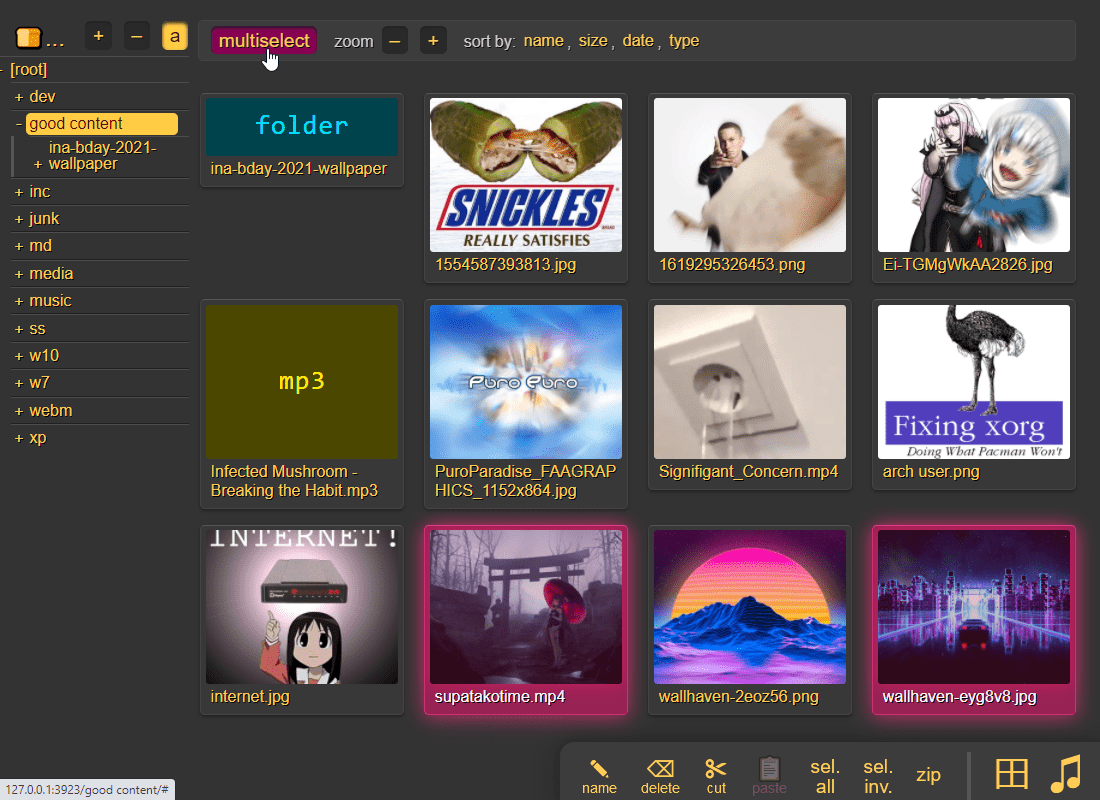
press `g` or `田` to toggle grid-view instead of the file listing and `t` toggles icons / thumbnails
2023-06-02 18:41:21 +00:00
* can be made default globally with `--grid` or per-volume with volflag `grid`
2021-08-22 17:23:42 +02:00
2021-08-17 00:23:12 +02:00
2021-05-26 00:47:43 +02:00
2022-04-11 10:38:57 +02:00
it does static images with Pillow / pyvips / FFmpeg, and uses FFmpeg for video files, so you may want to `--no-thumb` or maybe just `--no-vthumb` depending on how dangerous your users are
* pyvips is 3x faster than Pillow, Pillow is 3x faster than FFmpeg
2022-04-14 17:11:26 +02:00
* disable thumbnails for specific volumes with volflag `dthumb` for all, or `dvthumb` / `dathumb` / `dithumb` for video/audio/images only
2021-05-26 00:47:43 +02:00
2021-11-06 22:15:37 +01:00
audio files are covnerted into spectrograms using FFmpeg unless you `--no-athumb` (and some FFmpeg builds may need `--th-ff-swr` )
2021-07-15 01:13:15 +02:00
images with the following names (see `--th-covers` ) become the thumbnail of the folder they're in: `folder.png` , `folder.jpg` , `cover.png` , `cover.jpg`
2023-06-06 22:04:39 +00:00
* and, if you enable [file indexing ](#file-indexing ), all remaining folders will also get thumbnails (as long as they contain any pics at all)
2021-06-12 03:06:56 +02:00
2021-06-25 20:04:19 +02:00
in the grid/thumbnail view, if the audio player panel is open, songs will start playing when clicked
2021-12-04 18:52:14 +01:00
* indicated by the audio files having the ▶ icon instead of 💾
2021-06-25 20:04:19 +02:00
2021-05-26 00:47:43 +02:00
2021-03-27 03:34:03 +01:00
## zip downloads
2021-08-22 17:23:42 +02:00
download folders (or file selections) as `zip` or `tar` files
2021-09-04 21:07:45 +02:00
select which type of archive you want in the `[⚙️] config` tab:
2021-03-27 03:35:57 +01:00
2021-03-27 03:34:03 +01:00
| name | url-suffix | description |
|--|--|--|
| `tar` | `?tar` | plain gnutar, works great with `curl \| tar -xv` |
| `zip` | `?zip=utf8` | works everywhere, glitchy filenames on win7 and older |
| `zip_dos` | `?zip` | traditional cp437 (no unicode) to fix glitchy filenames |
| `zip_crc` | `?zip=crc` | cp437 with crc32 computed early for truly ancient software |
* hidden files (dotfiles) are excluded unless `-ed`
2021-07-16 02:44:06 +02:00
* `up2k.db` and `dir.txt` is always excluded
2021-03-27 03:34:03 +01:00
* `zip_crc` will take longer to download since the server has to read each file twice
2021-07-16 02:56:21 +02:00
* this is only to support MS-DOS PKZIP v2.04g (october 1993) and older
* how are you accessing copyparty actually
2021-03-27 03:34:03 +01:00
2021-04-25 04:34:06 +02:00
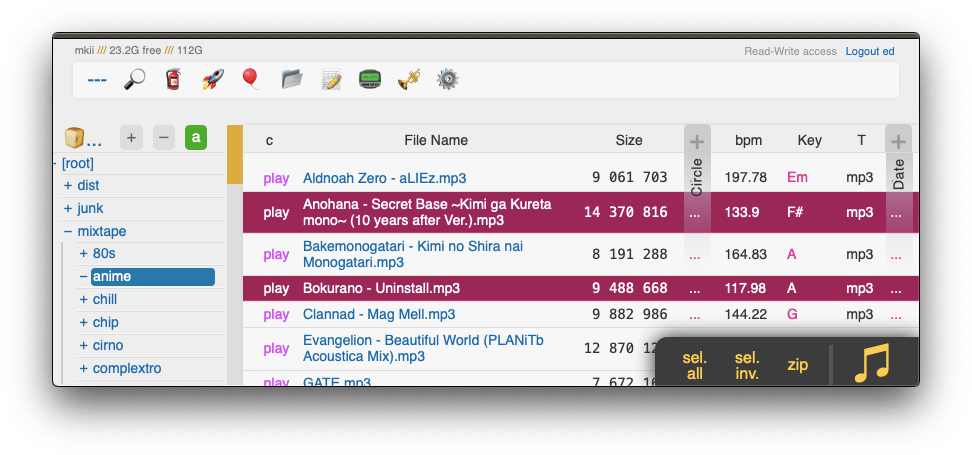
you can also zip a selection of files or folders by clicking them in the browser, that brings up a selection editor and zip button in the bottom right
2021-08-17 00:23:12 +02:00
2021-03-27 03:34:03 +01:00
2021-08-22 17:23:42 +02:00
2021-04-25 03:00:47 +02:00
## uploading
2023-05-07 15:35:56 +00:00
drag files/folders into the web-browser to upload (or use the [command-line uploader ](https://github.com/9001/copyparty/tree/hovudstraum/bin#u2cpy ))
2021-09-07 22:44:48 +02:00
this initiates an upload using `up2k` ; there are two uploaders available:
2021-07-30 00:53:15 +02:00
* `[🎈] bup` , the basic uploader, supports almost every browser since netscape 4.0
2022-07-05 23:27:48 +02:00
* `[🚀] up2k` , the good / fancy one
2021-07-30 00:53:15 +02:00
2022-07-05 23:27:48 +02:00
NB: you can undo/delete your own uploads with `[🧯]` [unpost ](#unpost )
2021-04-25 03:00:47 +02:00
up2k has several advantages:
* you can drop folders into the browser (files are added recursively)
* files are processed in chunks, and each chunk is checksummed
2021-07-16 02:44:06 +02:00
* uploads autoresume if they are interrupted by network issues
2021-07-16 02:56:21 +02:00
* uploads resume if you reboot your browser or pc, just upload the same files again
2021-04-25 03:00:47 +02:00
* server detects any corruption; the client reuploads affected chunks
* the client doesn't upload anything that already exists on the server
2021-07-16 02:44:06 +02:00
* much higher speeds than ftp/scp/tarpipe on some internet connections (mainly american ones) thanks to parallel connections
2021-04-25 03:00:47 +02:00
* the last-modified timestamp of the file is preserved
2023-03-09 22:47:37 +00:00
> it is perfectly safe to restart / upgrade copyparty while someone is uploading to it!
> all known up2k clients will resume just fine 💪
2023-03-09 22:11:39 +00:00
2022-07-05 23:27:48 +02:00
see [up2k ](#up2k ) for details on how it works, or watch a [demo video ](https://a.ocv.me/pub/demo/pics-vids/#gf-0f6f5c0d )
2021-04-25 03:00:47 +02:00
2021-08-17 00:23:12 +02:00
2021-04-25 03:00:47 +02:00
2023-03-09 22:11:39 +00:00
**protip:** you can avoid scaring away users with [contrib/plugins/minimal-up2k.js ](contrib/plugins/minimal-up2k.js ) which makes it look [much simpler ](https://user-images.githubusercontent.com/241032/118311195-dd6ca380-b4ef-11eb-86f3-75a3ff2e1332.png )
2021-05-14 16:38:07 +02:00
2022-09-23 22:32:04 +02:00
**protip:** if you enable `favicon` in the `[⚙️] settings` tab (by typing something into the textbox), the icon in the browser tab will indicate upload progress -- also, the `[🔔]` and/or `[🔊]` switches enable visible and/or audible notifications on upload completion
2021-10-31 15:30:09 +01:00
2021-04-25 03:00:47 +02:00
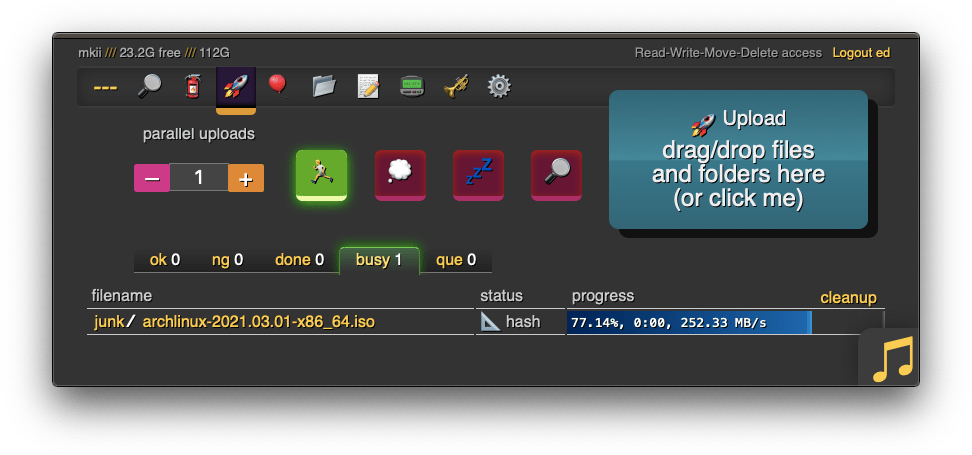
the up2k UI is the epitome of polished inutitive experiences:
* "parallel uploads" specifies how many chunks to upload at the same time
2021-04-25 03:04:24 +02:00
* `[🏃]` analysis of other files should continue while one is uploading
2022-07-16 03:58:58 +02:00
* `[🥔]` shows a simpler UI for faster uploads from slow devices
2021-09-04 21:07:45 +02:00
* `[💭]` ask for confirmation before files are added to the queue
* `[🔎]` switch between upload and [file-search ](#file-search ) mode
2021-09-07 21:49:00 +02:00
* ignore `[🔎]` if you add files by dragging them into the browser
2021-04-25 03:00:47 +02:00
and then theres the tabs below it,
2021-09-04 21:07:45 +02:00
* `[ok]` is the files which completed successfully
* `[ng]` is the ones that failed / got rejected (already exists, ...)
2021-04-25 03:04:24 +02:00
* `[done]` shows a combined list of `[ok]` and `[ng]` , chronological order
* `[busy]` files which are currently hashing, pending-upload, or uploading
2021-05-02 09:16:14 +02:00
* plus up to 3 entries each from `[done]` and `[que]` for context
2021-04-25 03:04:24 +02:00
* `[que]` is all the files that are still queued
2022-07-05 23:27:48 +02:00
note that since up2k has to read each file twice, `[🎈] bup` can * theoretically * be up to 2x faster in some extreme cases (files bigger than your ram, combined with an internet connection faster than the read-speed of your HDD, or if you're uploading from a cuo2duo)
2021-09-04 21:07:45 +02:00
if you are resuming a massive upload and want to skip hashing the files which already finished, you can enable `turbo` in the `[⚙️] config` tab, but please read the tooltip on that button
2021-08-22 17:23:42 +02:00
2021-04-25 21:42:45 +02:00
### file-search
2021-09-07 22:44:48 +02:00
dropping files into the browser also lets you see if they exist on the server
2021-08-22 17:23:42 +02:00
2021-08-17 00:23:12 +02:00
2021-04-25 22:44:50 +02:00
2021-09-07 22:44:48 +02:00
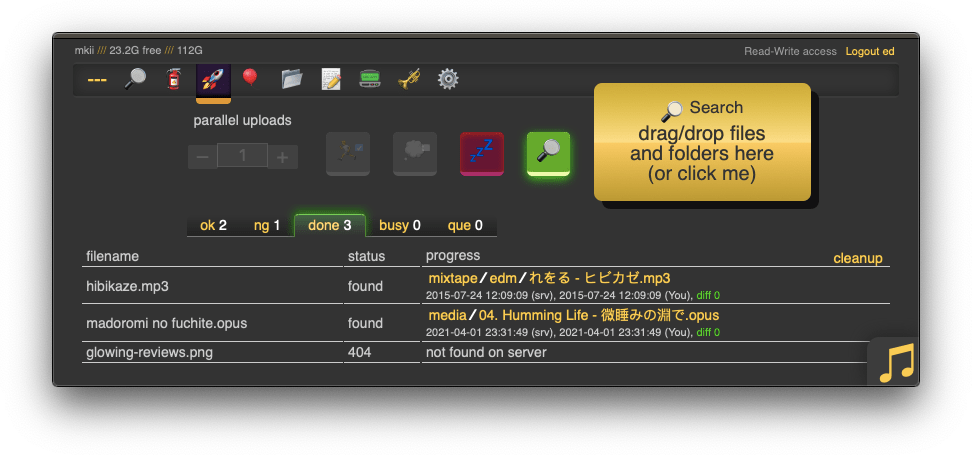
when you drag/drop files into the browser, you will see two dropzones: `Upload` and `Search`
2021-09-07 21:49:00 +02:00
> on a phone? toggle the `[🔎]` switch green before tapping the big yellow Search button to select your files
the files will be hashed on the client-side, and each hash is sent to the server, which checks if that file exists somewhere
2021-04-25 21:42:45 +02:00
files go into `[ok]` if they exist (and you get a link to where it is), otherwise they land in `[ng]`
2021-05-16 09:05:40 +02:00
* the main reason filesearch is combined with the uploader is cause the code was too spaghetti to separate it out somewhere else, this is no longer the case but now i've warmed up to the idea too much
2021-04-25 03:00:47 +02:00
2021-04-25 04:34:06 +02:00
2021-08-17 00:23:12 +02:00
### unpost
2021-08-22 17:23:42 +02:00
undo/delete accidental uploads
2021-08-17 00:23:12 +02:00
2021-08-22 17:23:42 +02:00
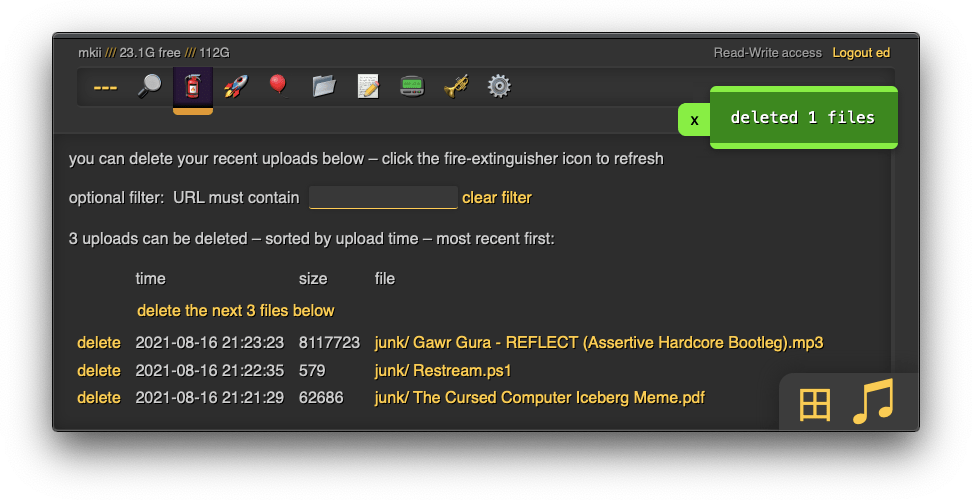
you can unpost even if you don't have regular move/delete access, however only for files uploaded within the past `--unpost` seconds (default 12 hours) and the server must be running with `-e2d`
2021-08-17 00:23:12 +02:00
2022-09-19 23:49:07 +02:00
### self-destruct
uploads can be given a lifetime, afer which they expire / self-destruct
the feature must be enabled per-volume with the `lifetime` [upload rule ](#upload-rules ) which sets the upper limit for how long a file gets to stay on the server
clients can specify a shorter expiration time using the [up2k ui ](#uploading ) -- the relevant options become visible upon navigating into a folder with `lifetimes` enabled -- or by using the `life` [upload modifier ](#write )
specifying a custom expiration time client-side will affect the timespan in which unposts are permitted, so keep an eye on the estimates in the up2k ui
2021-07-25 01:09:14 +02:00
## file manager
2021-08-22 17:23:42 +02:00
cut/paste, rename, and delete files/folders (if you have permission)
2021-07-25 01:09:14 +02:00
2021-09-04 21:07:45 +02:00
file selection: click somewhere on the line (not the link itsef), then:
* `space` to toggle
* `up/down` to move
* `shift-up/down` to move-and-select
* `ctrl-shift-up/down` to also scroll
* cut: select some files and `ctrl-x`
* paste: `ctrl-v` in another folder
* rename: `F2`
2021-07-25 01:09:14 +02:00
you can move files across browser tabs (cut in one tab, paste in another)
2021-08-05 21:53:51 +02:00
## batch rename
2021-09-04 21:07:45 +02:00
select some files and press `F2` to bring up the rename UI
2021-08-05 21:53:51 +02:00
2021-08-22 17:23:42 +02:00
2021-08-05 21:53:51 +02:00
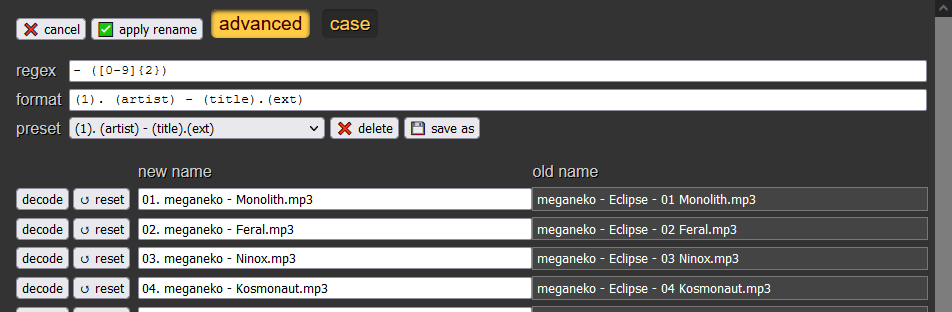
quick explanation of the buttons,
* `[✅ apply rename]` confirms and begins renaming
* `[❌ cancel]` aborts and closes the rename window
* `[↺ reset]` reverts any filename changes back to the original name
* `[decode]` does a URL-decode on the filename, fixing stuff like `&` and `%20`
* `[advanced]` toggles advanced mode
advanced mode: rename files based on rules to decide the new names, based on the original name (regex), or based on the tags collected from the file (artist/title/...), or a mix of both
in advanced mode,
* `[case]` toggles case-sensitive regex
* `regex` is the regex pattern to apply to the original filename; any files which don't match will be skipped
* `format` is the new filename, taking values from regex capturing groups and/or from file tags
2021-08-05 23:11:06 +02:00
* very loosely based on foobar2000 syntax
2021-08-05 21:53:51 +02:00
* `presets` lets you save rename rules for later
2021-08-05 23:11:06 +02:00
available functions:
* `$lpad(text, length, pad_char)`
* `$rpad(text, length, pad_char)`
2021-08-05 21:53:51 +02:00
so,
say you have a file named [`meganeko - Eclipse - 07 Sirius A.mp3` ](https://www.youtube.com/watch?v=-dtb0vDPruI ) (absolutely fantastic album btw) and the tags are: `Album:Eclipse` , `Artist:meganeko` , `Title:Sirius A` , `tn:7`
you could use just regex to rename it:
2021-08-05 21:56:52 +02:00
* `regex` = `(.*) - (.*) - ([0-9]{2}) (.*)`
* `format` = `(3). (1) - (4)`
* `output` = `07. meganeko - Sirius A.mp3`
2021-08-05 21:53:51 +02:00
or you could use just tags:
2021-08-05 23:14:19 +02:00
* `format` = `$lpad((tn),2,0). (artist) - (title).(ext)`
2021-08-05 21:56:52 +02:00
* `output` = `7. meganeko - Sirius A.mp3`
2021-08-05 21:53:51 +02:00
2021-08-05 23:14:19 +02:00
or a mix of both:
2021-08-05 21:56:52 +02:00
* `regex` = ` - ([0-9]{2}) `
* `format` = `(1). (artist) - (title).(ext)`
* `output` = `07. meganeko - Sirius A.mp3`
2021-08-05 21:53:51 +02:00
2021-08-05 23:11:06 +02:00
the metadata keys you can use in the format field are the ones in the file-browser table header (whatever is collected with `-mte` and `-mtp` )
2021-08-05 21:53:51 +02:00
2023-04-12 22:06:44 +00:00
## media player
plays almost every audio format there is (if the server has FFmpeg installed for on-demand transcoding)
the following audio formats are usually always playable, even without FFmpeg: `aac|flac|m4a|mp3|ogg|opus|wav`
some hilights:
2023-04-19 21:46:33 +00:00
* OS integration; control playback from your phone's lockscreen ([windows ](https://user-images.githubusercontent.com/241032/233213022-298a98ba-721a-4cf1-a3d4-f62634bc53d5.png ) // [iOS ](https://user-images.githubusercontent.com/241032/142711926-0700be6c-3e31-47b3-9928-53722221f722.png ) // [android ](https://user-images.githubusercontent.com/241032/233212311-a7368590-08c7-4f9f-a1af-48ccf3f36fad.png ))
2023-04-12 22:06:44 +00:00
* shows the audio waveform in the seekbar
2023-04-19 21:46:33 +00:00
* not perfectly gapless but can get really close (see settings + eq below); good enough to enjoy gapless albums as intended
2023-04-12 22:06:44 +00:00
click the `play` link next to an audio file, or copy the link target to [share it ](https://a.ocv.me/pub/demo/music/Ubiktune%20-%20SOUNDSHOCK%202%20-%20FM%20FUNK%20TERRROR!!/#af-1fbfba61&t=18 ) (optionally with a timestamp to start playing from, like that example does)
open the `[🎺]` media-player-settings tab to configure it,
* switches:
* `[preload]` starts loading the next track when it's about to end, reduces the silence between songs
* `[full]` does a full preload by downloading the entire next file; good for unreliable connections, bad for slow connections
* `[~s]` toggles the seekbar waveform display
* `[/np]` enables buttons to copy the now-playing info as an irc message
* `[os-ctl]` makes it possible to control audio playback from the lockscreen of your device (enables [mediasession ](https://developer.mozilla.org/en-US/docs/Web/API/MediaSession ))
* `[seek]` allows seeking with lockscreen controls (buggy on some devices)
* `[art]` shows album art on the lockscreen
* `[🎯]` keeps the playing song scrolled into view (good when using the player as a taskbar dock)
* `[⟎]` shrinks the playback controls
* playback mode:
* `[loop]` keeps looping the folder
* `[next]` plays into the next folder
* transcode:
* `[flac]` convers `flac` and `wav` files into opus
* `[aac]` converts `aac` and `m4a` files into opus
* `[oth]` converts all other known formats into opus
* `aac|ac3|aif|aiff|alac|alaw|amr|ape|au|dfpwm|dts|flac|gsm|it|m4a|mo3|mod|mp2|mp3|mpc|mptm|mt2|mulaw|ogg|okt|opus|ra|s3m|tak|tta|ulaw|wav|wma|wv|xm|xpk`
* "tint" reduces the contrast of the playback bar
### audio equalizer
bass boosted
can also boost the volume in general, or increase/decrease stereo width (like [crossfeed ](https://www.foobar2000.org/components/view/foo_dsp_meiercf ) just worse)
2023-04-19 21:46:33 +00:00
has the convenient side-effect of reducing the pause between songs, so gapless albums play better with the eq enabled (just make it flat)
2023-04-12 22:06:44 +00:00
2023-04-29 09:44:46 +00:00
### fix unreliable playback on android
2023-04-29 09:31:53 +00:00
due to phone / app settings, android phones may randomly stop playing music when the power saver kicks in, especially at the end of an album -- you can fix it by [disabling power saving ](https://user-images.githubusercontent.com/241032/235262123-c328cca9-3930-4948-bd18-3949b9fd3fcf.png ) in the [app settings ](https://user-images.githubusercontent.com/241032/235262121-2ffc51ae-7821-4310-a322-c3b7a507890c.png ) of the browser you use for music streaming (preferably a dedicated one)
2021-04-25 04:34:06 +02:00
## markdown viewer
2021-08-22 17:23:42 +02:00
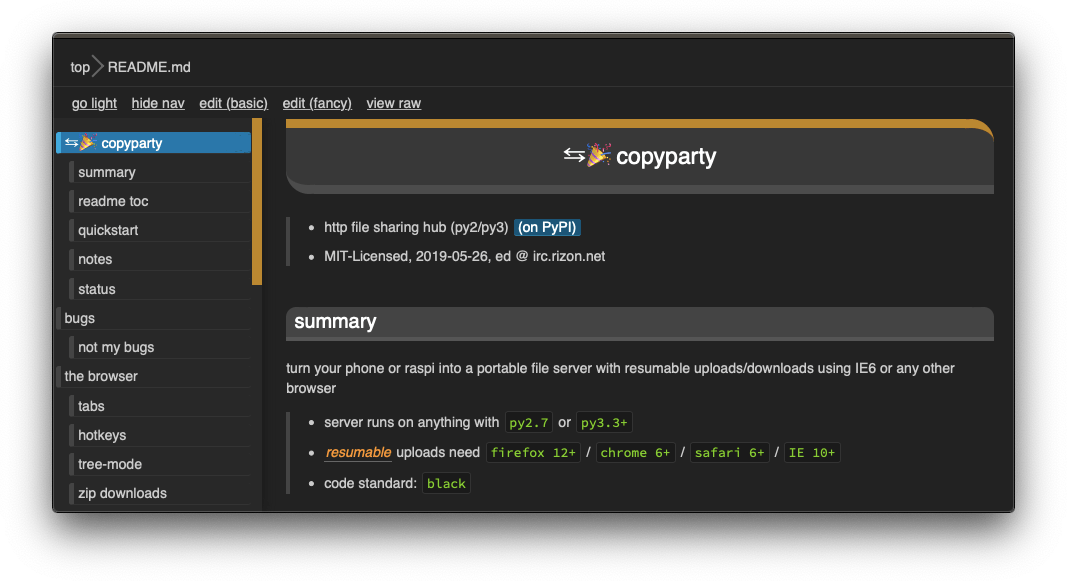
and there are * two * editors
2021-04-25 04:34:06 +02:00
2023-04-12 22:06:44 +00:00
there is a built-in extension for inline clickable thumbnails;
* enable it by adding `<!-- th -->` somewhere in the doc
* add thumbnails with `!th[l](your.jpg)` where `l` means left-align (`r` = right-align)
* a single line with `---` clears the float / inlining
* in the case of README.md being displayed below a file listing, thumbnails will open in the gallery viewer
other notes,
2021-04-25 04:34:06 +02:00
* the document preview has a max-width which is the same as an A4 paper when printed
2021-04-25 03:00:47 +02:00
## other tricks
* you can link a particular timestamp in an audio file by adding it to the URL, such as `&20` / `&20s` / `&1m20` / `&t=1:20` after the `.../#af-c8960dab`
2021-11-20 19:33:56 +01:00
* enabling the audio equalizer can help make gapless albums fully gapless in some browsers (chrome), so consider leaving it on with all the values at zero
2021-10-27 00:47:50 +02:00
* get a plaintext file listing by adding `?ls=t` to a URL, or a compact colored one with `?ls=v` (for unix terminals)
2022-07-05 23:27:48 +02:00
* if you are using media hotkeys to switch songs and are getting tired of seeing the OSD popup which Windows doesn't let you disable, consider [./contrib/media-osd-bgone.ps1 ](contrib/#media-osd-bgoneps1 )
2021-06-21 23:43:07 +02:00
2021-09-04 21:40:22 +02:00
* click the bottom-left `π` to open a javascript prompt for debugging
2021-09-06 00:23:35 +02:00
* files named `.prologue.html` / `.epilogue.html` will be rendered before/after directory listings unless `--no-logues`
* files named `README.md` / `readme.md` will be rendered after directory listings unless `--no-readme` (but `.epilogue.html` takes precedence)
2021-04-25 03:00:47 +02:00
2021-08-07 21:11:01 +02:00
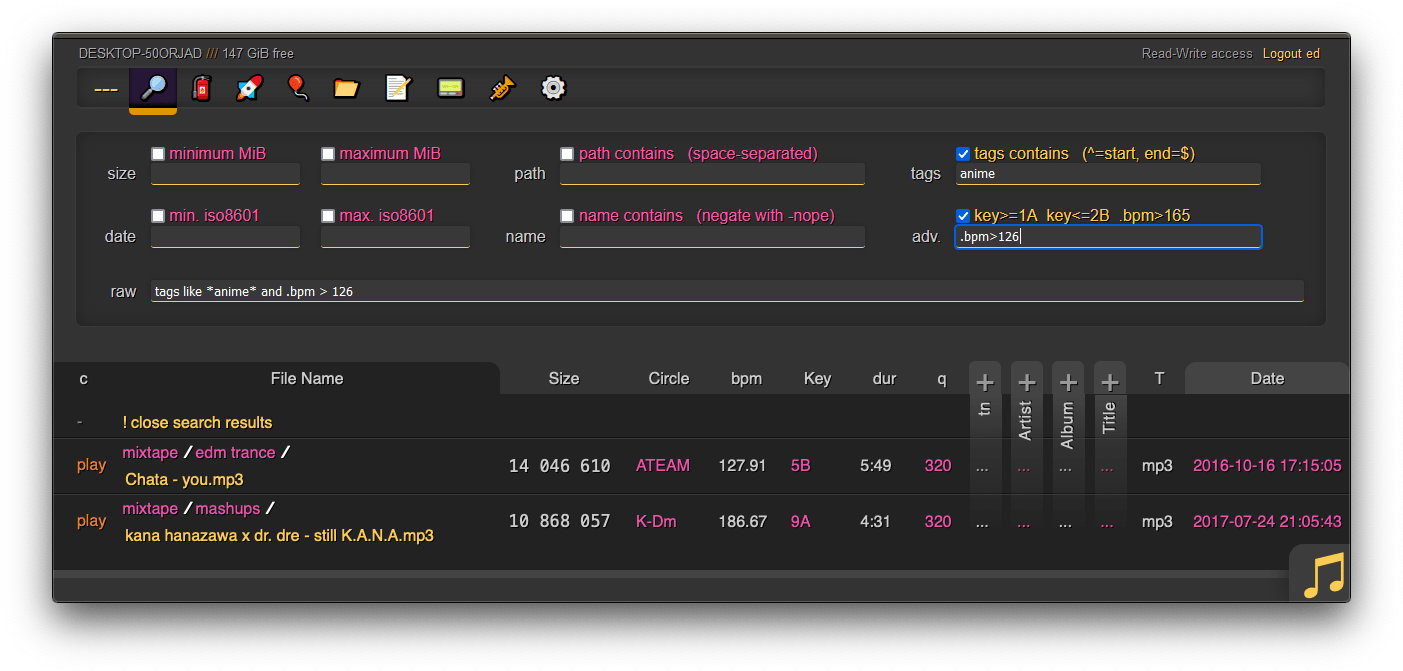
## searching
2021-02-22 02:33:30 +01:00
2021-08-22 17:23:42 +02:00
search by size, date, path/name, mp3-tags, ...
2021-08-17 00:23:12 +02:00
2021-04-25 04:34:06 +02:00
2021-02-22 03:33:24 +01:00
when started with `-e2dsa` copyparty will scan/index all your files. This avoids duplicates on upload, and also makes the volumes searchable through the web-ui:
* make search queries by `size` /`date` /`directory-path` /`filename` , or...
2021-04-25 21:42:45 +02:00
* drag/drop a local file to see if the same contents exist somewhere on the server, see [file-search ](#file-search )
2021-02-22 02:33:30 +01:00
2021-02-22 03:33:24 +01:00
path/name queries are space-separated, AND'ed together, and words are negated with a `-` prefix, so for example:
* path: `shibayan -bossa` finds all files where one of the folders contain `shibayan` but filters out any results where `bossa` exists somewhere in the path
* name: `demetori styx` gives you [good stuff ](https://www.youtube.com/watch?v=zGh0g14ZJ8I&list=PL3A147BD151EE5218&index=9 )
2021-02-22 02:33:30 +01:00
2022-07-05 23:27:48 +02:00
the `raw` field allows for more complex stuff such as `( tags like *nhato* or tags like *taishi* ) and ( not tags like *nhato* or not tags like *taishi* )` which finds all songs by either nhato or taishi, excluding collabs (terrible example, why would you do that)
for the above example to work, add the commandline argument `-e2ts` to also scan/index tags from music files, which brings us over to:
2021-03-02 01:02:13 +01:00
2021-03-01 02:50:10 +01:00
2021-08-07 21:11:01 +02:00
# server config
2021-03-01 02:50:10 +01:00
2021-11-06 22:15:37 +01:00
using arguments or config files, or a mix of both:
2022-11-04 23:48:14 +00:00
* config files (`-c some.conf` ) can set additional commandline arguments; see [./docs/example.conf ](docs/example.conf ) and [./docs/example2.conf ](docs/example2.conf )
2021-11-12 22:30:23 +01:00
* `kill -s USR1` (same as `systemctl reload copyparty` ) to reload accounts and volumes from config files without restarting
* or click the `[reload cfg]` button in the control-panel when logged in as admin
2023-02-07 19:54:08 +00:00
* changes to the `[global]` config section requires a restart to take effect
2021-11-06 22:15:37 +01:00
2022-11-27 01:30:18 +00:00
## zeroconf
2023-01-29 18:28:53 +00:00
announce enabled services on the LAN ([pic ](https://user-images.githubusercontent.com/241032/215344737-0eae8d98-9496-4256-9aa8-cd2f6971810d.png )) -- `-z` enables both [mdns ](#mdns ) and [ssdp ](#ssdp )
2022-11-27 01:30:18 +00:00
2022-12-03 18:58:56 +00:00
* `--z-on` / `--z-off` ' limits the feature to certain networks
2022-11-27 01:30:18 +00:00
### mdns
LAN domain-name and feature announcer
uses [multicast dns ](https://en.wikipedia.org/wiki/Multicast_DNS ) to give copyparty a domain which any machine on the LAN can use to access it
all enabled services ([webdav ](#webdav-server ), [ftp ](#ftp-server ), [smb ](#smb-server )) will appear in mDNS-aware file managers (KDE, gnome, macOS, ...)
the domain will be http://partybox.local if the machine's hostname is `partybox` unless `--name` specifies soemthing else
### ssdp
windows-explorer announcer
uses [ssdp ](https://en.wikipedia.org/wiki/Simple_Service_Discovery_Protocol ) to make copyparty appear in the windows file explorer on all machines on the LAN
doubleclicking the icon opens the "connect" page which explains how to mount copyparty as a local filesystem
2022-12-09 19:11:26 +00:00
if copyparty does not appear in windows explorer, use `--zsv` to see why:
* maybe the discovery multicast was sent from an IP which does not intersect with the server subnets
2022-11-27 01:30:18 +00:00
2022-10-09 00:04:02 +02:00
## qr-code
print a qr-code [(screenshot) ](https://user-images.githubusercontent.com/241032/194728533-6f00849b-c6ac-43c6-9359-83e454d11e00.png ) for quick access, great between phones on android hotspots which keep changing the subnet
* `--qr` enables it
* `--qrs` does https instead of http
* `--qrl lootbox/?pw=hunter2` appends to the url, linking to the `lootbox` folder with password `hunter2`
* `--qrz 1` forces 1x zoom instead of autoscaling to fit the terminal size
* 1x may render incorrectly on some terminals/fonts, but 2x should always work
2022-11-27 01:30:18 +00:00
it uses the server hostname if [mdns ](#mdns ) is enbled, otherwise it'll use your external ip (default route) unless `--qri` specifies a specific ip-prefix or domain
2022-10-09 00:04:02 +02:00
2022-10-18 19:36:52 +02:00
## ftp server
2022-02-13 03:10:53 +01:00
2022-02-13 15:46:33 +01:00
an FTP server can be started using `--ftp 3921` , and/or `--ftps` for explicit TLS (ftpes)
2022-02-13 03:10:53 +01:00
* based on [pyftpdlib ](https://github.com/giampaolo/pyftpdlib )
* needs a dedicated port (cannot share with the HTTP/HTTPS API)
2022-02-13 15:46:33 +01:00
* uploads are not resumable -- delete and restart if necessary
* runs in active mode by default, you probably want `--ftp-pr 12000-13000`
* if you enable both `ftp` and `ftps` , the port-range will be divided in half
2022-02-13 16:38:24 +01:00
* some older software (filezilla on debian-stable) cannot passive-mode with TLS
2022-10-19 15:52:19 +02:00
* login with any username + your password, or put your password in the username field
2022-02-13 03:10:53 +01:00
2023-04-23 23:05:31 +00:00
some recommended FTP / FTPS clients; `wark` = example password:
* https://winscp.net/eng/download.php
* https://filezilla-project.org/ struggles a bit with ftps in active-mode, but is fine otherwise
* https://rclone.org/ does FTPS with `tls=false explicit_tls=true`
* `lftp -u k,wark -p 3921 127.0.0.1 -e ls`
* `lftp -u k,wark -p 3990 127.0.0.1 -e 'set ssl:verify-certificate no; ls'`
2022-02-13 03:10:53 +01:00
2022-10-18 19:36:52 +02:00
## webdav server
2022-10-24 02:33:23 +02:00
with read-write support, supports winXP and later, macos, nautilus/gvfs
2022-10-18 19:36:52 +02:00
2022-11-27 01:30:18 +00:00
click the [connect ](http://127.0.0.1:3923/?hc ) button in the control-panel to see connection instructions for windows, linux, macos
2022-10-19 15:52:19 +02:00
general usage:
2022-11-03 23:08:04 +00:00
* login with any username + your password, or put your password in the username field (password field can be empty/whatever)
2022-10-19 15:52:19 +02:00
2022-10-30 17:11:43 +00:00
on macos, connect from finder:
* [Go] -> [Connect to Server...] -> http://192.168.123.1:3923/
2022-10-18 19:36:52 +02:00
2023-02-15 17:51:20 +00:00
in order to grant full write-access to webdav clients, the volflag `daw` must be set and the account must also have delete-access (otherwise the client won't be allowed to replace the contents of existing files, which is how webdav works)
2022-10-30 17:11:43 +00:00
### connecting to webdav from windows
using the GUI (winXP or later):
* rightclick [my computer] -> [map network drive] -> Folder: `http://192.168.123.1:3923/`
* on winXP only, click the `Sign up for online storage` hyperlink instead and put the URL there
* providing your password as the username is recommended; the password field can be anything or empty
2022-10-22 00:04:51 +02:00
known client bugs:
2022-10-23 23:37:32 +02:00
* win7+ doesn't actually send the password to the server when reauthenticating after a reboot unless you first try to login with an incorrect password and then switch to the correct password
2022-10-19 15:52:19 +02:00
* or just type your password into the username field instead to get around it entirely
2022-10-30 17:11:43 +00:00
* connecting to a folder which allows anonymous read will make writing impossible, as windows has decided it doesn't need to login
2022-10-31 22:42:47 +00:00
* workaround: connect twice; first to a folder which requires auth, then to the folder you actually want, and leave both of those mounted
* win7+ may open a new tcp connection for every file and sometimes forgets to close them, eventually needing a reboot
2022-10-24 02:33:23 +02:00
* maybe NIC-related (??), happens with win10-ltsc on e1000e but not virtio
2022-10-23 23:37:32 +02:00
* windows cannot access folders which contain filenames with invalid unicode or forbidden characters (`<>:"/\|?*` ), or names ending with `.`
2022-10-18 20:29:06 +02:00
* winxp cannot show unicode characters outside of * some range *
* latin-1 is fine, hiragana is not (not even as shift-jis on japanese xp)
2022-10-18 19:36:52 +02:00
2022-10-23 23:08:00 +02:00
## smb server
2022-10-24 15:48:34 +02:00
unsafe, slow, not recommended for wan, enable with `--smb` for read-only or `--smbw` for read-write
2022-10-23 23:08:00 +02:00
2022-11-27 01:30:18 +00:00
click the [connect ](http://127.0.0.1:3923/?hc ) button in the control-panel to see connection instructions for windows, linux, macos
2022-10-23 23:08:00 +02:00
dependencies: `python3 -m pip install --user -U impacket==0.10.0`
* newer versions of impacket will hopefully work just fine but there is monkeypatching so maybe not
2022-10-24 18:48:12 +02:00
some **BIG WARNINGS ** specific to SMB/CIFS, in decreasing importance:
2022-10-23 23:08:00 +02:00
* not entirely confident that read-only is read-only
2022-10-24 18:48:12 +02:00
* the smb backend is not fully integrated with vfs, meaning there could be security issues (path traversal). Please use `--smb-port` (see below) and [prisonparty ](./bin/prisonparty.sh )
2022-10-24 21:16:57 +02:00
* account passwords work per-volume as expected, but account permissions are coalesced; all accounts have read-access to all volumes, and if a single account has write-access to some volume then all other accounts also do
* if no accounts have write-access to a specific volume, or if `--smbw` is not set, then writing to that volume from smb * should * be impossible
2022-11-03 23:08:04 +00:00
* will be fixed once [impacket v0.11.0 ](https://github.com/SecureAuthCorp/impacket/commit/d923c00f75d54b972bca573a211a82f09b55261a ) is released
2022-10-24 18:48:12 +02:00
* [shadowing ](#shadowing ) probably works as expected but no guarantees
2022-10-23 23:08:00 +02:00
and some minor issues,
2022-11-03 23:17:24 +00:00
* clients only see the first ~400 files in big folders; [impacket#1433 ](https://github.com/SecureAuthCorp/impacket/issues/1433 )
2023-02-07 19:54:08 +00:00
* hot-reload of server config (`/?reload=cfg` ) does not include the `[global]` section (commandline args)
2022-11-06 16:48:05 +00:00
* listens on the first IPv4 `-i` interface only (default = :: = 0.0.0.0 = all)
2022-10-23 23:08:00 +02:00
* login doesn't work on winxp, but anonymous access is ok -- remove all accounts from copyparty config for that to work
2022-10-24 15:48:34 +02:00
* win10 onwards does not allow connecting anonymously / without accounts
2022-10-24 16:08:02 +02:00
* on windows, creating a new file through rightclick --> new --> textfile throws an error due to impacket limitations -- hit OK and F5 to get your file
2022-10-23 23:08:00 +02:00
* python3 only
* slow
known client bugs:
2022-10-24 02:33:23 +02:00
* on win7 only, `--smb1` is much faster than smb2 (default) because it keeps rescanning folders on smb2
* however smb1 is buggy and is not enabled by default on win10 onwards
2022-10-23 23:08:00 +02:00
* windows cannot access folders which contain filenames with invalid unicode or forbidden characters (`<>:"/\|?*` ), or names ending with `.`
the smb protocol listens on TCP port 445, which is a privileged port on linux and macos, which would require running copyparty as root. However, this can be avoided by listening on another port using `--smb-port 3945` and then using NAT to forward the traffic from 445 to there;
* on linux: `iptables -t nat -A PREROUTING -i eth0 -p tcp --dport 445 -j REDIRECT --to-port 3945`
authenticate with one of the following:
* username `$username` , password `$password`
2022-11-03 23:08:04 +00:00
* username `$password` , password `k`
2022-10-23 23:08:00 +02:00
2021-08-22 17:23:42 +02:00
## file indexing
2022-08-03 22:20:28 +02:00
enables dedup and music search ++
file indexing relies on two database tables, the up2k filetree (`-e2d` ) and the metadata tags (`-e2t` ), stored in `.hist/up2k.db` . Configuration can be done through arguments, volflags, or a mix of both.
2021-03-01 02:50:10 +01:00
through arguments:
* `-e2d` enables file indexing on upload
2021-09-04 21:07:45 +02:00
* `-e2ds` also scans writable folders for new files on startup
* `-e2dsa` also scans all mounted volumes (including readonly ones)
2021-03-01 02:50:10 +01:00
* `-e2t` enables metadata indexing on upload
2021-09-04 21:07:45 +02:00
* `-e2ts` also scans for tags in all files that don't have tags yet
* `-e2tsr` also deletes all existing tags, doing a full reindex
2022-07-13 00:48:39 +02:00
* `-e2v` verfies file integrity at startup, comparing hashes from the db
* `-e2vu` patches the database with the new hashes from the filesystem
* `-e2vp` panics and kills copyparty instead
2022-12-02 17:25:37 +00:00
* `--xlink` enables deduplication across volumes
2021-03-01 02:50:10 +01:00
2022-08-03 22:20:28 +02:00
the same arguments can be set as volflags, in addition to `d2d` , `d2ds` , `d2t` , `d2ts` , `d2v` for disabling:
2023-06-06 22:04:39 +00:00
* `-v ~/music::r:c,e2ds,e2tsr` does a full reindex of everything on startup
2021-08-06 00:50:29 +02:00
* `-v ~/music::r:c,d2d` disables **all ** indexing, even if any `-e2*` are on
* `-v ~/music::r:c,d2t` disables all `-e2t*` (tags), does not affect `-e2d*`
2021-12-06 20:54:13 +01:00
* `-v ~/music::r:c,d2ds` disables on-boot scans; only index new uploads
* `-v ~/music::r:c,d2ts` same except only affecting tags
2021-03-01 02:50:10 +01:00
2021-06-10 18:08:30 +02:00
note:
2021-07-16 02:44:06 +02:00
* `e2tsr` is probably always overkill, since `e2ds` /`e2dsa` would pick up any file modifications and `e2ts` would then reindex those, unless there is a new copyparty version with new parsers and the release note says otherwise
2021-06-10 18:08:30 +02:00
* the rescan button in the admin panel has no effect unless the volume has `-e2ds` or higher
2022-09-23 22:32:04 +02:00
* deduplication is possible on windows if you run copyparty as administrator (not saying you should!)
2021-03-01 02:50:10 +01:00
2022-07-27 11:48:47 +02:00
### exclude-patterns
2022-08-03 22:20:28 +02:00
to save some time, you can provide a regex pattern for filepaths to only index by filename/path/size/last-modified (and not the hash of the file contents) by setting `--no-hash \.iso$` or the volflag `:c,nohash=\.iso$` , this has the following consequences:
2021-07-16 02:44:06 +02:00
* initial indexing is way faster, especially when the volume is on a network disk
2021-06-10 18:08:30 +02:00
* makes it impossible to [file-search ](#file-search )
* if someone uploads the same file contents, the upload will not be detected as a dupe, so it will not get symlinked or rejected
2021-10-12 01:40:19 +02:00
similarly, you can fully ignore files/folders using `--no-idx [...]` and `:c,noidx=\.iso$`
if you set `--no-hash [...]` globally, you can enable hashing for specific volumes using flag `:c,nohash=`
2021-08-07 03:45:50 +02:00
2022-08-03 22:20:28 +02:00
### filesystem guards
avoid traversing into other filesystems using `--xdev` / volflag `:c,xdev` , skipping any symlinks or bind-mounts to another HDD for example
and/or you can `--xvol` / `:c,xvol` to ignore all symlinks leaving the volume's top directory, but still allow bind-mounts pointing elsewhere
2023-04-29 21:10:02 +00:00
* symlinks are permitted with `xvol` if they point into another volume where the user has the same level of access
these options will reduce performance; unlikely worst-case estimates are 14% reduction for directory listings, 35% for download-as-tar
as of copyparty v1.7.0 these options also prevent file access at runtime -- in previous versions it was just hints for the indexer
2022-08-03 22:20:28 +02:00
2022-07-27 11:48:47 +02:00
### periodic rescan
filesystem monitoring; if copyparty is not the only software doing stuff on your filesystem, you may want to enable periodic rescans to keep the index up to date
argument `--re-maxage 60` will rescan all volumes every 60 sec, same as volflag `:c,scan=60` to specify it per-volume
uploads are disabled while a rescan is happening, so rescans will be delayed by `--db-act` (default 10 sec) when there is write-activity going on (uploads, renames, ...)
2021-08-07 03:45:50 +02:00
2021-08-07 21:11:01 +02:00
## upload rules
2021-08-07 03:45:50 +02:00
2022-08-03 22:20:28 +02:00
set upload rules using volflags, some examples:
2021-08-07 03:45:50 +02:00
2021-11-12 22:30:23 +01:00
* `:c,sz=1k-3m` sets allowed filesize between 1 KiB and 3 MiB inclusive (suffixes: `b` , `k` , `m` , `g` )
2022-07-17 22:33:08 +02:00
* `:c,df=4g` block uploads if there would be less than 4 GiB free disk space afterwards
2021-08-07 03:45:50 +02:00
* `:c,nosub` disallow uploading into subdirectories; goes well with `rotn` and `rotf` :
* `:c,rotn=1000,2` moves uploads into subfolders, up to 1000 files in each folder before making a new one, two levels deep (must be at least 1)
* `:c,rotf=%Y/%m/%d/%H` enforces files to be uploaded into a structure of subfolders according to that date format
* if someone uploads to `/foo/bar` the path would be rewritten to `/foo/bar/2021/08/06/23` for example
2021-08-07 21:11:01 +02:00
* but the actual value is not verified, just the structure, so the uploader can choose any values which conform to the format string
2021-08-07 03:45:50 +02:00
* just to avoid additional complexity in up2k which is enough of a mess already
2021-08-09 22:17:41 +02:00
* `:c,lifetime=300` delete uploaded files when they become 5 minutes old
2021-08-07 03:45:50 +02:00
you can also set transaction limits which apply per-IP and per-volume, but these assume `-j 1` (default) otherwise the limits will be off, for example `-j 4` would allow anywhere between 1x and 4x the limits you set depending on which processing node the client gets routed to
* `:c,maxn=250,3600` allows 250 files over 1 hour from each IP (tracked per-volume)
* `:c,maxb=1g,300` allows 1 GiB total over 5 minutes from each IP (tracked per-volume)
2021-05-29 23:35:07 +02:00
2021-03-19 00:08:31 +01:00
2021-08-08 02:45:50 +02:00
## compress uploads
2021-09-04 21:21:18 +02:00
files can be autocompressed on upload, either on user-request (if config allows) or forced by server-config
2021-08-08 02:45:50 +02:00
2022-08-03 22:20:28 +02:00
* volflag `gz` allows gz compression
* volflag `xz` allows lzma compression
* volflag `pk` **forces ** compression on all files
2021-08-08 02:45:50 +02:00
* url parameter `pk` requests compression with server-default algorithm
* url parameter `gz` or `xz` requests compression with a specific algorithm
* url parameter `xz` requests xz compression
things to note,
* the `gz` and `xz` arguments take a single optional argument, the compression level (range 0 to 9)
2022-08-03 22:20:28 +02:00
* the `pk` volflag takes the optional argument `ALGORITHM,LEVEL` which will then be forced for all uploads, for example `gz,9` or `xz,0`
2021-08-08 02:45:50 +02:00
* default compression is gzip level 9
* all upload methods except up2k are supported
* the files will be indexed after compression, so dupe-detection and file-search will not work as expected
some examples,
2021-11-20 18:50:55 +01:00
* `-v inc:inc:w:c,pk=xz,0`
folder named inc, shared at inc, write-only for everyone, forces xz compression at level 0
* `-v inc:inc:w:c,pk`
same write-only inc, but forces gz compression (default) instead of xz
* `-v inc:inc:w:c,gz`
allows (but does not force) gz compression if client uploads to `/inc?pk` or `/inc?gz` or `/inc?gz=4`
2021-08-08 02:45:50 +02:00
2022-09-18 17:30:57 +02:00
## other flags
* `:c,magic` enables filetype detection for nameless uploads, same as `--magic`
2023-01-22 23:35:31 +00:00
* needs https://pypi.org/project/python-magic/ `python3 -m pip install --user -U python-magic`
* on windows grab this instead `python3 -m pip install --user -U python-magic-bin`
2022-09-18 17:30:57 +02:00
2021-06-10 01:27:04 +02:00
## database location
2021-09-04 21:07:45 +02:00
in-volume (`.hist/up2k.db` , default) or somewhere else
2021-08-22 17:23:42 +02:00
2021-06-10 01:27:04 +02:00
copyparty creates a subfolder named `.hist` inside each volume where it stores the database, thumbnails, and some other stuff
2022-08-03 22:20:28 +02:00
this can instead be kept in a single place using the `--hist` argument, or the `hist=` volflag, or a mix of both:
2021-08-06 00:50:29 +02:00
* `--hist ~/.cache/copyparty -v ~/music::r:c,hist=-` sets `~/.cache/copyparty` as the default place to put volume info, but `~/music` gets the regular `.hist` subfolder (`-` restores default behavior)
2021-06-10 01:27:04 +02:00
2021-06-10 18:08:30 +02:00
note:
2021-06-10 01:27:04 +02:00
* markdown edits are always stored in a local `.hist` subdirectory
2021-06-10 18:08:30 +02:00
* on windows the volflag path is cyglike, so `/c/temp` means `C:\temp` but use regular paths for `--hist`
2021-06-12 01:55:45 +02:00
* you can use cygpaths for volumes too, `-v C:\Users::r` and `-v /c/users::r` both work
2021-06-10 01:27:04 +02:00
2021-03-19 00:08:31 +01:00
## metadata from audio files
2021-08-22 17:23:42 +02:00
set `-e2t` to index tags on upload
2021-03-01 02:50:10 +01:00
`-mte` decides which tags to index and display in the browser (and also the display order), this can be changed per-volume:
2021-08-06 00:50:29 +02:00
* `-v ~/music::r:c,mte=title,artist` indexes and displays * title * followed by * artist *
2021-03-01 02:50:10 +01:00
if you add/remove a tag from `mte` you will need to run with `-e2tsr` once to rebuild the database, otherwise only new files will be affected
2021-09-04 21:07:45 +02:00
but instead of using `-mte` , `-mth` is a better way to hide tags in the browser: these tags will not be displayed by default, but they still get indexed and become searchable, and users can choose to unhide them in the `[⚙️] config` pane
2021-08-02 00:47:07 +02:00
2021-03-01 02:50:10 +01:00
`-mtm` can be used to add or redefine a metadata mapping, say you have media files with `foo` and `bar` tags and you want them to display as `qux` in the browser (preferring `foo` if both are present), then do `-mtm qux=foo,bar` and now you can `-mte artist,title,qux`
2021-03-19 00:08:31 +01:00
tags that start with a `.` such as `.bpm` and `.dur` (ation) indicate numeric value
2021-09-07 23:18:54 +02:00
see the beautiful mess of a dictionary in [mtag.py ](https://github.com/9001/copyparty/blob/hovudstraum/copyparty/mtag.py ) for the default mappings (should cover mp3,opus,flac,m4a,wav,aif,)
2021-03-01 02:50:10 +01:00
2021-07-18 22:50:29 +02:00
`--no-mutagen` disables Mutagen and uses FFprobe instead, which...
* is about 20x slower than Mutagen
* catches a few tags that Mutagen doesn't
2021-05-27 01:42:22 +02:00
* melodic key, video resolution, framerate, pixfmt
2021-03-01 02:50:10 +01:00
* avoids pulling any GPL code into copyparty
2021-07-18 22:50:29 +02:00
* more importantly runs FFprobe on incoming files which is bad if your FFmpeg has a cve
2021-02-22 02:33:30 +01:00
2022-09-04 21:21:54 +02:00
`--mtag-to` sets the tag-scan timeout; very high default (60 sec) to cater for zfs and other randomly-freezing filesystems. Lower values like 10 are usually safe, allowing for faster processing of tricky files
2021-02-22 02:33:30 +01:00
2021-03-19 00:08:31 +01:00
## file parser plugins
2022-10-08 14:25:13 +02:00
provide custom parsers to index additional tags, also see [./bin/mtag/README.md ](./bin/mtag/README.md )
2021-08-22 17:23:42 +02:00
2022-09-04 21:21:54 +02:00
copyparty can invoke external programs to collect additional metadata for files using `mtp` (either as argument or volflag), there is a default timeout of 60sec, and only files which contain audio get analyzed by default (see ay/an/ad below)
2021-03-19 00:08:31 +01:00
2021-03-19 21:22:56 +01:00
* `-mtp .bpm=~/bin/audio-bpm.py` will execute `~/bin/audio-bpm.py` with the audio file as argument 1 to provide the `.bpm` tag, if that does not exist in the audio metadata
* `-mtp key=f,t5,~/bin/audio-key.py` uses `~/bin/audio-key.py` to get the `key` tag, replacing any existing metadata tag (`f,` ), aborting if it takes longer than 5sec (`t5,` )
2021-08-06 00:50:29 +02:00
* `-v ~/music::r:c,mtp=.bpm=~/bin/audio-bpm.py:c,mtp=key=f,t5,~/bin/audio-key.py` both as a per-volume config wow this is getting ugly
2021-03-19 00:08:31 +01:00
2022-07-05 23:27:48 +02:00
*but wait, there's more!* `-mtp` can be used for non-audio files as well using the `a` flag: `ay` only do audio files (default), `an` only do non-audio files, or `ad` do all files (d as in dontcare)
2021-05-16 07:04:18 +02:00
2022-07-03 14:23:56 +02:00
* "audio file" also means videos btw, as long as there is an audio stream
2021-05-16 07:04:18 +02:00
* `-mtp ext=an,~/bin/file-ext.py` runs `~/bin/file-ext.py` to get the `ext` tag only if file is not audio (`an` )
2021-05-29 04:18:57 +02:00
* `-mtp arch,built,ver,orig=an,eexe,edll,~/bin/exe.py` runs `~/bin/exe.py` to get properties about windows-binaries only if file is not audio (`an` ) and file extension is exe or dll
2022-09-04 01:42:28 +02:00
* if you want to daisychain parsers, use the `p` flag to set processing order
* `-mtp foo=p1,~/a.py` runs before `-mtp foo=p2,~/b.py` and will forward all the tags detected so far as json to the stdin of b.py
* option `c0` disables capturing of stdout/stderr, so copyparty will not receive any tags from the process at all -- instead the invoked program is free to print whatever to the console, just using copyparty as a launcher
* `c1` captures stdout only, `c2` only stderr, and `c3` (default) captures both
* you can control how the parser is killed if it times out with option `kt` killing the entire process tree (default), `km` just the main process, or `kn` let it continue running until copyparty is terminated
2022-07-05 23:27:48 +02:00
2022-07-03 14:23:56 +02:00
if something doesn't work, try `--mtag-v` for verbose error messages
2021-03-19 00:08:31 +01:00
2023-01-22 23:35:31 +00:00
## event hooks
2021-10-09 22:09:35 +02:00
2023-01-27 23:55:57 +00:00
trigger a program on uploads, renames etc ([examples ](./bin/hooks/ ))
2023-01-22 23:35:31 +00:00
you can set hooks before and/or after an event happens, and currently you can hook uploads, moves/renames, and deletes
there's a bunch of flags and stuff, see `--help-hooks`
### upload events
2023-01-27 23:55:57 +00:00
the older, more powerful approach ([examples ](./bin/mtag/ )):
2021-10-09 22:09:35 +02:00
```
2022-07-05 23:27:48 +02:00
-v /mnt/inc:inc:w:c,mte=+x1:c,mtp=x1=ad,kn,/usr/bin/notify-send
2021-10-09 22:09:35 +02:00
```
2022-07-05 23:27:48 +02:00
so filesystem location `/mnt/inc` shared at `/inc` , write-only for everyone, appending `x1` to the list of tags to index (`mte` ), and using `/usr/bin/notify-send` to "provide" tag `x1` for any filetype (`ad` ) with kill-on-timeout disabled (`kn` )
2021-10-09 22:09:35 +02:00
that'll run the command `notify-send` with the path to the uploaded file as the first and only argument (so on linux it'll show a notification on-screen)
2023-01-22 23:35:31 +00:00
note that this is way more complicated than the new [event hooks ](#event-hooks ) but this approach has the following advantages:
* non-blocking and multithreaded; doesn't hold other uploads back
* you get access to tags from FFmpeg and other mtp parsers
* only trigger on new unique files, not dupes
2021-10-09 22:09:35 +02:00
2023-01-22 23:35:31 +00:00
note that it will occupy the parsing threads, so fork anything expensive (or set `kn` to have copyparty fork it for you) -- otoh if you want to intentionally queue/singlethread you can combine it with `--mtag-mt 1`
2021-10-09 22:09:35 +02:00
2022-03-20 06:15:57 +01:00
## hiding from google
tell search engines you dont wanna be indexed, either using the good old [robots.txt ](https://www.robotstxt.org/robotstxt.html ) or through copyparty settings:
* `--no-robots` adds HTTP (`X-Robots-Tag` ) and HTML (`<meta>` ) headers with `noindex, nofollow` globally
2022-08-03 22:20:28 +02:00
* volflag `[...]:c,norobots` does the same thing for that single volume
* volflag `[...]:c,robots` ALLOWS search-engine crawling for that volume, even if `--no-robots` is set globally
2022-03-20 06:15:57 +01:00
also, `--force-js` disables the plain HTML folder listing, making things harder to parse for search engines
2022-04-29 02:06:56 +02:00
## themes
2022-04-30 02:16:34 +02:00
you can change the default theme with `--theme 2` , and add your own themes by modifying `browser.css` or providing your own css to `--css-browser` , then telling copyparty they exist by increasing `--themes`
2022-04-29 02:06:56 +02:00
2022-04-29 23:13:37 +02:00
<table><tr><td width="33%" align="center"><a href="https://user-images.githubusercontent.com/241032/165864907-17e2ac7d-319d-4f25-8718-2f376f614b51.png"><img src="https://user-images.githubusercontent.com/241032/165867551-fceb35dd-38f0-42bb-bef3-25ba651ca69b.png"></a>
2022-05-16 18:56:53 +02:00
0. classic dark</td><td width="33%" align="center"><a href="https://user-images.githubusercontent.com/241032/168644399-68938de5-da9b-445f-8d92-b51c74b5f345.png"><img src="https://user-images.githubusercontent.com/241032/168644404-8e1a2fdc-6e59-4c41-905e-ba5399ed686f.png"></a>
2. flat pm-monokai</td><td width="33%" align="center"><a href="https://user-images.githubusercontent.com/241032/165864901-db13a429-a5da-496d-8bc6-ce838547f69d.png"><img src="https://user-images.githubusercontent.com/241032/165867560-aa834aef-58dc-4abe-baef-7e562b647945.png"></a>
2022-04-29 23:13:37 +02:00
4. vice</td></tr><tr><td align="center"><a href="https://user-images.githubusercontent.com/241032/165864905-692682eb-6fb4-4d40-b6fe-27d2c7d3e2a7.png"><img src="https://user-images.githubusercontent.com/241032/165867555-080b73b6-6d85-41bb-a7c6-ad277c608365.png"></a>
2022-05-16 19:01:32 +02:00
1. classic light</td><td align="center"><a href="https://user-images.githubusercontent.com/241032/168645276-fb02fd19-190a-407a-b8d3-d58fee277e02.png"><img src="https://user-images.githubusercontent.com/241032/168645280-f0662b3c-9764-4875-a2e2-d91cc8199b23.png"></a>
2022-04-29 23:13:37 +02:00
3. flat light
</td><td align="center"><a href="https://user-images.githubusercontent.com/241032/165864898-10ce7052-a117-4fcf-845b-b56c91687908.png"><img src="https://user-images.githubusercontent.com/241032/165867562-f3003d45-dd2a-4564-8aae-fed44c1ae064.png"></a>
5. <a href="https://blog.codinghorror.com/a-tribute-to-the-windows-31-hot-dog-stand-color-scheme/">hotdog stand</a></td></tr></table>
2022-04-29 02:06:56 +02:00
the classname of the HTML tag is set according to the selected theme, which is used to set colors as css variables ++
* each theme * generally * has a dark theme (even numbers) and a light theme (odd numbers), showing in pairs
* the first theme (theme 0 and 1) is `html.a` , second theme (2 and 3) is `html.b`
* if a light theme is selected, `html.y` is set, otherwise `html.z` is
2022-04-29 23:13:37 +02:00
* so if the dark edition of the 2nd theme is selected, you use any of `html.b` , `html.z` , `html.bz` to specify rules
2022-04-29 02:06:56 +02:00
see the top of [./copyparty/web/browser.css ](./copyparty/web/browser.css ) where the color variables are set, and there's layout-specific stuff near the bottom
2021-03-21 14:15:55 +01:00
## complete examples
2023-05-13 00:00:07 +00:00
* see [running on windows ](./docs/examples/windows.md ) for a fancy windows setup
* or use any of the examples below, just replace `python copyparty-sfx.py` with `copyparty.exe` if you're using the exe edition
2023-04-13 21:36:55 +00:00
2023-05-12 22:41:06 +00:00
* allow anyone to download or upload files into the current folder:
`python copyparty-sfx.py`
* enable searching and music indexing with `-e2dsa -e2ts`
* start an FTP server on port 3921 with `--ftp 3921`
* announce it on your LAN with `-z` so it appears in windows/Linux file managers
* anyone can upload, but nobody can see any files (even the uploader):
`python copyparty-sfx.py -e2dsa -v .::w`
* block uploads if there's less than 4 GiB free disk space with `--df 4`
* show a popup on new uploads with `--xau bin/hooks/notify.py`
* anyone can upload, and receive "secret" links for each upload they do:
`python copyparty-sfx.py -e2dsa -v .::wG:c,fk=8`
* anyone can browse, only `kevin` (password `okgo` ) can upload/move/delete files:
`python copyparty-sfx.py -e2dsa -a kevin:okgo -v .::r:rwmd,kevin`
* read-only music server:
2022-07-06 00:12:10 +02:00
`python copyparty-sfx.py -v /mnt/nas/music:/music:r -e2dsa -e2ts --no-robots --force-js --theme 2`
2022-07-06 00:00:56 +02:00
* ...with bpm and key scanning
`-mtp .bpm=f,audio-bpm.py -mtp key=f,audio-key.py`
* ...with a read-write folder for `kevin` whose password is `okgo`
`-a kevin:okgo -v /mnt/nas/inc:/inc:rw,kevin`
* ...with logging to disk
`-lo log/cpp-%Y-%m%d-%H%M%S.txt.xz`
2021-03-21 14:15:55 +01:00
2022-12-11 21:01:38 +00:00
## reverse-proxy
2023-03-19 21:45:35 +00:00
running copyparty next to other websites hosted on an existing webserver such as nginx, caddy, or apache
2022-12-11 21:01:38 +00:00
you can either:
* give copyparty its own domain or subdomain (recommended)
* or do location-based proxying, using `--rp-loc=/stuff` to tell copyparty where it is mounted -- has a slight performance cost and higher chance of bugs
* if copyparty says `incorrect --rp-loc or webserver config; expected vpath starting with [...]` it's likely because the webserver is stripping away the proxy location from the request URLs -- see the `ProxyPass` in the apache example below
2023-03-19 21:45:35 +00:00
some reverse proxies (such as [Caddy ](https://caddyserver.com/ )) can automatically obtain a valid https/tls certificate for you, and some support HTTP/2 and QUIC which could be a nice speed boost
2022-12-11 21:01:38 +00:00
example webserver configs:
* [nginx config ](contrib/nginx/copyparty.conf ) -- entire domain/subdomain
* [apache2 config ](contrib/apache/copyparty.conf ) -- location-based
2023-04-17 13:17:53 +02:00
2023-04-29 09:44:46 +00:00
# packages
the party might be closer than you think
## arch package
now [available on aur ](https://aur.archlinux.org/packages/copyparty ) maintained by [@icxes ](https://github.com/icxes )
2023-04-17 13:17:53 +02:00
## nix package
`nix profile install github:9001/copyparty`
requires a [flake-enabled ](https://nixos.wiki/wiki/Flakes ) installation of nix
some recommended dependencies are enabled by default; [override the package ](https://github.com/9001/copyparty/blob/hovudstraum/contrib/package/nix/copyparty/default.nix#L3-L22 ) if you want to add/remove some features/deps
`ffmpeg-full` was chosen over `ffmpeg-headless` mainly because we need `withWebp` (and `withOpenmpt` is also nice) and being able to use a cached build felt more important than optimizing for size at the time -- PRs welcome if you disagree 👍
2023-04-04 18:32:31 +02:00
## nixos module
2023-04-17 13:17:53 +02:00
2023-04-04 18:32:31 +02:00
for this setup, you will need a [flake-enabled ](https://nixos.wiki/wiki/Flakes ) installation of NixOS.
```nix
{
# add copyparty flake to your inputs
inputs.copyparty.url = "github:9001/copyparty";
# ensure that copyparty is an allowed argument to the outputs function
outputs = { self, nixpkgs, copyparty }: {
nixosConfigurations.yourHostName = nixpkgs.lib.nixosSystem {
modules = [
# load the copyparty NixOS module
copyparty.nixosModules.default
({ pkgs, ... }: {
# add the copyparty overlay to expose the package to the module
nixpkgs.overlays = [ copyparty.overlays.default ];
# (optional) install the package globally
environment.systemPackages = [ pkgs.copyparty ];
# configure the copyparty module
services.copyparty.enable = true;
})
];
};
};
}
```
2023-04-06 15:29:23 +02:00
copyparty on NixOS is configured via `services.copyparty` options, for example:
2023-04-04 18:32:31 +02:00
```nix
services.copyparty = {
enable = true;
2023-04-06 15:29:23 +02:00
# directly maps to values in the [global] section of the copyparty config.
# see `copyparty --help` for available options
settings = {
i = "0.0.0.0";
# use lists to set multiple values
p = [ 3210 3211 ];
# use booleans to set binary flags
no-reload = true;
# using 'false' will do nothing and omit the value when generating a config
ignored-flag = false;
};
# create users
accounts = {
# specify the account name as the key
ed = {
# provide the path to a file containing the password, keeping it out of /nix/store
# must be readable by the copyparty service user
passwordFile = "/run/keys/copyparty/ed_password";
};
# or do both in one go
k.passwordFile = "/run/keys/copyparty/k_password";
};
# create a volume
volumes = {
# create a volume at "/" (the webroot), which will
"/" = {
# share the contents of "/srv/copyparty"
path = "/srv/copyparty";
# see `copyparty --help-accounts` for available options
access = {
# everyone gets read-access, but
r = "*";
# users "ed" and "k" get read-write
rw = [ "ed" "k" ];
};
# see `copyparty --help-flags` for available options
flags = {
# "fk" enables filekeys (necessary for upget permission) (4 chars long)
fk = 4;
# scan for new files every 60sec
scan = 60;
# volflag "e2d" enables the uploads database
e2d = true;
# "d2t" disables multimedia parsers (in case the uploads are malicious)
d2t = true;
# skips hashing file contents if path matches *.iso
nohash = "\.iso$";
};
};
};
2023-04-04 18:32:31 +02:00
# you may increase the open file limit for the process
openFilesLimit = 8192;
};
```
2022-12-11 21:01:38 +00:00
2023-04-17 13:17:53 +02:00
the passwordFile at /run/keys/copyparty/ could for example be generated by [agenix ](https://github.com/ryantm/agenix ), or you could just dump it in the nix store instead if that's acceptable
2021-04-02 02:43:07 +02:00
# browser support
2021-08-22 17:23:42 +02:00
TLDR: yes
2021-05-14 00:00:15 +02:00
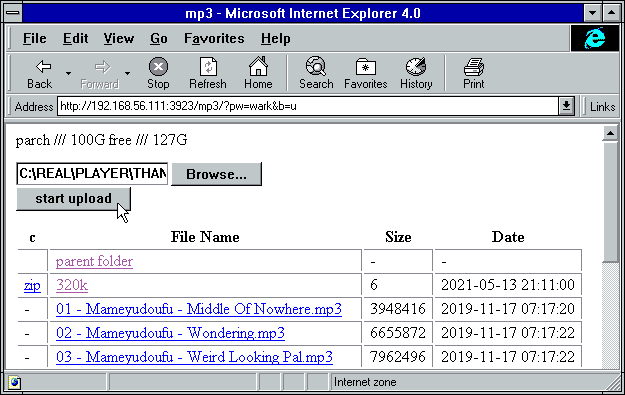
2021-04-25 22:44:50 +02:00
2021-04-03 02:58:50 +02:00
`ie` = internet-explorer, `ff` = firefox, `c` = chrome, `iOS` = iPhone/iPad, `Andr` = Android
2021-08-16 07:37:41 +02:00
| feature | ie6 | ie9 | ie10 | ie11 | ff 52 | c 49 | iOS | Andr |
2021-08-16 08:18:52 +02:00
| --------------- | --- | ---- | ---- | ---- | ----- | ---- | --- | ---- |
2021-08-16 07:37:41 +02:00
| browse files | yep | yep | yep | yep | yep | yep | yep | yep |
| thumbnail view | - | yep | yep | yep | yep | yep | yep | yep |
| basic uploader | yep | yep | yep | yep | yep | yep | yep | yep |
2021-08-16 08:16:52 +02:00
| up2k | - | - | `*1` | `*1` | yep | yep | yep | yep |
2021-08-16 07:37:41 +02:00
| make directory | yep | yep | yep | yep | yep | yep | yep | yep |
| send message | yep | yep | yep | yep | yep | yep | yep | yep |
| set sort order | - | yep | yep | yep | yep | yep | yep | yep |
| zip selection | - | yep | yep | yep | yep | yep | yep | yep |
| file rename | - | yep | yep | yep | yep | yep | yep | yep |
| file cut/paste | - | yep | yep | yep | yep | yep | yep | yep |
2021-10-24 02:57:19 +02:00
| navpane | - | yep | yep | yep | yep | yep | yep | yep |
2021-08-16 07:37:41 +02:00
| image viewer | - | yep | yep | yep | yep | yep | yep | yep |
| video player | - | yep | yep | yep | yep | yep | yep | yep |
| markdown editor | - | - | yep | yep | yep | yep | yep | yep |
2021-09-18 02:07:09 +02:00
| markdown viewer | - | yep | yep | yep | yep | yep | yep | yep |
2021-08-16 07:37:41 +02:00
| play mp3/m4a | - | yep | yep | yep | yep | yep | yep | yep |
| play ogg/opus | - | - | - | - | yep | yep | `*3` | yep |
| * * = feature =** | ie6 | ie9 | ie10 | ie11 | ff 52 | c 49 | iOS | Andr |
2021-04-02 02:43:07 +02:00
2021-04-03 08:26:42 +02:00
* internet explorer 6 to 8 behave the same
2021-09-04 21:07:45 +02:00
* firefox 52 and chrome 49 are the final winxp versions
* `*1` yes, but extremely slow (ie10: `1 MiB/s` , ie11: `270 KiB/s` )
2021-11-15 20:28:53 +01:00
* `*3` iOS 11 and newer, opus only, and requires FFmpeg on the server
2021-04-02 02:43:07 +02:00
2021-04-03 07:56:35 +02:00
quick summary of more eccentric web-browsers trying to view a directory index:
2021-05-16 08:52:22 +02:00
| browser | will it blend |
| ------- | ------------- |
2021-05-16 09:05:40 +02:00
| **links ** (2.21/macports) | can browse, login, upload/mkdir/msg |
| **lynx ** (2.8.9/macports) | can browse, login, upload/mkdir/msg |
| **w3m ** (0.5.3/macports) | can browse, login, upload at 100kB/s, mkdir/msg |
| **netsurf ** (3.10/arch) | is basically ie6 with much better css (javascript has almost no effect) |
2021-08-16 07:37:41 +02:00
| **opera ** (11.60/winxp) | OK: thumbnails, image-viewer, zip-selection, rename/cut/paste. NG: up2k, navpane, markdown, audio |
2022-05-01 11:29:51 +02:00
| **ie4 ** and **netscape ** 4.0 | can browse, upload with `?b=u` , auth with `&pw=wark` |
2022-06-17 00:37:56 +02:00
| **ncsa mosaic ** 2.7 | does not get a pass, [pic1 ](https://user-images.githubusercontent.com/241032/174189227-ae816026-cf6f-4be5-a26e-1b3b072c1b2f.png ) - [pic2 ](https://user-images.githubusercontent.com/241032/174189225-5651c059-5152-46e9-ac26-7e98e497901b.png ) |
2021-07-16 02:44:06 +02:00
| **SerenityOS ** (7e98457) | hits a page fault, works with `?b=u` , file upload not-impl |
2021-05-16 08:52:22 +02:00
2021-04-02 02:43:07 +02:00
2020-08-08 00:47:54 +00:00
# client examples
2021-08-22 17:23:42 +02:00
interact with copyparty using non-browser clients
2020-08-08 00:47:54 +00:00
* javascript: dump some state into a file (two separate examples)
2021-11-12 22:30:23 +01:00
* `await fetch('//127.0.0.1:3923/', {method:"PUT", body: JSON.stringify(foo)});`
* `var xhr = new XMLHttpRequest(); xhr.open('POST', '//127.0.0.1:3923/msgs?raw'); xhr.send('foo');`
2020-08-08 00:47:54 +00:00
2021-02-25 22:26:03 +01:00
* curl/wget: upload some files (post=file, chunk=stdin)
2022-09-19 00:59:54 +02:00
* `post(){ curl -F act=bput -F f=@"$1" http://127.0.0.1:3923/?pw=wark;}`
`post movie.mkv`
2023-01-28 00:59:04 +00:00
* `post(){ curl -H pw:wark -H rand:8 -T "$1" http://127.0.0.1:3923/;}`
2021-02-25 22:26:03 +01:00
`post movie.mkv`
2023-01-28 00:59:04 +00:00
* `post(){ wget --header='pw: wark' --post-file="$1" -O- http://127.0.0.1:3923/?raw;}`
2021-02-25 22:26:03 +01:00
`post movie.mkv`
2023-01-28 00:59:04 +00:00
* `chunk(){ curl -H pw:wark -T- http://127.0.0.1:3923/;}`
2021-02-25 22:26:03 +01:00
`chunk <movie.mkv`
2021-10-01 19:27:21 +02:00
* bash: when curl and wget is not available or too boring
* `(printf 'PUT /junk?pw=wark HTTP/1.1\r\n\r\n'; cat movie.mkv) | nc 127.0.0.1 3923`
* `(printf 'PUT / HTTP/1.1\r\n\r\n'; cat movie.mkv) >/dev/tcp/127.0.0.1/3923`
2023-05-07 15:35:56 +00:00
* python: [u2c.py ](https://github.com/9001/copyparty/blob/hovudstraum/bin/u2c.py ) is a command-line up2k client [(webm) ](https://ocv.me/stuff/u2cli.webm )
2023-03-20 21:54:08 +00:00
* file uploads, file-search, [folder sync ](#folder-sync ), autoresume of aborted/broken uploads
2023-05-07 15:35:56 +00:00
* can be downloaded from copyparty: controlpanel -> connect -> [u2c.py ](http://127.0.0.1:3923/.cpr/a/u2c.py )
* see [./bin/README.md#u2cpy ](bin/README.md#u2cpy )
2021-09-27 23:28:34 +02:00
2020-10-25 08:05:11 +01:00
* FUSE: mount a copyparty server as a local filesystem
* cross-platform python client available in [./bin/ ](bin/ )
2022-11-27 01:30:18 +00:00
* can be downloaded from copyparty: controlpanel -> connect -> [partyfuse.py ](http://127.0.0.1:3923/.cpr/a/partyfuse.py )
2020-10-25 08:05:11 +01:00
* [rclone ](https://rclone.org/ ) as client can give ~5x performance, see [./docs/rclone.md ](docs/rclone.md )
2020-08-08 00:47:54 +00:00
2021-06-06 02:53:01 +02:00
* sharex (screenshot utility): see [./contrib/sharex.sxcu ](contrib/#sharexsxcu )
2021-02-25 22:26:03 +01:00
copyparty returns a truncated sha512sum of your PUT/POST as base64; you can generate the same checksum locally to verify uplaods:
2021-06-20 18:53:58 +02:00
b512(){ printf "$((sha512sum||shasum -a512)|sed -E 's/ .*//;s/(..)/\\x\1/g')"|base64|tr '+/' '-_'|head -c44;}
2021-02-25 22:26:03 +01:00
b512 <movie.mkv
2023-01-28 00:59:04 +00:00
you can provide passwords using header `PW: hunter2` , cookie `cppwd=hunter2` , url-param `?pw=hunter2` , or with basic-authentication (either as the username or password)
2022-09-19 00:59:54 +02:00
NOTE: curl will not send the original filename if you use `-T` combined with url-params! Also, make sure to always leave a trailing slash in URLs unless you want to override the filename
2021-09-04 21:40:22 +02:00
2020-08-08 00:47:54 +00:00
2023-03-20 21:54:08 +00:00
## folder sync
sync folders to/from copyparty
2023-05-07 15:35:56 +00:00
the commandline uploader [u2c.py ](https://github.com/9001/copyparty/tree/hovudstraum/bin#u2cpy ) with `--dr` is the best way to sync a folder to copyparty; verifies checksums and does files in parallel, and deletes unexpected files on the server after upload has finished which makes file-renames really cheap (it'll rename serverside and skip uploading)
2023-03-20 21:54:08 +00:00
2023-04-01 15:15:53 +00:00
alternatively there is [rclone ](./docs/rclone.md ) which allows for bidirectional sync and is * way * more flexible (stream files straight from sftp/s3/gcs to copyparty, ...), although there is no integrity check and it won't work with files over 100 MiB if copyparty is behind cloudflare
2023-04-01 10:21:21 +00:00
2023-05-07 15:35:56 +00:00
* starting from rclone v1.63 (currently [in beta ](https://beta.rclone.org/?filter=latest )), rclone will also be faster than u2c.py
2023-03-20 21:54:08 +00:00
2022-10-24 15:48:34 +02:00
## mount as drive
2022-12-03 18:58:56 +00:00
a remote copyparty server as a local filesystem; go to the control-panel and click `connect` to see a list of commands to do that
alternatively, some alternatives roughly sorted by speed (unreproducible benchmark), best first:
2022-10-24 15:48:34 +02:00
2023-04-01 15:15:53 +00:00
* [rclone-webdav ](./docs/rclone.md ) (25s), read/WRITE ([v1.63-beta ](https://beta.rclone.org/?filter=latest ))
2023-04-01 10:21:21 +00:00
* [rclone-http ](./docs/rclone.md ) (26s), read-only
* [partyfuse.py ](./bin/#partyfusepy ) (35s), read-only
2022-11-27 01:30:18 +00:00
* [rclone-ftp ](./docs/rclone.md ) (47s), read/WRITE
* davfs2 (103s), read/WRITE, * very fast * on small files
2022-10-24 15:48:34 +02:00
* [win10-webdav ](#webdav-server ) (138s), read/WRITE
* [win10-smb2 ](#smb-server ) (387s), read/WRITE
most clients will fail to mount the root of a copyparty server unless there is a root volume (so you get the admin-panel instead of a browser when accessing it) -- in that case, mount a specific volume instead
2023-03-18 18:38:37 +00:00
# android app
upload to copyparty with one tap
<a href="https://f-droid.org/packages/me.ocv.partyup/"><img src="https://ocv.me/fdroid.png" alt="Get it on F-Droid" height="50" /> '' <img src="https://img.shields.io/f-droid/v/me.ocv.partyup.svg" alt="f-droid version info" /></a> '' <a href="https://github.com/9001/party-up"><img src="https://img.shields.io/github/release/9001/party-up.svg?logo=github" alt="github version info" /></a>
the app is **NOT ** the full copyparty server! just a basic upload client, nothing fancy yet
if you want to run the copyparty server on your android device, see [install on android ](#install-on-android )
# iOS shortcuts
2023-03-19 21:45:35 +00:00
there is no iPhone app, but the following shortcuts are almost as good:
2023-03-18 18:38:37 +00:00
* [upload to copyparty ](https://www.icloud.com/shortcuts/41e98dd985cb4d3bb433222bc1e9e770 ) ([offline ](https://github.com/9001/copyparty/raw/hovudstraum/contrib/ios/upload-to-copyparty.shortcut )) ([png ](https://user-images.githubusercontent.com/241032/226118053-78623554-b0ed-482e-98e4-6d57ada58ea4.png )) based on the [original ](https://www.icloud.com/shortcuts/ab415d5b4de3467b9ce6f151b439a5d7 ) by [Daedren ](https://github.com/Daedren ) (thx!)
* can strip exif, upload files, pics, vids, links, clipboard
* can download links and rehost the target file on copyparty (see first comment inside the shortcut)
* pics become lowres if you share from gallery to shortcut, so better to launch the shortcut and pick stuff from there
2021-07-09 17:10:37 +02:00
# performance
2021-09-04 21:40:22 +02:00
defaults are usually fine - expect `8 GiB/s` download, `1 GiB/s` upload
2021-08-22 17:23:42 +02:00
2021-07-09 17:10:37 +02:00
below are some tweaks roughly ordered by usefulness:
* `-q` disables logging and can help a bunch, even when combined with `-lo` to redirect logs to file
* `--hist` pointing to a fast location (ssd) will make directory listings and searches faster when `-e2d` or `-e2t` is set
2021-10-12 01:40:19 +02:00
* `--no-hash .` when indexing a network-disk if you don't care about the actual filehashes and only want the names/tags searchable
2022-11-27 01:30:18 +00:00
* `--no-htp --hash-mt=0 --mtag-mt=1 --th-mt=1` minimizes the number of threads; can help in some eccentric environments (like the vscode debugger)
2023-04-13 21:36:55 +00:00
* `-j0` enables multiprocessing (actual multithreading), can reduce latency to `20+80/numCores` percent and generally improve performance in cpu-intensive workloads, for example:
* lots of connections (many users or heavy clients)
2023-01-28 13:35:49 +00:00
* simultaneous downloads and uploads saturating a 20gbps connection
2021-07-09 17:10:37 +02:00
2021-07-09 17:12:21 +02:00
...however it adds an overhead to internal communication so it might be a net loss, see if it works 4 u
2023-04-13 21:36:55 +00:00
* using [pypy ](https://www.pypy.org/ ) instead of [cpython ](https://www.python.org/ ) * can * be 70% faster for some workloads, but slower for many others
* and pypy can sometimes crash on startup with `-j0` (TODO make issue)
2021-07-09 17:10:37 +02:00
2021-10-31 06:24:11 +01:00
## client-side
when uploading files,
* chrome is recommended, at least compared to firefox:
* up to 90% faster when hashing, especially on SSDs
* up to 40% faster when uploading over extremely fast internets
2023-05-07 15:35:56 +00:00
* but [u2c.py ](https://github.com/9001/copyparty/blob/hovudstraum/bin/u2c.py ) can be 40% faster than chrome again
2021-10-31 06:24:11 +01:00
* if you're cpu-bottlenecked, or the browser is maxing a cpu core:
* up to 30% faster uploads if you hide the upload status list by switching away from the `[🚀]` up2k ui-tab (or closing it)
2022-08-13 00:58:49 +02:00
* optionally you can switch to the lightweight potato ui by clicking the `[🥔]`
2021-10-31 15:30:09 +01:00
* switching to another browser-tab also works, the favicon will update every 10 seconds in that case
2021-10-31 06:24:11 +01:00
* unlikely to be a problem, but can happen when uploding many small files, or your internet is too fast, or PC too slow
2021-09-06 00:23:35 +02:00
# security
some notes on hardening
2023-01-28 00:59:04 +00:00
* set `--rproxy 0` if your copyparty is directly facing the internet (not through a reverse-proxy)
* cors doesn't work right otherwise
safety profiles:
2022-06-19 16:05:48 +02:00
* option `-s` is a shortcut to set the following options:
* `--no-thumb` disables thumbnails and audio transcoding to stop copyparty from running `FFmpeg` /`Pillow` /`VIPS` on uploaded files, which is a [good idea ](https://www.cvedetails.com/vulnerability-list.php?vendor_id=3611 ) if anonymous upload is enabled
* `--no-mtag-ff` uses `mutagen` to grab music tags instead of `FFmpeg` , which is safer and faster but less accurate
* `--dotpart` hides uploads from directory listings while they're still incoming
* `--no-robots` and `--force-js` makes life harder for crawlers, see [hiding from google ](#hiding-from-google )
* option `-ss` is a shortcut for the above plus:
* `--unpost 0` , `--no-del` , `--no-mv` disables all move/delete support
* `--hardlink` creates hardlinks instead of symlinks when deduplicating uploads, which is less maintenance
* however note if you edit one file it will also affect the other copies
2022-10-18 19:36:52 +02:00
* `--vague-401` returns a "404 not found" instead of "401 unauthorized" which is a common enterprise meme
2022-09-21 22:27:20 +02:00
* `--ban-404=50,60,1440` ban client for 1440min (24h) if they hit 50 404's in 60min
* **NB:** will ban anyone who enables up2k turbo
2022-06-19 16:05:48 +02:00
* `--nih` removes the server hostname from directory listings
* option `-sss` is a shortcut for the above plus:
2022-10-23 23:37:32 +02:00
* `--no-dav` disables webdav support
2023-01-28 21:24:40 +00:00
* `--no-logues` and `--no-readme` disables support for readme's and prologues / epilogues in directory listings, which otherwise lets people upload arbitrary (but sandboxed) `<script>` tags
2022-06-19 16:05:48 +02:00
* `-lo cpp-%Y-%m%d-%H%M%S.txt.xz` enables logging to disk
* `-ls **,*,ln,p,r` does a scan on startup for any dangerous symlinks
other misc notes:
2021-09-15 23:17:02 +02:00
2021-09-18 17:50:40 +02:00
* you can disable directory listings by giving permission `g` instead of `r` , only accepting direct URLs to files
2022-10-08 16:34:04 +02:00
* combine this with volflag `c,fk` to generate filekeys (per-file accesskeys); users which have full read-access will then see URLs with `?k=...` appended to the end, and `g` users must provide that URL including the correct key to avoid a 404
2023-01-31 21:03:43 +00:00
* the default filekey entropy is fairly small so give `--fk-salt` around 30 characters if you want filekeys longer than 16 chars
2022-10-08 16:34:04 +02:00
* permissions `wG` lets users upload files and receive their own filekeys, still without being able to see other uploads
2021-09-15 23:17:02 +02:00
2021-09-06 00:23:35 +02:00
## gotchas
behavior that might be unexpected
* users without read-access to a folder can still see the `.prologue.html` / `.epilogue.html` / `README.md` contents, for the purpose of showing a description on how to use the uploader for example
2023-01-28 21:24:40 +00:00
* users can submit `<script>` s which autorun for other visitors in a few ways;
* uploading a `README.md` -- avoid with `--no-readme`
* renaming `some.html` to `.epilogue.html` -- avoid with either `--no-logues` or `--no-dot-ren`
* the directory-listing embed is sandboxed (so any malicious scripts can't do any damage) but the markdown editor is not
2023-01-28 00:59:04 +00:00
## cors
cross-site request config
by default, except for `GET` and `HEAD` operations, all requests must either:
* not contain an `Origin` header at all
* or have an `Origin` matching the server domain
* or the header `PW` with your password as value
cors can be configured with `--acao` and `--acam` , or the protections entirely disabled with `--allow-csrf`
2021-09-06 00:23:35 +02:00
2023-03-19 21:45:35 +00:00
## https
both HTTP and HTTPS are accepted by default, but letting a [reverse proxy ](#reverse-proxy ) handle the https/tls/ssl would be better (probably more secure by default)
copyparty doesn't speak HTTP/2 or QUIC, so using a reverse proxy would solve that as well
2023-06-10 22:46:24 +00:00
if [cfssl ](https://github.com/cloudflare/cfssl/releases/latest ) is installed, copyparty will automatically create a CA and server-cert on startup
* the certs are written to `--crt-dir` for distribution, see `--help` for the other `--crt` options
* this will be a self-signed certificate so you must install your `ca.pem` into all your browsers/devices
* if you want to avoid the hassle of distributing certs manually, please consider using a reverse proxy
2023-03-19 21:45:35 +00:00
2021-09-25 18:03:19 +02:00
# recovering from crashes
## client crashes
### frefox wsod
firefox 87 can crash during uploads -- the entire browser goes, including all other browser tabs, everything turns white
however you can hit `F12` in the up2k tab and use the devtools to see how far you got in the uploads:
* get a complete list of all uploads, organized by statuts (ok / no-good / busy / queued):
`var tabs = { ok:[], ng:[], bz:[], q:[] }; for (var a of up2k.ui.tab) tabs[a.in].push(a); tabs`
* list of filenames which failed:
2021-09-25 19:26:48 +02:00
`
2021-09-25 18:03:19 +02:00
* send the list of filenames to copyparty for safekeeping:
`await fetch('/inc', {method:'PUT', body:JSON.stringify(ng,null,1)})`
2021-10-31 15:30:09 +01:00
# HTTP API
2023-04-19 21:46:33 +00:00
see [devnotes ](./docs/devnotes.md#http-api )
2021-10-31 15:30:09 +01:00
2019-06-10 15:47:08 +00:00
# dependencies
2019-06-07 08:54:41 +00:00
2021-08-22 17:23:42 +02:00
mandatory deps:
2021-03-02 01:02:13 +01:00
* `jinja2` (is built into the SFX)
2019-06-07 08:54:41 +00:00
2021-05-25 06:14:25 +02:00
## optional dependencies
2021-08-22 17:23:42 +02:00
install these to enable bonus features
2022-02-13 20:44:03 +01:00
enable ftp-server:
* for just plaintext FTP, `pyftpdlib` (is built into the SFX)
* with TLS encryption, `pyftpdlib pyopenssl`
2021-05-25 06:14:25 +02:00
enable music tags:
2021-03-02 01:02:13 +01:00
* either `mutagen` (fast, pure-python, skips a few tags, makes copyparty GPL? idk)
2021-07-18 22:50:29 +02:00
* or `ffprobe` (20x slower, more accurate, possibly dangerous depending on your distro and users)
2021-03-02 00:31:08 +01:00
2021-09-04 21:07:45 +02:00
enable [thumbnails ](#thumbnails ) of...
2022-04-11 10:38:57 +02:00
* **images:** `Pillow` and/or `pyvips` and/or `ffmpeg` (requires py2.7 or py3.5+)
2021-11-06 22:15:37 +01:00
* **videos/audio:** `ffmpeg` and `ffprobe` somewhere in `$PATH`
2022-04-11 10:38:57 +02:00
* **HEIF pictures:** `pyvips` or `ffmpeg` or `pyheif-pillow-opener` (requires Linux or a C compiler)
* **AVIF pictures:** `pyvips` or `ffmpeg` or `pillow-avif-plugin`
* **JPEG XL pictures:** `pyvips` or `ffmpeg`
2022-04-10 14:16:09 +02:00
2023-02-10 18:37:37 +00:00
enable [smb ](#smb-server ) support (**not** recommended):
2022-10-23 23:08:00 +02:00
* `impacket==0.10.0`
2022-04-10 14:16:09 +02:00
`pyvips` gives higher quality thumbnails than `Pillow` and is 320% faster, using 270% more ram: `sudo apt install libvips42 && python3 -m pip install --user -U pyvips`
2021-05-28 05:01:12 +02:00
2021-05-25 03:37:01 +02:00
2021-03-17 00:55:27 +01:00
## optional gpl stuff
2021-03-17 01:37:59 +01:00
some bundled tools have copyleft dependencies, see [./bin/#mtag ](bin/#mtag )
2021-03-17 00:55:27 +01:00
2021-07-16 02:56:21 +02:00
these are standalone programs and will never be imported / evaluated by copyparty, and must be enabled through `-mtp` configs
2021-03-17 00:55:27 +01:00
2020-05-06 00:39:21 +02:00
# sfx
2022-02-13 20:44:03 +01:00
the self-contained "binary" [copyparty-sfx.py ](https://github.com/9001/copyparty/releases/latest/download/copyparty-sfx.py ) will unpack itself and run copyparty, assuming you have python installed of course
2020-05-06 00:39:21 +02:00
2023-03-18 18:38:37 +00:00
you can reduce the sfx size by repacking it; see [./docs/devnotes.md#sfx-repack ](./docs/devnotes.md#sfx-repack )
2020-11-19 01:23:24 +01:00
2020-05-06 00:39:21 +02:00
2022-10-08 14:18:52 +02:00
## copyparty.exe
2023-02-26 19:22:54 +00:00
download [copyparty.exe ](https://github.com/9001/copyparty/releases/latest/download/copyparty.exe ) (win8+) or [copyparty32.exe ](https://github.com/9001/copyparty/releases/latest/download/copyparty32.exe ) (win7+)
2022-12-03 18:58:56 +00:00
2023-02-26 22:26:40 +00:00
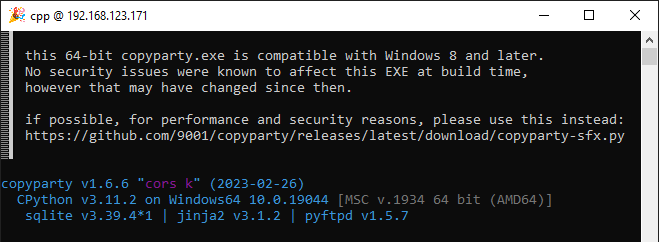
2022-10-08 14:18:52 +02:00
2023-02-26 19:22:54 +00:00
can be convenient on machines where installing python is problematic, however is **not recommended ** -- if possible, please use * * [copyparty-sfx.py ](https://github.com/9001/copyparty/releases/latest/download/copyparty-sfx.py )** instead
2022-12-03 18:58:56 +00:00
2023-02-26 19:22:54 +00:00
* [copyparty.exe ](https://github.com/9001/copyparty/releases/latest/download/copyparty.exe ) runs on win8 or newer, was compiled on win10, does thumbnails + media tags, and is * currently * safe to use, but any future python/expat/pillow CVEs can only be remedied by downloading a newer version of the exe
2022-10-08 14:18:52 +02:00
2023-02-26 19:22:54 +00:00
* on win8 it needs [vc redist 2015 ](https://www.microsoft.com/en-us/download/details.aspx?id=48145 ), on win10 it just works
2023-04-23 20:25:44 +00:00
* some antivirus may freak out (false-positive), possibly [Avast, AVG, and McAfee ](https://www.virustotal.com/gui/file/52391a1e9842cf70ad243ef83844d46d29c0044d101ee0138fcdd3c8de2237d6/detection )
2023-02-26 19:22:54 +00:00
2023-02-26 22:26:40 +00:00
* dangerous: [copyparty32.exe ](https://github.com/9001/copyparty/releases/latest/download/copyparty32.exe ) is compatible with [windows7 ](https://user-images.githubusercontent.com/241032/221445944-ae85d1f4-d351-4837-b130-82cab57d6cca.png ), which means it uses an ancient copy of python (3.7.9) which cannot be upgraded and should never be exposed to the internet (LAN is fine)
2023-02-26 19:22:54 +00:00
2023-03-12 16:10:07 +00:00
* dangerous and deprecated: [copyparty-winpe64.exe ](https://github.com/9001/copyparty/releases/download/v1.6.8/copyparty-winpe64.exe ) lets you [run copyparty in WinPE ](https://user-images.githubusercontent.com/241032/205454984-e6b550df-3c49-486d-9267-1614078dd0dd.png ) and is otherwise completely useless
2022-10-08 14:18:52 +02:00
meanwhile [copyparty-sfx.py ](https://github.com/9001/copyparty/releases/latest/download/copyparty-sfx.py ) instead relies on your system python which gives better performance and will stay safe as long as you keep your python install up-to-date
then again, if you are already into downloading shady binaries from the internet, you may also want my [minimal builds ](./scripts/pyinstaller#ffmpeg ) of [ffmpeg ](https://ocv.me/stuff/bin/ffmpeg.exe ) and [ffprobe ](https://ocv.me/stuff/bin/ffprobe.exe ) which enables copyparty to extract multimedia-info, do audio-transcoding, and thumbnails/spectrograms/waveforms, however it's much better to instead grab a [recent official build ](https://github.com/BtbN/FFmpeg-Builds/releases/download/latest/ffmpeg-master-latest-win64-gpl.zip ) every once ina while if you can afford the size
2019-06-13 11:38:05 +00:00
# install on android
2019-06-10 15:47:08 +00:00
2022-10-26 02:35:10 +02:00
install [Termux ](https://termux.com/ ) + its companion app `Termux:API` (see [ocv.me/termux ](https://ocv.me/termux/ )) and then copy-paste this into Termux (long-tap) all at once:
2019-06-10 15:47:08 +00:00
```sh
2022-10-29 20:46:22 +00:00
yes | pkg upgrade && termux-setup-storage && yes | pkg install python termux-api && python -m ensurepip && python -m pip install --user -U copyparty && { grep -qE 'PATH=.*\.local/bin' ~/.bashrc 2>/dev/null || { echo 'PATH="$HOME/.local/bin:$PATH"' >> ~/.bashrc && . ~/.bashrc; }; }
2019-06-13 11:43:05 +00:00
echo $?
2019-06-10 15:47:08 +00:00
```
2022-10-09 00:04:02 +02:00
after the initial setup, you can launch copyparty at any time by running `copyparty` anywhere in Termux -- and if you run it with `--qr` you'll get a [neat qr-code ](#qr-code ) pointing to your external ip
2019-06-10 15:47:08 +00:00
2022-10-29 20:46:22 +00:00
if you want thumbnails (photos+videos) and you're okay with spending another 132 MiB of storage, `pkg install ffmpeg && python3 -m pip install --user -U pillow`
2022-05-12 23:10:54 +02:00
2022-10-29 20:46:22 +00:00
* or if you want to use `vips` for photo-thumbs instead, `pkg install libvips && python -m pip install --user -U wheel && python -m pip install --user -U pyvips && (cd /data/data/com.termux/files/usr/lib/; ln -s libgobject-2.0.so{,.0}; ln -s libvips.so{,.42})`
2022-05-12 23:10:54 +02:00
2019-06-10 15:47:08 +00:00
2021-11-15 20:28:53 +01:00
# reporting bugs
ideas for context to include in bug reports
2022-07-16 20:43:26 +02:00
in general, commandline arguments (and config file if any)
2021-11-15 20:28:53 +01:00
if something broke during an upload (replacing FILENAME with a part of the filename that broke):
```
journalctl -aS '48 hour ago' -u copyparty | grep -C10 FILENAME | tee bug.log
```
2022-07-16 20:43:26 +02:00
if there's a wall of base64 in the log (thread stacks) then please include that, especially if you run into something freezing up or getting stuck, for example `OperationalError('database is locked')` -- alternatively you can visit `/?stack` to see the stacks live, so http://127.0.0.1:3923/?stack for example
2021-11-15 20:28:53 +01:00
2022-10-24 18:48:12 +02:00
# devnotes
2021-04-03 04:13:51 +02:00
2022-10-24 18:48:12 +02:00
for build instructions etc, see [./docs/devnotes.md ](./docs/devnotes.md )
