2019-05-26 16:30:19 +00:00
# ⇆🎉 copyparty
2020-01-19 16:20:49 +01:00
* http file sharing hub (py2/py3) [(on PyPI) ](https://pypi.org/project/copyparty/ )
2019-05-26 16:30:19 +00:00
* MIT-Licensed, 2019-05-26, ed @ irc.rizon.net
2019-06-25 23:21:15 +00:00
2019-05-26 20:21:54 +00:00
## summary
turn your phone or raspi into a portable file server with resumable uploads/downloads using IE6 or any other browser
2021-02-03 22:32:01 +01:00
* server runs on anything with `py2.7` or `py3.3+`
2019-05-29 23:46:17 +00:00
* *resumable* uploads need `firefox 12+` / `chrome 6+` / `safari 6+` / `IE 10+`
2019-05-26 20:24:48 +00:00
* code standard: `black`
2019-05-26 20:21:54 +00:00
2021-04-25 22:44:50 +02:00
📷 screenshots: [browser ](#the-browser ) // [upload ](#uploading ) // [md-viewer ](#markdown-viewer ) // [search ](#searching ) // [fsearch ](#file-search ) // [zip-DL ](#zip-downloads ) // [ie4 ](#browser-support )
2021-04-25 04:34:06 +02:00
2019-06-25 23:21:15 +00:00
2021-03-21 09:41:05 +01:00
## readme toc
* top
* [quickstart ](#quickstart )
* [notes ](#notes )
* [status ](#status )
* [bugs ](#bugs )
2021-04-25 03:00:47 +02:00
* [not my bugs ](#not-my-bugs )
* [the browser ](#the-browser )
* [tabs ](#tabs )
* [hotkeys ](#hotkeys )
* [tree-mode ](#tree-mode )
2021-03-27 03:34:03 +01:00
* [zip downloads ](#zip-downloads )
2021-04-25 03:00:47 +02:00
* [uploading ](#uploading )
2021-04-25 21:42:45 +02:00
* [file-search ](#file-search )
2021-04-25 04:34:06 +02:00
* [markdown viewer ](#markdown-viewer )
2021-04-25 03:00:47 +02:00
* [other tricks ](#other-tricks )
2021-03-21 09:41:05 +01:00
* [searching ](#searching )
* [search configuration ](#search-configuration )
* [metadata from audio files ](#metadata-from-audio-files )
* [file parser plugins ](#file-parser-plugins )
2021-03-21 20:38:29 +01:00
* [complete examples ](#complete-examples )
2021-04-02 02:55:41 +02:00
* [browser support ](#browser-support )
2021-03-21 09:41:05 +01:00
* [client examples ](#client-examples )
2021-04-25 03:00:47 +02:00
* [up2k ](#up2k )
2021-03-21 09:41:05 +01:00
* [dependencies ](#dependencies )
* [optional gpl stuff ](#optional-gpl-stuff )
* [sfx ](#sfx )
* [sfx repack ](#sfx-repack )
* [install on android ](#install-on-android )
* [dev env setup ](#dev-env-setup )
* [how to release ](#how-to-release )
* [todo ](#todo )
2021-01-02 22:57:48 +01:00
## quickstart
download [copyparty-sfx.py ](https://github.com/9001/copyparty/releases/latest/download/copyparty-sfx.py ) and you're all set!
running the sfx without arguments (for example doubleclicking it on Windows) will let anyone access the current folder; see `-h` for help if you want accounts and volumes etc
you may also want these, especially on servers:
* [contrib/systemd/copyparty.service ](contrib/systemd/copyparty.service ) to run copyparty as a systemd service
* [contrib/nginx/copyparty.conf ](contrib/nginx/copyparty.conf ) to reverse-proxy behind nginx (for legit https)
2019-07-05 19:01:04 +00:00
## notes
* iPhone/iPad: use Firefox to download files
2021-04-25 22:44:50 +02:00
* Android-Chrome: increase "parallel uploads" for higher speed (android bug)
* Android-Firefox: takes a while to select files (their fix for ☝️)
2021-04-26 04:02:22 +02:00
* Desktop-Firefox: ~~may use gigabytes of RAM if your files are massive~~ * seems to be OK now *
2020-05-17 00:33:34 +02:00
* paper-printing is affected by dark/light-mode! use lightmode for color, darkmode for grayscale
* because no browsers currently implement the media-query to do this properly orz
2019-07-05 19:01:04 +00:00
2019-05-26 16:30:19 +00:00
## status
2021-02-21 00:26:29 +00:00
* backend stuff
* ☑ sanic multipart parser
* ☑ load balancer (multiprocessing)
* ☑ volumes (mountpoints)
* ☑ accounts
* upload
* ☑ basic: plain multipart, ie6 support
* ☑ up2k: js, resumable, multithreaded
2021-02-21 00:29:10 +00:00
* ☑ stash: simple PUT filedropper
* ☑ symlink/discard existing files (content-matching)
2021-02-21 00:26:29 +00:00
* download
* ☑ single files in browser
2021-03-27 02:08:07 +01:00
* ☑ folders as zip / tar files
2021-02-21 00:26:29 +00:00
* ☑ FUSE client (read-only)
* browser
2021-02-21 00:29:10 +00:00
* ☑ tree-view
2021-02-21 00:26:29 +00:00
* ☑ media player
* ✖ thumbnails
2021-02-21 00:29:10 +00:00
* ✖ SPA (browse while uploading)
* currently safe using the file-tree on the left only, not folders in the file list
* server indexing
* ☑ locate files by contents
* ☑ search by name/path/date/size
2021-03-02 00:31:08 +01:00
* ☑ search by ID3-tags etc.
2021-02-21 00:26:29 +00:00
* markdown
* ☑ viewer
* ☑ editor (sure why not)
2019-05-26 16:30:19 +00:00
2020-04-26 23:43:26 +02:00
summary: it works! you can use it! (but technically not even close to beta)
2019-06-10 19:47:01 +00:00
2019-06-07 08:54:41 +00:00
2021-02-22 01:25:13 +01:00
# bugs
2021-03-06 00:30:05 +01:00
* Windows: python 3.7 and older cannot read tags with ffprobe, so use mutagen or upgrade
* Windows: python 2.7 cannot index non-ascii filenames with `-e2d`
2021-03-27 03:07:44 +01:00
* Windows: python 2.7 cannot handle filenames with mojibake
2021-03-29 06:11:33 +02:00
* hiding the contents at url `/d1/d2/d3` using `-v :d1/d2/d3:cd2d` has the side-effect of creating databases (for files/tags) inside folders d1 and d2, and those databases take precedence over the main db at the top of the vfs - this means all files in d2 and below will be reindexed unless you already had a vfs entry at or below d2
2021-03-06 00:30:05 +01:00
* probably more, pls let me know
2021-02-22 01:25:13 +01:00
2021-04-21 21:42:37 +02:00
## not my bugs
* Windows: msys2-python 3.8.6 occasionally throws "RuntimeError: release unlocked lock" when leaving a scoped mutex in up2k
* this is an msys2 bug, the regular windows edition of python is fine
2021-02-22 01:25:13 +01:00
2021-04-25 03:00:47 +02:00
# the browser
2021-04-25 04:34:06 +02:00
2021-04-25 03:00:47 +02:00
## tabs
2021-04-25 21:42:45 +02:00
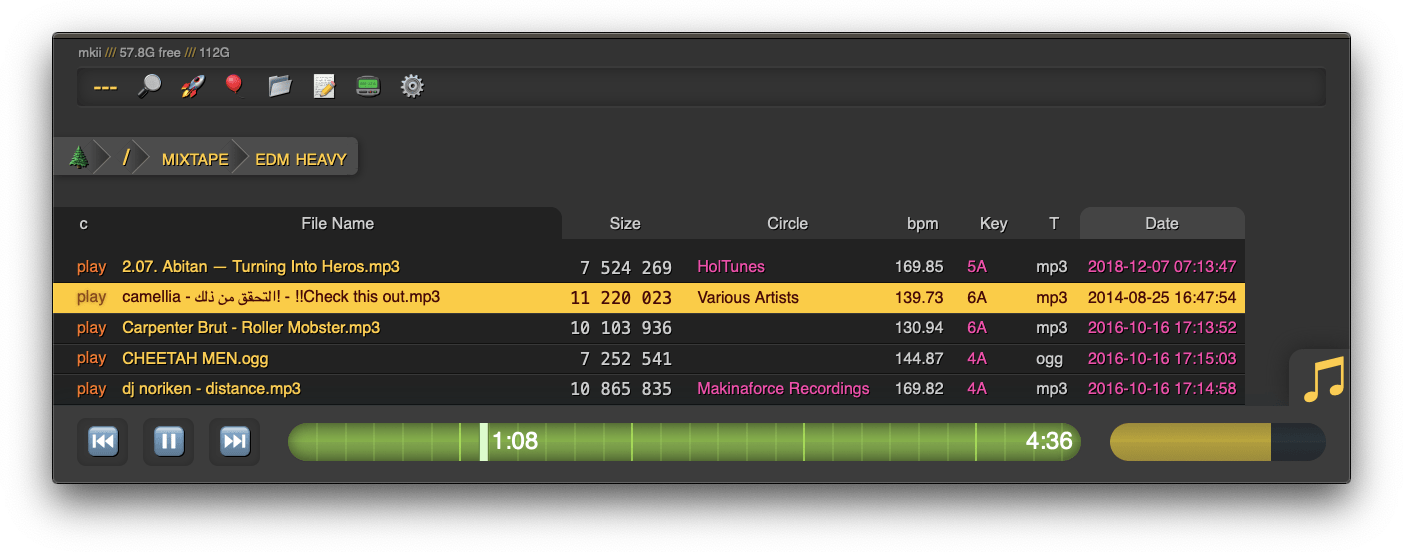
* `[🔎]` search by size, date, path/name, mp3-tags ... see [searching ](#searching )
2021-04-25 03:04:24 +02:00
* `[🚀]` and `[🎈]` are the uploaders, see [uploading ](#uploading )
* `[📂]` mkdir, create directories
* `[📝]` new-md, create a new markdown document
* `[📟]` send-msg, either to server-log or into textfiles if `--urlform save`
* `[⚙️]` client configuration options
2021-04-25 03:00:47 +02:00
## hotkeys
2021-03-21 09:41:05 +01:00
the browser has the following hotkeys
* `0..9` jump to 10%..90%
* `U/O` skip 10sec back/forward
* `J/L` prev/next song
* `I/K` prev/next folder
* `P` parent folder
2021-04-25 03:00:47 +02:00
## tree-mode
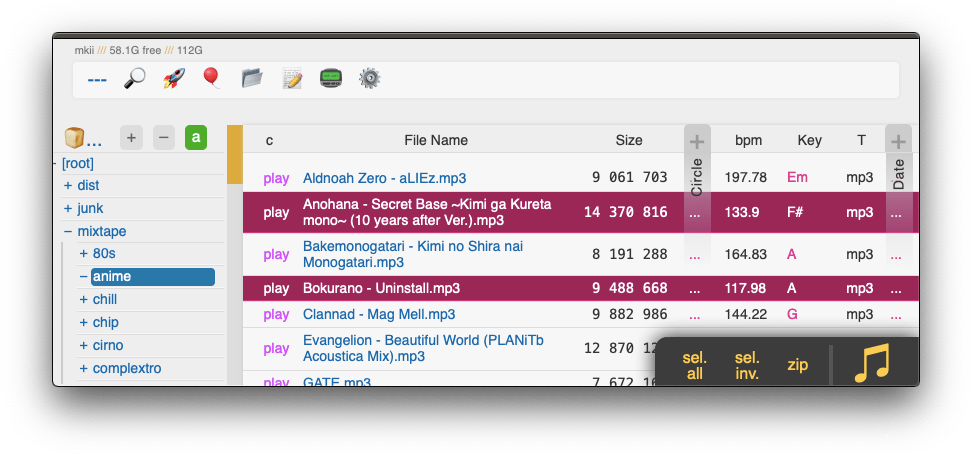
by default there's a breadcrumbs path; you can replace this with a tree-browser sidebar thing by clicking the 🌲
2021-04-25 03:04:24 +02:00
click `[-]` and `[+]` to adjust the size, and the `[a]` toggles if the tree should widen dynamically as you go deeper or stay fixed-size
2021-04-19 16:41:06 +02:00
2021-03-21 09:41:05 +01:00
2021-03-27 03:34:03 +01:00
## zip downloads
2021-03-27 03:35:57 +01:00
the `zip` link next to folders can produce various types of zip/tar files using these alternatives in the browser settings tab:
2021-03-27 03:34:03 +01:00
| name | url-suffix | description |
|--|--|--|
| `tar` | `?tar` | plain gnutar, works great with `curl \| tar -xv` |
| `zip` | `?zip=utf8` | works everywhere, glitchy filenames on win7 and older |
| `zip_dos` | `?zip` | traditional cp437 (no unicode) to fix glitchy filenames |
| `zip_crc` | `?zip=crc` | cp437 with crc32 computed early for truly ancient software |
* hidden files (dotfiles) are excluded unless `-ed`
* the up2k.db is always excluded
* `zip_crc` will take longer to download since the server has to read each file twice
* please let me know if you find a program old enough to actually need this
2021-04-25 04:34:06 +02:00
you can also zip a selection of files or folders by clicking them in the browser, that brings up a selection editor and zip button in the bottom right
2021-04-25 22:44:50 +02:00
2021-03-27 03:34:03 +01:00
2021-04-25 03:00:47 +02:00
## uploading
two upload methods are available in the html client:
* 🎈 bup, the basic uploader, supports almost every browser since netscape 4.0
* 🚀 up2k, the fancy one
up2k has several advantages:
* you can drop folders into the browser (files are added recursively)
* files are processed in chunks, and each chunk is checksummed
* uploads resume if they are interrupted (for example by a reboot)
* server detects any corruption; the client reuploads affected chunks
* the client doesn't upload anything that already exists on the server
* the last-modified timestamp of the file is preserved
see [up2k ](#up2k ) for details on how it works
2021-04-25 04:34:06 +02:00
2021-04-25 03:00:47 +02:00
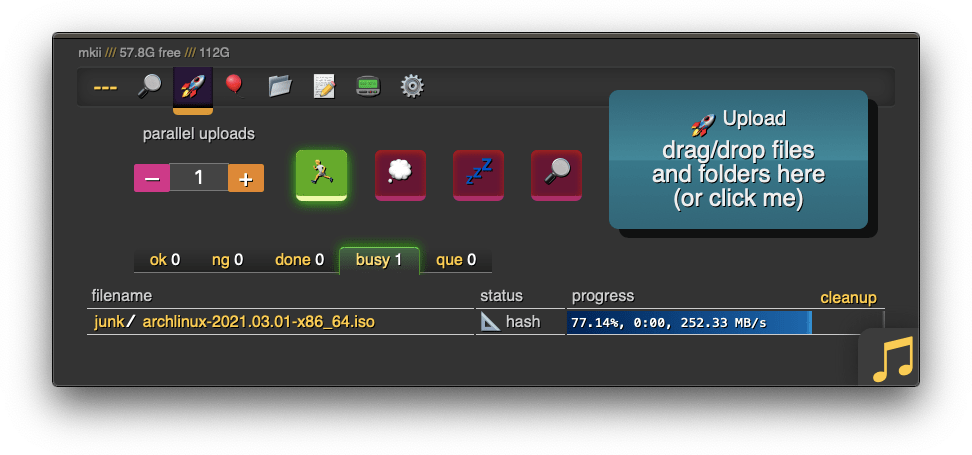
the up2k UI is the epitome of polished inutitive experiences:
* "parallel uploads" specifies how many chunks to upload at the same time
2021-04-25 03:04:24 +02:00
* `[🏃]` analysis of other files should continue while one is uploading
* `[💭]` ask for confirmation before files are added to the list
* `[💤]` sync uploading between other copyparty tabs so only one is active
* `[🔎]` switch between upload and file-search mode
2021-04-25 03:00:47 +02:00
and then theres the tabs below it,
2021-04-25 03:04:24 +02:00
* `[ok]` is uploads which completed successfully
* `[ng]` is the uploads which failed / got rejected (already exists, ...)
* `[done]` shows a combined list of `[ok]` and `[ng]` , chronological order
* `[busy]` files which are currently hashing, pending-upload, or uploading
* plus up to 3 entries from `[done]` and `[que]` for context
* `[que]` is all the files that are still queued
2021-04-25 21:42:45 +02:00
### file-search
2021-04-25 22:44:50 +02:00
2021-04-25 21:42:45 +02:00
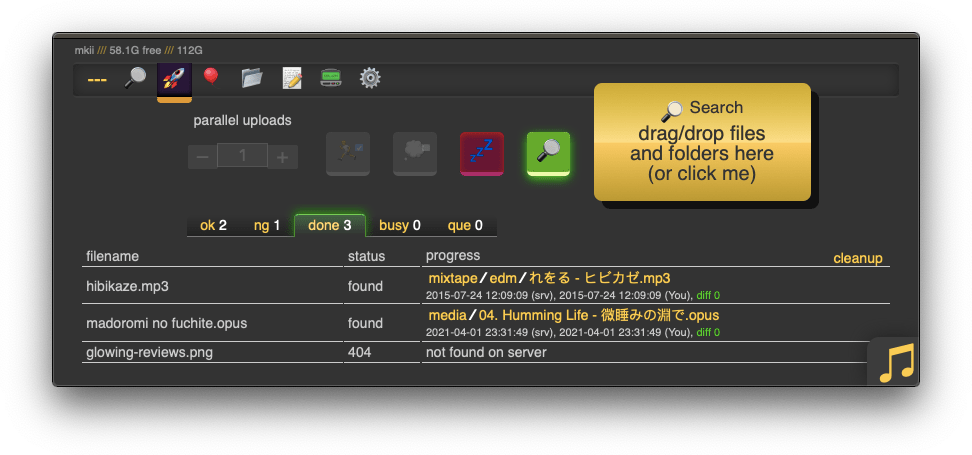
in the 🚀 up2k tab, after toggling the `[🔎]` switch green, any files/folders you drop onto the dropzone will be hashed on the client-side. Each hash is sent to the server which checks if that file exists somewhere already
files go into `[ok]` if they exist (and you get a link to where it is), otherwise they land in `[ng]`
2021-04-25 03:00:47 +02:00
* the main reason filesearch is combined with the uploader is cause the code was too spaghetti to separate it out somewhere else
2021-04-27 09:24:50 +02:00
adding the same file multiple times is blocked, so if you first search for a file and then decide to upload it, you have to click the `[cleanup]` button to discard `[done]` files
2021-04-25 03:00:47 +02:00
2021-04-25 04:34:06 +02:00
note that since up2k has to read the file twice, bup can be up to 2x faster if your internet connection is faster than the read-speed of your HDD
up2k has saved a few uploads from becoming corrupted in-transfer already; caughtn android phone on wifi redhanded in wireshark with a bitflip, however bup with https would * probably * have noticed as well thanks to tls also functioning as an integrity check
## markdown viewer
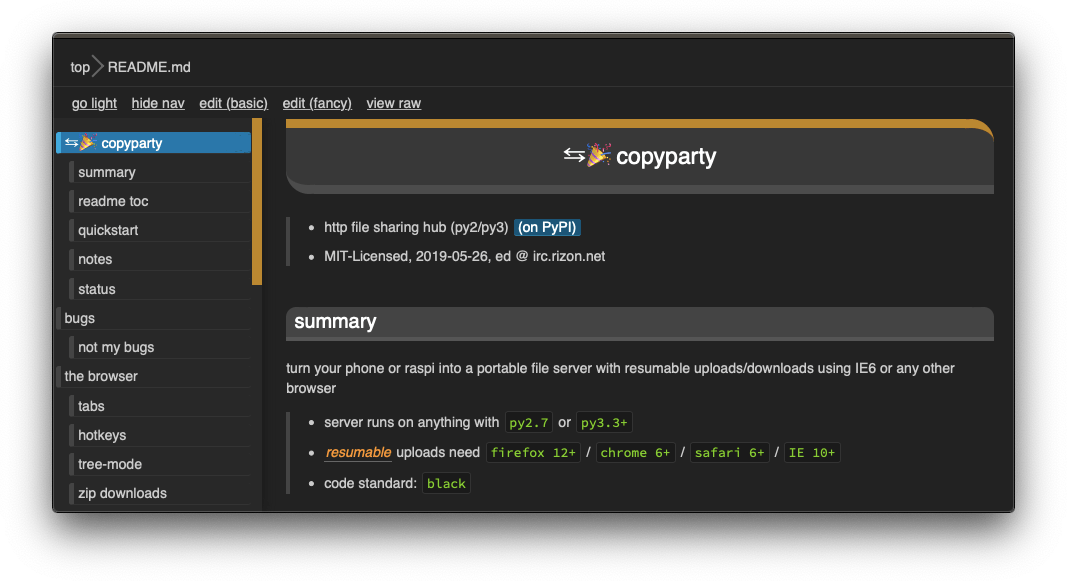
* the document preview has a max-width which is the same as an A4 paper when printed
2021-04-25 03:00:47 +02:00
## other tricks
* you can link a particular timestamp in an audio file by adding it to the URL, such as `&20` / `&20s` / `&1m20` / `&t=1:20` after the `.../#af-c8960dab`
2021-02-22 02:33:30 +01:00
# searching
2021-04-25 04:34:06 +02:00
2021-02-22 03:33:24 +01:00
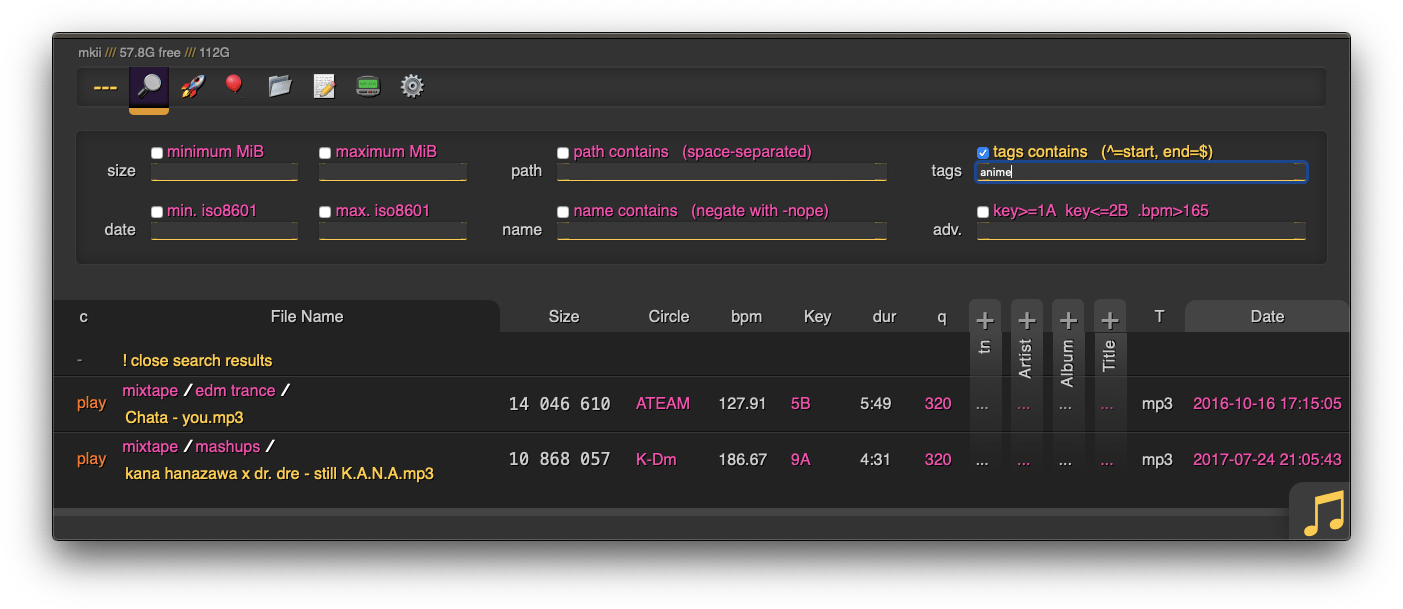
when started with `-e2dsa` copyparty will scan/index all your files. This avoids duplicates on upload, and also makes the volumes searchable through the web-ui:
* make search queries by `size` /`date` /`directory-path` /`filename` , or...
2021-04-25 21:42:45 +02:00
* drag/drop a local file to see if the same contents exist somewhere on the server, see [file-search ](#file-search )
2021-02-22 02:33:30 +01:00
2021-02-22 03:33:24 +01:00
path/name queries are space-separated, AND'ed together, and words are negated with a `-` prefix, so for example:
* path: `shibayan -bossa` finds all files where one of the folders contain `shibayan` but filters out any results where `bossa` exists somewhere in the path
* name: `demetori styx` gives you [good stuff ](https://www.youtube.com/watch?v=zGh0g14ZJ8I&list=PL3A147BD151EE5218&index=9 )
2021-02-22 02:33:30 +01:00
2021-03-02 01:02:13 +01:00
add `-e2ts` to also scan/index tags from music files:
2021-03-01 02:50:10 +01:00
## search configuration
searching relies on two databases, the up2k filetree (`-e2d` ) and the metadata tags (`-e2t` ). Configuration can be done through arguments, volume flags, or a mix of both.
through arguments:
* `-e2d` enables file indexing on upload
* `-e2ds` scans writable folders on startup
* `-e2dsa` scans all mounted volumes (including readonly ones)
* `-e2t` enables metadata indexing on upload
* `-e2ts` scans for tags in all files that don't have tags yet
* `-e2tsr` deletes all existing tags, so a full reindex
2021-03-01 03:15:41 +01:00
the same arguments can be set as volume flags, in addition to `d2d` and `d2t` for disabling:
2021-03-19 00:08:31 +01:00
* `-v ~/music::r:ce2dsa:ce2tsr` does a full reindex of everything on startup
* `-v ~/music::r:cd2d` disables **all ** indexing, even if any `-e2*` are on
* `-v ~/music::r:cd2t` disables all `-e2t*` (tags), does not affect `-e2d*`
2021-03-01 02:50:10 +01:00
`e2tsr` is probably always overkill, since `e2ds` /`e2dsa` would pick up any file modifications and cause `e2ts` to reindex those
2021-03-19 00:08:31 +01:00
## metadata from audio files
2021-03-01 02:50:10 +01:00
`-mte` decides which tags to index and display in the browser (and also the display order), this can be changed per-volume:
2021-03-19 00:08:31 +01:00
* `-v ~/music::r:cmte=title,artist` indexes and displays * title * followed by * artist *
2021-03-01 02:50:10 +01:00
if you add/remove a tag from `mte` you will need to run with `-e2tsr` once to rebuild the database, otherwise only new files will be affected
`-mtm` can be used to add or redefine a metadata mapping, say you have media files with `foo` and `bar` tags and you want them to display as `qux` in the browser (preferring `foo` if both are present), then do `-mtm qux=foo,bar` and now you can `-mte artist,title,qux`
2021-03-19 00:08:31 +01:00
tags that start with a `.` such as `.bpm` and `.dur` (ation) indicate numeric value
2021-03-01 02:50:10 +01:00
see the beautiful mess of a dictionary in [mtag.py ](https://github.com/9001/copyparty/blob/master/copyparty/mtag.py ) for the default mappings (should cover mp3,opus,flac,m4a,wav,aif,)
`--no-mutagen` disables mutagen and uses ffprobe instead, which...
* is about 20x slower than mutagen
* catches a few tags that mutagen doesn't
* avoids pulling any GPL code into copyparty
* more importantly runs ffprobe on incoming files which is bad if your ffmpeg has a cve
2021-02-22 02:33:30 +01:00
2021-03-19 00:08:31 +01:00
## file parser plugins
2021-03-19 21:22:56 +01:00
copyparty can invoke external programs to collect additional metadata for files using `mtp` (as argument or volume flag), there is a default timeout of 30sec
2021-03-19 00:08:31 +01:00
2021-03-19 21:22:56 +01:00
* `-mtp .bpm=~/bin/audio-bpm.py` will execute `~/bin/audio-bpm.py` with the audio file as argument 1 to provide the `.bpm` tag, if that does not exist in the audio metadata
* `-mtp key=f,t5,~/bin/audio-key.py` uses `~/bin/audio-key.py` to get the `key` tag, replacing any existing metadata tag (`f,` ), aborting if it takes longer than 5sec (`t5,` )
* `-v ~/music::r:cmtp=.bpm=~/bin/audio-bpm.py:cmtp=key=f,t5,~/bin/audio-key.py` both as a per-volume config wow this is getting ugly
2021-03-19 00:08:31 +01:00
2021-03-21 14:15:55 +01:00
## complete examples
2021-03-21 17:56:05 +01:00
* read-only music server with bpm and key scanning
`python copyparty-sfx.py -v /mnt/nas/music:/music:r -e2dsa -e2ts -mtp .bpm=f,audio-bpm.py -mtp key=f,audio-key.py`
2021-03-21 14:15:55 +01:00
2021-04-02 02:43:07 +02:00
# browser support
2021-04-25 22:44:50 +02:00
2021-04-03 02:58:50 +02:00
`ie` = internet-explorer, `ff` = firefox, `c` = chrome, `iOS` = iPhone/iPad, `Andr` = Android
| feature | ie6 | ie9 | ie10 | ie11 | ff 52 | c 49 | iOS | Andr |
| --------------- | --- | --- | ---- | ---- | ----- | ---- | --- | ---- |
| browse files | yep | yep | yep | yep | yep | yep | yep | yep |
| basic uploader | yep | yep | yep | yep | yep | yep | yep | yep |
| make directory | yep | yep | yep | yep | yep | yep | yep | yep |
| send message | yep | yep | yep | yep | yep | yep | yep | yep |
| set sort order | - | yep | yep | yep | yep | yep | yep | yep |
| zip selection | - | yep | yep | yep | yep | yep | yep | yep |
| directory tree | - | - | `*1` | yep | yep | yep | yep | yep |
| up2k | - | - | yep | yep | yep | yep | yep | yep |
| icons work | - | - | yep | yep | yep | yep | yep | yep |
| markdown editor | - | - | yep | yep | yep | yep | yep | yep |
| markdown viewer | - | - | yep | yep | yep | yep | yep | yep |
| play mp3/m4a | - | yep | yep | yep | yep | yep | yep | yep |
| play ogg/opus | - | - | - | - | yep | yep | `*2` | yep |
2021-04-02 02:43:07 +02:00
2021-04-03 08:26:42 +02:00
* internet explorer 6 to 8 behave the same
2021-04-02 02:43:07 +02:00
* firefox 52 and chrome 49 are the last winxp versions
* `*1` only public folders (login session is dropped) and no history / back-button
2021-04-03 02:52:19 +02:00
* `*2` using a wasm decoder which can sometimes get stuck and consumes a bit more power
2021-04-02 02:43:07 +02:00
2021-04-03 07:56:35 +02:00
quick summary of more eccentric web-browsers trying to view a directory index:
2021-04-03 08:08:43 +02:00
* safari (14.0.3/macos) is chrome with janky wasm, so playing opus can deadlock the javascript engine
* safari (14.0.1/iOS) same as macos, except it recovers from the deadlocks if you poke it a bit
2021-04-03 07:56:35 +02:00
* links (2.21/macports) can browse, login, upload/mkdir/msg
* lynx (2.8.9/macports) can browse, login, upload/mkdir/msg
* w3m (0.5.3/macports) can browse, login, upload at 100kB/s, mkdir/msg
* netsurf (3.10/arch) is basically ie6 with much better css (javascript has almost no effect)
2021-04-25 22:44:50 +02:00
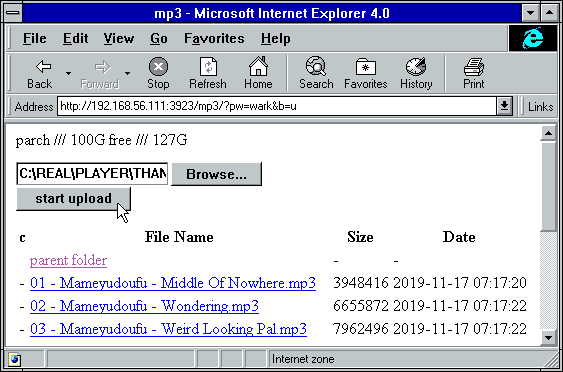
* ie4 and netscape 4.0 can browse (text is yellow on white), upload with `?b=u`
2021-04-03 08:26:42 +02:00
* SerenityOS (22d13d8) hits a page fault, works with `?b=u` , file input not-impl, url params are multiplying
2021-04-02 02:43:07 +02:00
2020-08-08 00:47:54 +00:00
# client examples
* javascript: dump some state into a file (two separate examples)
2020-08-08 00:51:37 +00:00
* `await fetch('https://127.0.0.1:3923/', {method:"PUT", body: JSON.stringify(foo)});`
* `var xhr = new XMLHttpRequest(); xhr.open('POST', 'https://127.0.0.1:3923/msgs?raw'); xhr.send('foo');`
2020-08-08 00:47:54 +00:00
2021-02-25 22:26:03 +01:00
* curl/wget: upload some files (post=file, chunk=stdin)
* `post(){ curl -b cppwd=wark http://127.0.0.1:3923/ -F act=bput -F f=@"$1";}`
`post movie.mkv`
* `post(){ wget --header='Cookie: cppwd=wark' http://127.0.0.1:3923/?raw --post-file="$1" -O-;}`
`post movie.mkv`
* `chunk(){ curl -b cppwd=wark http://127.0.0.1:3923/ -T-;}`
`chunk <movie.mkv`
2020-10-25 08:05:11 +01:00
* FUSE: mount a copyparty server as a local filesystem
* cross-platform python client available in [./bin/ ](bin/ )
* [rclone ](https://rclone.org/ ) as client can give ~5x performance, see [./docs/rclone.md ](docs/rclone.md )
2020-08-08 00:47:54 +00:00
2021-02-25 22:26:03 +01:00
copyparty returns a truncated sha512sum of your PUT/POST as base64; you can generate the same checksum locally to verify uplaods:
b512(){ printf "$((sha512sum||shasum -a512)|sed -E 's/ .*//;s/(..)/\\x\1/g')"|base64|head -c43;}
b512 <movie.mkv
2020-08-08 00:47:54 +00:00
2021-04-25 03:00:47 +02:00
# up2k
2021-04-25 22:44:50 +02:00
quick outline of the up2k protocol, see [uploading ](#uploading ) for the web-client
2021-04-25 03:00:47 +02:00
* the up2k client splits a file into an "optimal" number of chunks
* 1 MiB each, unless that becomes more than 256 chunks
* tries 1.5, 2, 3, 4, 6, ... until <= 256 or chunksize >= 32M
* server creates the `wark` , an identifier for this upload
* `sha512( salt + filesize + chunk_hashes )`
* and a sparse file is created for the chunks to drop into
* client uploads each chunk
* header entries for the chunk-hash and wark
* server writes chunks into place based on the hash
* client does another handshake with the hashlist; server replies with OK or a list of chunks to reupload
2019-06-10 15:47:08 +00:00
# dependencies
2019-06-07 08:54:41 +00:00
2021-03-02 01:02:13 +01:00
* `jinja2` (is built into the SFX)
2019-06-07 08:54:41 +00:00
2021-03-02 01:02:13 +01:00
**optional,** enables music tags:
* either `mutagen` (fast, pure-python, skips a few tags, makes copyparty GPL? idk)
2021-03-02 00:31:08 +01:00
* or `FFprobe` (20x slower, more accurate, possibly dangerous depending on your distro and users)
2021-03-02 01:02:13 +01:00
**optional,** will eventually enable thumbnails:
2019-06-10 15:47:08 +00:00
* `Pillow` (requires py2.7 or py3.5+)
2021-03-17 00:55:27 +01:00
## optional gpl stuff
2021-03-17 01:37:59 +01:00
some bundled tools have copyleft dependencies, see [./bin/#mtag ](bin/#mtag )
2021-03-17 00:55:27 +01:00
2021-03-17 01:37:59 +01:00
these are standalone and will never be imported / evaluated by copyparty
2021-03-17 00:55:27 +01:00
2020-05-06 00:39:21 +02:00
# sfx
currently there are two self-contained binaries:
2021-02-12 20:53:29 +01:00
* [copyparty-sfx.py ](https://github.com/9001/copyparty/releases/latest/download/copyparty-sfx.py ) -- pure python, works everywhere
* [copyparty-sfx.sh ](https://github.com/9001/copyparty/releases/latest/download/copyparty-sfx.sh ) -- smaller, but only for linux and macos
2020-05-06 00:39:21 +02:00
2020-06-24 23:53:23 +00:00
launch either of them (**use sfx.py on systemd**) and it'll unpack and run copyparty, assuming you have python installed of course
2020-05-06 00:39:21 +02:00
pls note that `copyparty-sfx.sh` will fail if you rename `copyparty-sfx.py` to `copyparty.py` and keep it in the same folder because `sys.path` is funky
2020-06-24 23:53:23 +00:00
## sfx repack
2020-05-13 01:12:33 +02:00
if you don't need all the features you can repack the sfx and save a bunch of space; all you need is an sfx and a copy of this repo (nothing else to download or build, except for either msys2 or WSL if you're on windows)
* `724K` original size as of v0.4.0
* `256K` after `./scripts/make-sfx.sh re no-ogv`
* `164K` after `./scripts/make-sfx.sh re no-ogv no-cm`
2020-05-06 00:39:21 +02:00
2020-05-13 01:12:33 +02:00
the features you can opt to drop are
* `ogv` .js, the opus/vorbis decoder which is needed by apple devices to play foss audio files
* `cm` /easymde, the "fancy" markdown editor
2020-05-06 00:39:21 +02:00
2020-05-13 01:12:33 +02:00
for the `re` pack to work, first run one of the sfx'es once to unpack it
2020-05-06 00:39:21 +02:00
2020-11-19 01:23:24 +01:00
**note:** you can also just download and run [scripts/copyparty-repack.sh ](scripts/copyparty-repack.sh ) -- this will grab the latest copyparty release from github and do a `no-ogv no-cm` repack; works on linux/macos (and windows with msys2 or WSL)
2020-05-06 00:39:21 +02:00
2019-06-13 11:38:05 +00:00
# install on android
2019-06-10 15:47:08 +00:00
2019-06-13 11:38:05 +00:00
install [Termux ](https://termux.com/ ) (see [ocv.me/termux ](https://ocv.me/termux/ )) and then copy-paste this into Termux (long-tap) all at once:
2019-06-10 15:47:08 +00:00
```sh
2020-11-19 01:23:24 +01:00
apt update && apt -y full-upgrade && termux-setup-storage && apt -y install python && python -m ensurepip && python -m pip install -U copyparty
2019-06-13 11:43:05 +00:00
echo $?
2019-06-10 15:47:08 +00:00
```
2020-11-19 01:23:24 +01:00
after the initial setup, you can launch copyparty at any time by running `copyparty` anywhere in Termux
2019-06-10 15:47:08 +00:00
# dev env setup
2019-06-25 23:21:15 +00:00
2019-06-10 15:47:08 +00:00
```sh
2020-04-14 22:42:43 +00:00
python3 -m venv .venv
. .venv/bin/activate
2019-06-10 15:47:08 +00:00
pip install jinja2 # mandatory deps
pip install Pillow # thumbnail deps
2019-06-10 02:34:35 +00:00
pip install black bandit pylint flake8 # vscode tooling
```
2019-06-07 08:54:41 +00:00
2019-06-10 15:47:08 +00:00
2019-06-25 23:21:15 +00:00
# how to release
in the `scripts` folder:
* run `make -C deps-docker` to build all dependencies
2021-03-15 01:13:46 +01:00
* `git tag v1.2.3 && git push origin --tags`
2019-06-25 23:21:15 +00:00
* create github release with `make-tgz-release.sh`
* upload to pypi with `make-pypi-release.(sh|bat)`
2020-05-06 00:39:21 +02:00
* create sfx with `make-sfx.sh`
2019-06-25 23:21:15 +00:00
2019-06-29 20:19:32 +00:00
# todo
2019-06-10 15:47:08 +00:00
roughly sorted by priority
2021-04-03 04:13:51 +02:00
* separate sqlite table per tag
* audio fingerprinting
* readme.md as epilogue
2020-12-14 09:19:43 +01:00
* reduce up2k roundtrips
* start from a chunk index and just go
* terminate client on bad data
2021-01-07 00:50:42 +01:00
* `os.copy_file_range` for up2k cloning
2019-06-10 15:47:08 +00:00
* support pillow-simd
2019-06-12 22:18:54 +00:00
* figure out the deal with pixel3a not being connectable as hotspot
2019-06-13 01:09:55 +00:00
* pixel3a having unpredictable 3sec latency in general :||||
2021-04-03 04:13:51 +02:00
discarded ideas
* up2k partials ui
* cache sha512 chunks on client
* comment field
* look into android thumbnail cache file format
