
89 lines
5.7 KiB
Markdown
89 lines
5.7 KiB
Markdown
# Pi-Hosted Portainer Template V2
|
|
|
|
[](https://discord.com/invite/v8dAnFV) [](https://www.youtube.com/channel/UCrjKdwxaQMSV_NDywgKXVmw) [](https://twitter.com/novaspirittech) [](https://hacktoberfest.digitalocean.com)
|
|
|
|
This repository is a collection of tutorials for hosting a variety of server applications using Docker and [Portainer](https://github.com/portainer/portainer).
|
|
|
|
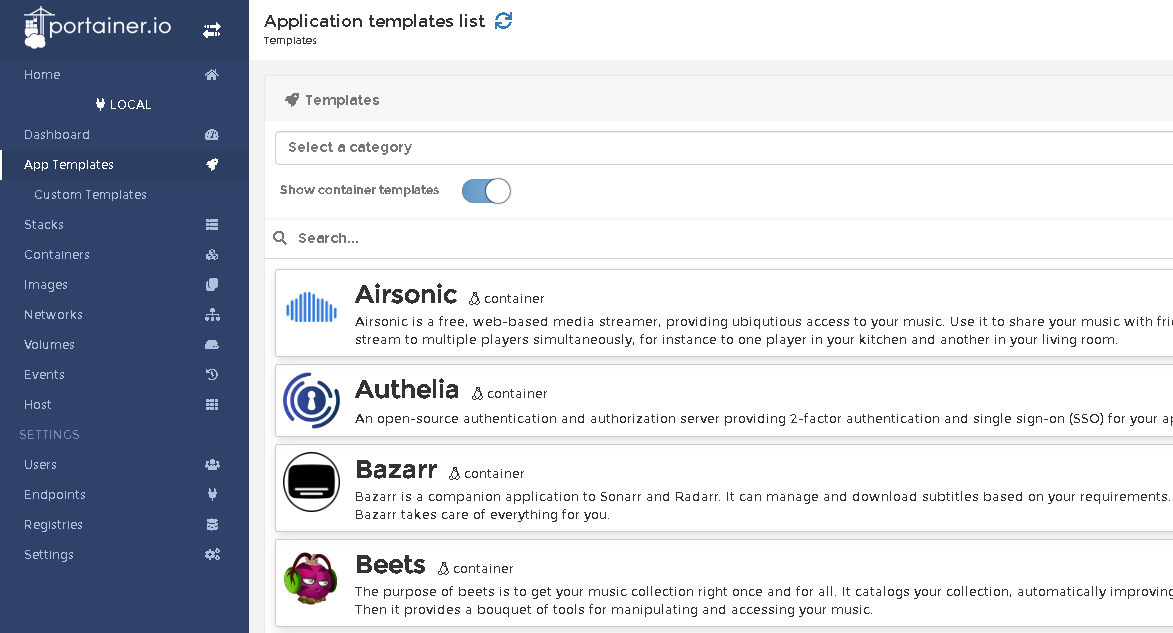
### App Template for Portainer
|
|
|
|
|
|
### Installation
|
|
Run `install-docker.sh`, to install docker, and add the current user to the docker usergroup.
|
|
```
|
|
wget -qO- https://git.io/JwUkc | bash
|
|
# need to reboot/logout for changes to take effect
|
|
```
|
|
|
|
### Pi OS Buster
|
|
On Oct 30, 2021 Pi OS bullseye was released and this is no longer needed. Older Pi OS buster releases run an old version of libseccomp that is causing problems with many containers that are preventing them from running. To fix this we need to manually install a newer version of libseccomp. However we first need to check and see if you are running an older version. To check please run sudo dpkg-query -W libseccomp.
|
|
```
|
|
sudo dpkg-query -W libseccomp2
|
|
```
|
|
If you are running a version less that 2.5 you will need to run the *upgrade script.
|
|
|
|
```
|
|
wget -qO- https://git.io/JPXdj | bash
|
|
```
|
|
* The upgrade script is for Pi OS 32bit. Pi OS 64 beta is untested and the upgrade script wont work with it.
|
|
|
|
### Reboot for changes to take effect
|
|
|
|
```
|
|
sudo reboot
|
|
```
|
|
|
|
After a reboot, run `install-portainer.sh`, to install Portainer.io
|
|
```
|
|
wget -qO- https://git.io/JwUnf | bash
|
|
# to update portainer, run this command
|
|
wget -qO- https://git.io/JwUlY | bash
|
|
```
|
|
Click Settings, in the bottom-left corner, and paste the Portainer v2 json file link from below into the "App Templates" box.
|
|
|
|
You're done! Now just click App Templates and deploy applications!
|
|
|
|
#### Versions
|
|
| Application | Supported OS's | URL |
|
|
| ------------- | ------------- | ------------- |
|
|
| Portainer v2 Arm32 | Pi OS | https://raw.githubusercontent.com/novaspirit/pi-hosted/master/template/portainer-v2-arm32.json |
|
|
| Portainer v2 Arm64 | Ubunutu 64, DietPI 64 | https://raw.githubusercontent.com/novaspirit/pi-hosted/master/template/portainer-v2-arm64.json |
|
|
|
|
* Limited testing Operating Systems: Pi OS 64 Beta, DietPI 32 bit
|
|
|
|
### Pi-Hosted YouTube series
|
|
|
|
[](https://www.youtube.com/watch?v=cO2-gQ09Jj0&list=PL846hFPMqg3jwkxcScD1xw2bKXrJVvarc)
|
|
|
|
|
|
| | Episode |
|
|
|---|-------------------------------------------------------------------------------------------------------------------------------------------------------------------------------|
|
|
| 1 | [Raspberry Pi 4 Server Setup, Docker Install, Portainer Install, Shell In A Box](https://www.youtube.com/watch?v=cO2-gQ09Jj0&list=PL846hFPMqg3jwkxcScD1xw2bKXrJVvarc&index=1) |
|
|
| 2 | [Installing and Configuring Homer Dashboard](https://www.youtube.com/watch?v=_d3J88ootYo&list=PL846hFPMqg3jwkxcScD1xw2bKXrJVvarc&index=2) |
|
|
| 3 | [Manually Installing Guacamole on Portainer](https://www.youtube.com/watch?v=cKAhnf8X1lo&list=PL846hFPMqg3jwkxcScD1xw2bKXrJVvarc&index=3) |
|
|
| 4 | [Installing JDownloader and File Browser On The Pi Docker Server](https://www.youtube.com/watch?v=30MYRgCObu8&list=PL846hFPMqg3jwkxcScD1xw2bKXrJVvarc&index=4) |
|
|
| 5 | [Torrent with Docker and OPENVPN with Transmission and PIA](https://www.youtube.com/watch?v=tGLVEq913_4&list=PL846hFPMqg3jwkxcScD1xw2bKXrJVvarc&index=5) |
|
|
| | [Portainer.io App Template for Raspberry Pi arm/arm64 I Need Your Help!](https://www.youtube.com/watch?v=Zn-VELlaIN4&list=PL846hFPMqg3jwkxcScD1xw2bKXrJVvarc&index=6) |
|
|
| 6 | [Upgrading Portainer and Updating Containers](https://www.youtube.com/watch?v=q3wKqk8qVS8&list=PL846hFPMqg3jwkxcScD1xw2bKXrJVvarc&index=7) |
|
|
| 7 | [Raspberry Pi Docker Monitoring](https://www.youtube.com/watch?v=IoD3vFuep64&list=PL846hFPMqg3jwkxcScD1xw2bKXrJVvarc&index=8) |
|
|
| 8 | [Installing Nextcloud on Raspberry Pi Docker](https://www.youtube.com/watch?v=E6IrT3g5Gqc&list=UUrjKdwxaQMSV_NDywgKXVmw&index=7) |
|
|
| 9 | [Installing Nginx Proxy Manager on Docker](https://www.youtube.com/watch?v=yl2Laxbqvo8) |
|
|
| 10 | [Setting up Raspberry Pi Samba Server For File Sharing on Docker](https://www.youtube.com/watch?v=2zZ3_1GRWrM) |
|
|
| 11 | [How to Install Whoogle to replace using Google and repo notes](https://www.youtube.com/watch?v=j3ZGxo3ibUs) |
|
|
|
|
|
|
=======
|
|
### Addition Documentation can be found in the Docs Folder
|
|
|
|
| Don't forgot to checkout the Additional Documentation |
|
|
| ------------- |
|
|
| https://github.com/novaspirit/pi-hosted/tree/master/docs |
|
|
|
|
|
|
### Contributors
|
|
|
|
See the list of [contributors](https://github.com/novaspirit/pi-hosted/graphs/contributors) who participated in this project.
|
|
|
|
### Acknowledgment
|
|
* based template on [SelfHosted](https://github.com/SelfhostedPro/selfhosted_templates) Portainer App Template
|
|
|