
tar1090
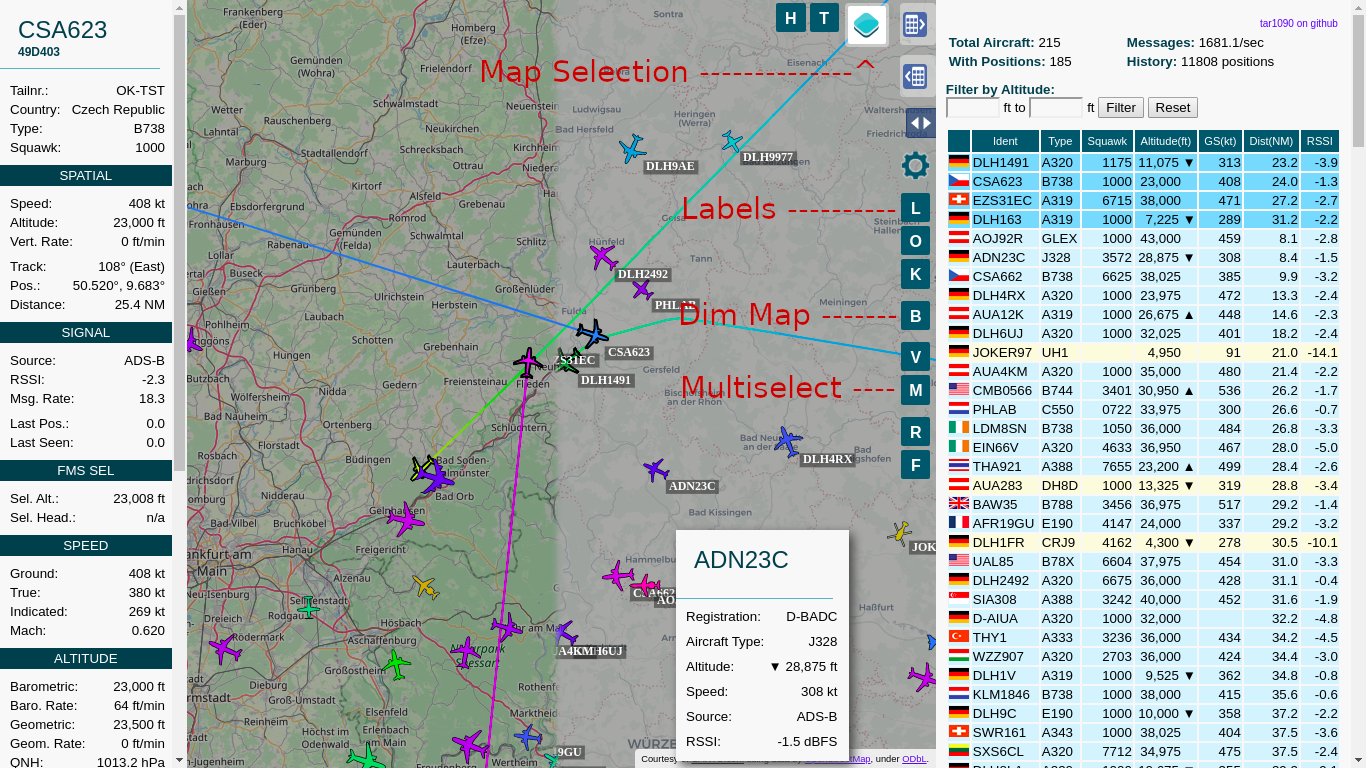
Provides an improved dump1090-fa webinterface
- Improved adjustable history
- Show All Tracks much faster than original with many planes
- Multiple Maps available
- Map can be dimmed/darkened
- Multiple aircraft can be selected
- Labels with the callsign can be switched on and off
See the bottom of the page for screenshots
Installation / Update:
sudo bash -c "$(wget -q -O - https://raw.githubusercontent.com/wiedehopf/tar1090/master/install.sh)"
View the added webinterface
Click the following URL and replace the IP address with address of your Raspberry Pi:
Check further down or keyboard shortcuts.
Configuration (optional):
Edit the configuration file to change the interval in seconds and number of history files saved:
sudo nano /etc/default/tar1090
Ctrl-x to exit, y (yes) and enter to save.
Apply the configuration:
sudo systemctl restart tar1090
The duration of the history in seconds can be calculated as interval times history_size.
Configuring the web interface (optional):
sudo nano /usr/local/share/tar1090/html/config.js
Ctrl-x to exit, y (yes) and enter to save. Then Ctrl-F5 to refresh the web interface in the browser.
Enable (/disable) FA links in the webinterface (previously enabled by default)
# ENABLE:
sudo sed -i -e 's?.*flightawareLinks.*?flightawareLinks = true;?' /usr/local/share/tar1090/html/config.js
# ENABLE if the above doesn't work (updated from previous version)
echo 'flightawareLinks = true;' | sudo tee -a /usr/local/share/tar1090/html/config.js
# DISABLE:
sudo sed -i -e 's?.*flightawareLinks.*?flightawareLinks = false;?' /usr/local/share/tar1090/html/config.js
Then Ctrl-F5 to refresh the web interface in the browser.
UAT receiver running dump978-fa and skyaware978:
This is the relevant part in the configuration file:
# Change to yes to enable UAT/978 display in tar1090
ENABLE_978=no
# If running dump978-fa on another computer, modify the IP-address as appropriate.
URL_978="http://127.0.0.1/skyaware978"
Open and save as described above in the Configuration section. Follow the instructions in the file.
Installation / Update to work with another folder, for example /run/combine1090
wget -q -O /tmp/install.sh https://raw.githubusercontent.com/wiedehopf/tar1090/master/install.sh
sudo bash /tmp/install.sh /run/combine1090
Or if you want it at /tar1090 but for example /my-cool-receiver :
sudo bash /tmp/install.sh /run/combine1090 my-cool-receiver
This way you can install multiple instances of tar1090. Note that you still need to take care of different dump1090-fa instances, combine1090 for example will run a second instance.
Remove / Uninstall
sudo bash -c "$(wget -q -O - https://raw.githubusercontent.com/wiedehopf/tar1090/master/uninstall.sh)"
Keyboard Shortcuts
- Q and E zoom out and in.
- A and D move West and East.
- W and S move North and South.
- C or Esc clears the selection.
- M toggles multiselect.
- T selects all aircraft
- B toggle map brightness
Alternative lighttpd configuration
Placing tar1090 on port 8504:
sudo cp /usr/local/share/tar1090/95-tar1090-otherport.conf /etc/lighttpd/conf-enabled
sudo systemctl restart lighttpd
Placing tar1090 at / instead of /tar1090:
sudo cp /usr/local/share/tar1090/99-tar1090-webroot.conf /etc/lighttpd/conf-enabled
sudo systemctl restart lighttpd
Note if those cause lighttpd not to start for any reason some other lighttpd configuration is conflicting. To solve the problem just delete the configuration you copied there:
sudo rm /etc/lighttpd/conf-enabled/95-tar1090-otherport.conf
sudo rm /etc/lighttpd/conf-enabled/99-tar1090-webroot.conf
sudo systemctl restart lighttpd
nginx configuration
If nginx is installed, the install script should give you a configuration file you can include. The configuration needs to go into the appropriate server { } section and looks something like this in case you are interested:
location /tar1090/data/ {
  alias /run/dump1090-fa/;
}

location /tar1090/chunks/ {
  alias /run/tar1090/;
  location ~* \.gz$ {
    add_header Cache-Control "must-revalidate";
    add_header Content-Type "application/json";
    add_header Content-Encoding "gzip";
  }
}

location /tar1090 {
  try_files $uri $uri/ =404;
  alias /usr/local/share/tar1090/html/;
}
If you are using another dump1090 fork, change /run/dump1090-fa in this section:
location /tar1090/data/ {
  alias /run/dump1090-fa/;
}